Migrator – Site Migration and Backup

Mô tả

Migrator packs your database and everything in wp-content into a single file you can download, keep as a backup, and restore, on the same site or on a brand-new install somewhere else. When you restore onto a different address, Migrator rewrites the old URLs and file paths to the new ones for you, so the site just works.

Everything happens on your own server. There is no account to create and no file size sold back to you, and nothing leaves your server unless you add an off-site destination you own or switch on Pull and Push. The source lives at github.com/wppoland/plogins-migrator, which is also where to file a bug or request a feature.

How it works

  1. On the site you want to copy, create a backup. Migrator writes your database to a portable SQL dump and streams every file in wp-content into one archive next to it.
  2. Download that archive (or, on a big site, build it from the command line, see below).
  3. On the destination, the same site to roll back, or a fresh WordPress install to move to, restore the archive. Migrator imports the database, puts the files back, and rewrites the source site’s web address and paths to this one.

The address rewrite is safe for serialized data: Migrator walks the actual data structures rather than doing a blind text replace, so the byte-length counts PHP stores inside serialized options and meta stay correct and nothing breaks.

Scheduled backups and off-site copies

Back up daily or weekly and keep as many copies as you choose. Each scheduled backup can also be copied off the server, to an FTP or FTPS server or to a local or mounted folder outside the web root. Older scheduled copies are deleted automatically, on the server and at the destination, once they fall outside your retention setting.

Pull and push between live sites

Copy a whole site to another server over HTTP, with no archive to download or upload and no SSH or FTP. On the site you are copying, switch on Migrator > Pull and Push. On the destination, run wp migrator pull https://your-old-site.example: the first run prints a key, which you paste on the source’s Pull and Push screen, then you run the same command again (a source without the OpenSSL extension takes a connection token instead). The files and the database travel in small pieces, an interrupted pull carries on where it stopped when you run it again, and the next run fetches only what changed. Addresses are rewritten while the database streams in, the database keeps its exact bytes so accented text survives, and the old host’s own platform plugins and server-bound drop-ins are left behind. wp migrator push sends the destination’s file changes back.

A few things worth knowing

Backups are written to wp-content/migrator-backups. On Apache and IIS that folder denies direct web access. nginx ignores those rules, so every backup file name also carries a random token and is never at a guessable URL. The in-browser download is served only to logged-in administrators through an authenticated handler. Each item inside an archive carries a checksum, and a finished archive ends with an end marker, so a truncated or corrupted backup is caught before it is restored over a live site.

Restoring overwrites the destination database and files, that is the point of a restore, so it asks for confirmation and is limited to administrators. Migrator never overwrites its own plugin folder during a restore, so it cannot pull the rug out from under itself mid-import.

For large sites where a browser request would time out, every job also runs from WP-CLI, which has no timeout:

wp migrator export
wp migrator import path/to/backup.migrator

What’s included

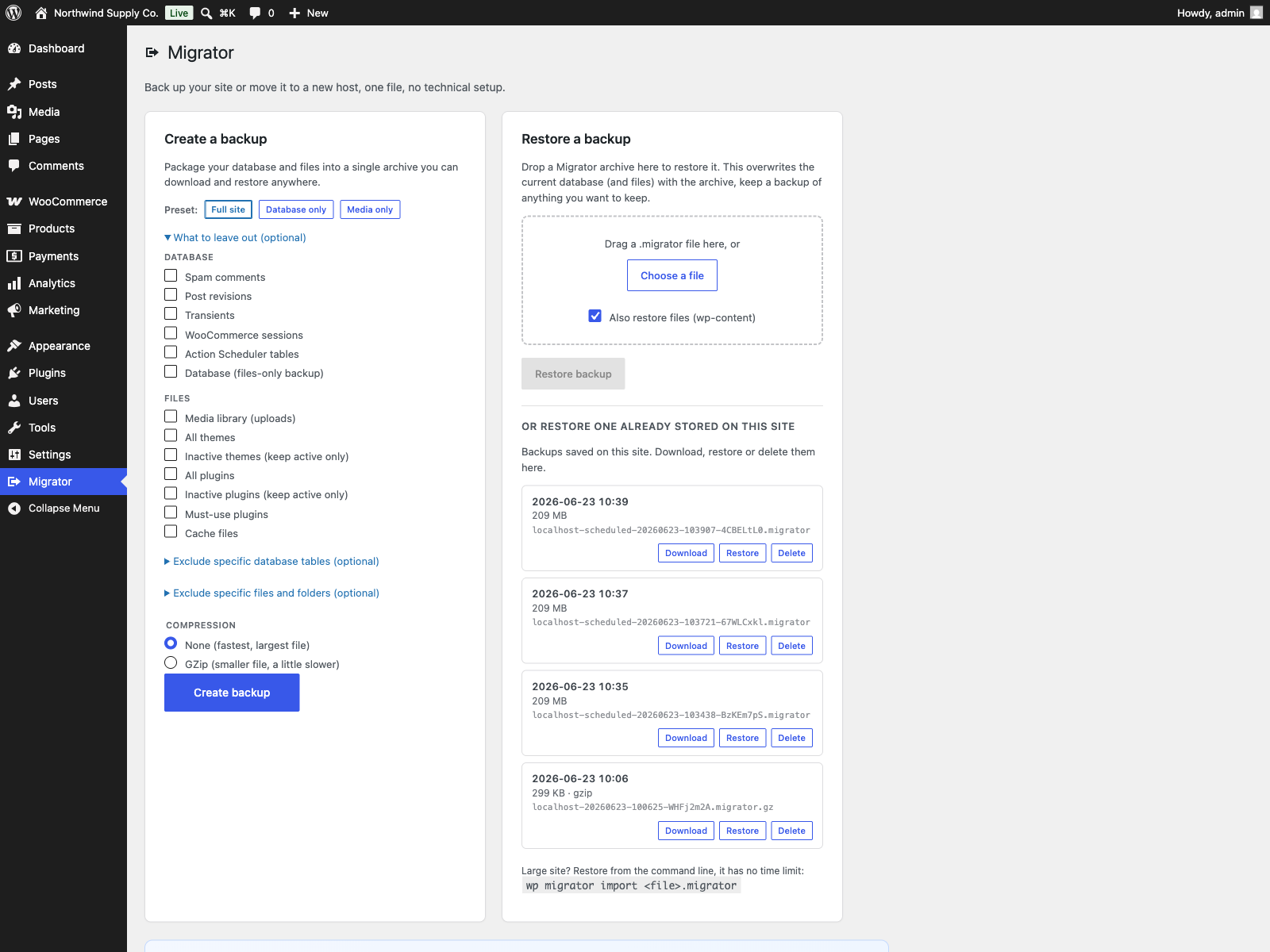
  • One-click backup of your database and all of wp-content into a single archive
  • Restore to the same site, or migrate to a new host with automatic, serialization-safe URL and path rewriting
  • Choose what to leave out: media, themes, plugins, cache, spam comments, post revisions, transients, WooCommerce sessions or Action Scheduler tables
  • In-browser export in short resumable steps with a progress bar and a direct download, plus drag-and-drop restore that uploads in 4 MB pieces
  • Scheduled backups, daily or weekly, with a retention rule
  • Pull a live site to another server over HTTP with wp migrator pull: resumable, and the next run fetches only the changes
  • Push file changes back with wp migrator push, and run the low-level transfer commands through wp migrator remote
  • Off-site copies to an FTP or FTPS server, or to a local or mounted folder
  • WP-CLI export, import and replace commands for sites too large for the browser
  • A snapshot of your database before every restore. If the database import or the URL rewrite fails, the previous database is put back automatically. If a later step fails, such as extracting files, the site is left partly restored and the message gives the path of the previous database dump to restore by hand
  • Per-item checksums and an archive check before the database is touched, so a corrupt or unfinished archive is refused, not restored
  • Serialization-safe search and replace across the database, with a dry-run preview and a wp migrator replace command, to change a domain, URL or path safely
  • Inspect any stored backup before you restore it: source URL, WordPress and PHP versions, table count, plus pre-restore checks for table prefix, disk space and writability
  • No account and no service of ours: nothing leaves your server unless you add an off-site destination you own

Documentation and links

Reporting a security issue: email hello@wppoland.com, and under our coordinated disclosure policy we confirm within two business days, assess within five, and patch a critical issue within seven days of confirming it.

How Migrator compares

All six plugins named here back up and migrate WordPress. What separates them is what you get without paying, so the grid reads the free edition of each. Every entry was checked against vendor pricing pages and vendor documentation on 29 July 2026.

The columns, left to right: Migrator, AIO is All-in-One WP Migration, Dupl is Duplicator, WPvivid, Updraft is UpdraftPlus, WPMigr is WP Migrate. A cell reads yes if the free edition does it, paid if that vendor sells it in a paid tier or add-on, no if the vendor does not offer it at any price, part if only partly, and ? if the vendor does not say. A row of paid is a paywall, not a missing feature; no is the one that means the thing does not exist.

                           Migrator   AIO   Dupl  WPvivid  Updraft  WPMigr
--------------------------------------------------------------------------
Full backup + migration         yes   yes    yes      yes      yes    part
No size cap, free tier          yes    no     no      yes      yes       ?
Scheduled backups               yes  paid   paid      yes      yes      no
Cloud or FTP destination        yes  paid   paid      yes      yes      no
Incremental backups            paid  paid     no     paid     paid      no
Encrypted archives             paid   yes   paid     part     part       ?
Server to server transfer       yes  paid   paid      yes     paid    paid
Multisite net. restore         paid  paid   paid     part     paid    paid
Imports chosen tables          paid     ?     no     paid     paid    paid
Paid plan, from               EUR49   $69    $99      $49      $70     $49

Where Migrator is ahead in free. Scheduled backups with a retention rule, an off-site copy over FTP/FTPS or to a folder outside the web root, no size limit beyond what your own server allows, and a database snapshot taken before every import and put back automatically if the database import fails. No other free tier here documents that rollback. Automation is not the paid tier here: a site that wants a nightly backup landing somewhere other than the server it protects needs nothing beyond the free plugin.

What PRO adds. Cloud destinations (S3, R2, Backblaze, Wasabi, SFTP, WebDAV), incremental backups, encrypted archives, recovery points, Table Sync, multisite restore, deploying to an empty server, resetting a staging site to a clean install, and a white-label mode that puts an agency’s own name on the plugin. From 49 EUR per year.

All-in-One WP Migration

Exports to a single .wpress file, and its AES-256 password-protected export is in the free plugin, which is one thing Migrator keeps in PRO. The free export is bounded by your host’s PHP limits; lifting them is the Unlimited extension at $69/yr. Multisite is a separate add-on at $319/yr.

Duplicator

Builds a package plus an installer. The vendor publishes a 4 GB ceiling for the free edition, and 500 MB on the DupArchive engine. Scheduling, recovery points and importing start at $99/yr.

WPvivid

Scheduled backups with one retention rule, Dropbox, Google Drive, S3, OneDrive, DO Spaces, FTP and SFTP as destinations, and server-to-server transfer with a migration key. Archives split at 200 MB. The vendor states databases cannot be backed up incrementally, encryption in Pro covers the database only, and table-level merging is sold as a separate product.

UpdraftPlus

Free scheduling from every 2 hours up to monthly, with Google Drive, Dropbox, S3, Rackspace, FTP, Swift and email as destinations. Archives split at 400 MB. Multisite, incremental file backups and database encryption are Premium, $70 to $399/yr excluding VAT.

WP Migrate

Lite exports a ZIP and does not import at all. Moving files between live sites, and push and pull, are paid, $49 to $219 for the first year. No tier offers a cloud or FTP destination.

Competitor prices are in USD, Migrator PRO is priced in EUR, and no conversion is implied. List prices and tier limits change without notice, so confirm on the vendor’s own page before you buy. Migrator itself is free under GPLv2 with no account to create; PRO is 49 to 149 EUR per year.

Plogins Migrator PRO

The free edition backs up on a schedule and copies each backup off the server. Plogins Migrator PRO is for putting those copies further away, keeping more of them, and getting back faster:

  • Cloud destinations: S3, R2, Backblaze B2, Wasabi, SFTP and WebDAV, on top of the FTP and folder destinations the free edition ships
  • Incremental backups: store only the files that changed between fulls, with retention that keeps whole chains so a base is never orphaned
  • Recovery points: one-click rollback to a known-good backup
  • Encrypted backups: password-protected archives, decrypted on restore
  • Table sync: import chosen database tables from a backup into a live site and leave the rest alone
  • Email notifications and activity log: a silent failure never slips by
  • Multisite, network to network: back up and migrate a whole network with correct URL rewriting; pulling a single subsite out is a WP-CLI job
  • Reset a site to a clean install: take a staging site back to fresh WordPress without reinstalling: a safety backup first, then the tables dropped, a clean install, and the address, title and administrator password put back. Single sites only, not networks
  • White label: replace the menu name with your own, point the upgrade link elsewhere and hide the purchase prompt, so a client sees the tool under your brand

Everything in the free edition stays free and open. Plogins Migrator PRO starts at 49 EUR per year, billed in EUR.

Compare editions and pricing: plogins.com/plogins-migrator-pro/pricing/

Translations

Plogins Migrator is fully translatable and ships the plogins-migrator.pot template. Translations are delivered by WordPress.org language packs from translate.wordpress.org, which is where Polish, German and Spanish are being contributed; the package itself carries no compiled translation files.

Ảnh màn hình

Cài đặt

  1. Upload the plugin to /wp-content/plugins/plogins-migrator, or install it from Plugins > Add New.
  2. Activate it. There are no required dependencies.
  3. Open Migrator in the admin menu to create a backup, or use wp migrator export from the command line.

Hỏi đáp

Does restoring delete what is already on the destination?

Yes. A restore replaces the destination’s database and files with the contents of the archive, that is what restoring a backup means. It is limited to administrators and asks for confirmation first. Always keep a separate backup of anything on the destination you want to keep.

Will my links break when I move to a new domain?

No. When you restore onto a different address, Migrator rewrites the old site URL and file paths to the new ones, including inside serialized data, so internal links and settings keep working.

How large a site can I move?

Migrator sets no size limit. A browser export runs in short steps, so PHP time limits do not stop it, and uploads go in 4 MB pieces, so your host’s upload limit does not apply. A browser restore runs as one long request, and some hosts or proxies (Cloudflare, nginx) cut those off. For a big site, restore with wp migrator import <file>, which has no time limit.

My host times out or shows a 502 during a restore. What now?

The restore may still be running on the server. Wait a few minutes, then check the site. To avoid it, restore over WP-CLI. If a restore stops after the database was replaced, the error message gives the path of the database dump taken before the restore, so you can put the old database back.

What happens if a restore fails?

The archive is checked before the database is touched, so an unfinished or corrupt archive is refused with the site left as it was. If the database import or the URL rewrite fails, the previous database is restored automatically. If a later step fails (for example, the disk fills while files are extracted), the site is left part restored, and the message says what state it is in and where the previous database dump is, so you can restore it by hand.

Do I need WordPress installed on the new host?

Yes. Install WordPress and Migrator on the destination, then restore the archive there. The database prefix in the new site’s wp-config.php must match the source site’s; the restore checks this first and tells you the value to set.

Does it back up WordPress core and wp-config.php?

No. An archive holds the database and everything in wp-content. WordPress core comes from the fresh install, and wp-config.php stays the destination’s own, so its database credentials are never overwritten.

Can I import a .wpress file from All-in-One WP Migration, or a Duplicator package?

Not yet. Restore it with the plugin that made it, then create a Migrator backup to use from then on.

Can I open a .migrator file without the plugin?

It is Migrator’s own streaming format, not a ZIP. Restore it with Migrator, or check its contents first with Details in the backups list.

Does it send my data anywhere?

Only where you tell it to. Migrator creates no account and calls no service of ours. Backups stay in wp-content/migrator-backups unless you add an off-site destination (an FTP or FTPS server, or a folder outside the web root), and then a copy goes there. Scheduled backups older than your retention setting are deleted automatically.

If you switch on Pull and Push, a site holding your connection token or an enrolled key can download this site’s files and database, user password hashes included. It is off by default, nothing is answered without that credential, and you can switch it off again when the move is done.

How do I copy a live site to another server without downloading a backup?

Install Migrator on both sites. On the old one, switch on Migrator > Pull and Push. On the new one, run wp migrator pull https://old-site.example with WP-CLI. The first run prints a key: paste it on the old site’s Pull and Push screen and run the command again. A server without the OpenSSL extension cannot check keys, so there you set a connection token and add --secret=<token>. The new site keeps its own WordPress core, wp-config.php and table prefix (the prefixes must match), its database is dumped before it is replaced and put back if the import fails, and Migrator’s own folder is never overwritten. Running the same command again fetches only what changed.

Can I send changes back to the original site?

Files, yes: wp migrator push https://old-site.example sends what changed since the pull. The old site must grant push access to your key on its Pull and Push screen, and its server needs a writable folder beside the web root on the same disk, where the upload is staged before it is swapped in. The database is pushed only to hosts that serve the transfer API on a standalone route; wp migrator remote db-push --help explains it. While a push applies its changes the old site shows a maintenance page; if the push stops part way, run it again to finish.

Where are my backups stored?

In wp-content/migrator-backups. On Apache and IIS the folder denies direct web access; on nginx, which ignores those rules, each file name carries a random token so it cannot be guessed. Removing the plugin deletes that folder and its contents. Copies on an off-site destination stay there.

Does it work with WooCommerce?

Yes. Orders (including HPOS tables), products and settings move with the database. You can leave out WooCommerce sessions and Action Scheduler tables to make the archive smaller.

Does this plugin work on WordPress Multisite?

It runs on Multisite: network activate it or activate it on individual sites, and each site keeps its own settings and data. Restoring a network is a different matter. The free edition refuses an import when either the archive or the target site is a network, so network migration needs the Migrator Pro add-on.

How does Migrator compare to Duplicator and All-in-One WP Migration?

Comparing free editions:

  • Size: Migrator sets no cap. All-in-One WP Migration is bounded by your host’s PHP upload limits, and lifting them is a paid extension. Duplicator publishes 4 GB (500 MB on DupArchive).
  • Scheduling and off-site copies: free in Migrator (daily or weekly, FTP/FTPS or a folder). Paid in both others.
  • WP-CLI: wp migrator export, import and replace are in the free plugin.
  • Rollback: Migrator snapshots the database before every import and puts it back if the database import fails.
  • Encryption: All-in-One WP Migration encrypts exports in its free plugin. Migrator keeps encryption in PRO.

See the grid above for all five competitors. Vendor details as of July 2026.

Đánh giá

31 Tháng 7, 2026
This plugin solved a problem I had been struggling with for weeks. The interface is clean and intuitive, and the performance impact is minimal.
Đọc tất cả 1 đánh giá

Người đóng góp & Lập trình viên

“Migrator – Site Migration and Backup” là mã nguồn mở. Những người sau đã đóng góp vào plugin này.

Những người đóng góp

“Migrator – Site Migration and Backup” đã được dịch qua 2 ngôn ngữ. Cảm ơn những người tham gia dịch vì đóng góp của họ.

Dịch “Migrator – Site Migration and Backup” sang ngôn ngữ của bạn.

Muốn tham gia phát triển?

Duyệt code, check out SVN repository, hoặc theo dõi nhật ký phát triển qua RSS.

Nhật ký thay đổi

1.5.1

  • Fixed: the PRO card on the settings screen no longer presents moving a site between servers as PRO-only; the free plugin does it with wp migrator pull, PRO adds the wp-admin screen.

1.5.0

  • Added: Pull and Push. Copy a live site to another server over HTTP with wp migrator pull, resume an interrupted pull, fetch only the changes on the next run, and send file changes back with wp migrator push. Off until you switch it on.
  • Added: wp migrator remote runs the low-level transfer commands, such as keygen, files-stats or db-push.
  • Added: a pull checks the disk space it needs before it starts, leaves the old host’s platform plugins and server-bound drop-ins (object cache, page cache, database driver) behind, and keeps the database password out of the process list.
  • Changed: server-to-server transfer is now part of the free edition.

1.4.0

  • Fixed: backups no longer alter % characters in the database. In 1.3.8, permalink structures, text such as “50%” and serialized values containing % were damaged on restore.
  • Fixed: scheduled backups, retention, and the FTP and folder copies now run in the free edition. They were not wired up from 1.3.0 to 1.3.8.
  • Fixed: database dumps are charset-safe on latin1 and utf8mb3 databases.
  • Fixed: collations from MySQL 8 and MariaDB 11 sources are normalised.
  • Fixed: a file that changes during a backup no longer corrupts the archive, and the archive is verified before a restore touches the database.
  • Fixed: off-site retention deletes only this site’s backups.
  • Fixed: home and siteurl are correct after a restore of WordPress installed in a subdirectory.
  • Fixed: JSON values are preserved during the URL rewrite.
  • Fixed: the object cache is flushed after every kind of restore.
  • Fixed: unreadable files are skipped.
  • Fixed: interrupted scheduled backups are now visible.
  • Fixed: downloading a large archive no longer runs out of memory.
  • Fixed: the Download buttons in the stored backups list no longer return an error.
  • Changed: wp-content/debug.log is left out of backups, and an uploads folder outside wp-content is reported before export.
  • Fixed: import error messages are readable and translatable.
  • Fixed: wp migrator import reports errors cleanly.
  • Fixed: the encryption password is passed to Migrator PRO intact.
  • Changed: on Multisite, Migrator is limited to super admins.
  • Changed: uninstalling removes all of Migrator’s settings and its scheduled event.
  • Readme: corrected the rollback, nginx and off-site wording and the competitor comparison, and added FAQ entries.

1.3.8

  • The sidebar upgrade promo now follows the same dismissal as the banner. Dismissing the banner used to leave a full-height advert on the settings screen for good, which is not what the WordPress.org guideline on upgrade prompts means by used with moderation.

1.3.7

  • Fixed: a restore only found out that an archive had been cut short part way through reading it, by which time the database had already been replaced. An archive is now checked for the end marker a finished backup carries before the restore touches anything, so an unfinished one is refused with the site left as it was.
  • Fixed: the copy of the database taken before a restore was deleted the moment the import of the database finished, so anything that failed after that point left the site part restored with nothing to go back to. That copy is now kept until the whole restore is through, and if a restore does stop after the database was replaced the error says what state the site is in, where the copy of the previous database is, and what to do with it.

1.3.6

  • Fixed: a backup could quietly leave rows out of the database dump. Every table was read in pages counted from the start of the table, so when anything deleted a row behind the reader (an expiring transient, a WooCommerce session, an abandoned cart), every later row moved up one place and the row sitting on the next page boundary was never read. It was missing from the backup and nothing reported it. Tables are now read in primary key order, each page starting after the last key already read, which no concurrent delete can move.
  • Fixed: a table with no primary key cannot be read that way, so it is still paged by position. Its row count is now taken before and after the read: if the table shrank while it was being dumped, the backup stops with an error naming the table instead of finishing and handing you an archive that quietly lacks rows.
  • Fixed: a backup that was killed part way through (execution time, memory, closing the browser tab on Run now) left half an archive behind under the final backup name. The backups screen listed it, the retention rule counted it as one of the copies to keep, and the good backup it pushed off the end was the one deleted. A run now builds under a temporary name and takes the real one only once the archive is finished, and the leavings of runs that died are cleared out.
  • Fixed: an archive that had been cut short was read as if it were simply a smaller archive. A complete archive ends with an end marker, but running out of file instead was treated as the same thing, so a backup killed while it was being written could be restored with everything after the cut silently absent. Reading one now stops and says the archive is incomplete.
  • Changed: a scheduled backup no longer runs under the host’s default execution time limit. Building a whole site archive and copying it off-site takes longer than that on any site large enough to need backups.

1.3.5

  • Fixed: the PRO upgrade promo kept selling to people who had already bought the paid edition. Only the banner could be dismissed, so the sidebar promo and the locked feature cards followed a paying customer around for good. The promo now checks whether the paid edition is active and steps aside when it is.
  • Fixed: arrow glyphs in the admin menu paths, and in the strings handed to translators. An arrow inside a translatable string makes the glyph every translator’s problem and changes the layout in any locale that drops it.

1.3.4

  • Fixed: a restore could stop part way through and still report success. When the disk filled up while the backup was being unpacked, the write stopped where it ran out of room and nothing said so, so the database was restored up to that point and the rest was silently missing. The same applied to every file taken out of the archive, and to the list of files written into a new backup. All three now stop and tell you the disk is full instead of finishing quietly.
  • Fixed: when an import failed and the attempt to put the previous database back ALSO failed, the message still said the database had been rolled back. It now says the site is in a partly imported state and gives the path of the dump that has to be restored by hand.

1.3.3

  • Fixed: deleting the plugin left the per-user “dismiss” flag from the PRO notice in the database. Uninstall now removes it for every user, not just the one who dismissed it.

1.3.2

  • Changed: the message shown when a restore crosses a multisite boundary now states the limitation instead of naming the paid add-on. The restore is still refused, because rewriting the network tables to the destination domain is genuinely not part of this plugin, but a free plugin’s own error text should not read as an upsell.
  • “Tested up to” was declared in the plugin header as well as in this readme. WordPress.org reads the readme; declaring it in two places is how a listing ends up advertising a compatibility claim nobody wrote. The header line is gone, the readme is unchanged.

1.3.1

  • The translation template was regenerated. 57 strings added to the plugin since the template was last built were missing from it, so no translator could reach them in any language, and 2 strings the plugin no longer uses have been dropped. Nothing you see changes; what a translator can see does.

1.3.0

  • Added: scheduled backups are now free. Daily or weekly, with a retention rule, running unattended through WordPress cron and using the same engine as a manual backup.
  • Added: off-site copies are now free. Every backup can be copied to an FTP or FTPS server, or to a folder outside the web root such as a mounted drive or NAS. A backup that lives only on the machine it protects is not a backup.
  • Added: a destination registry, so an add-on contributes further destinations through the migrator/backup_destinations filter instead of the free plugin knowing about them.
  • Changed: the free plugin no longer stores settings it cannot act on. A backup strategy or an encryption passphrase belongs to whatever implements them.
  • Fixed: deactivating the paid add-on used to clear the backup cron event, which stopped the site’s backups. Scheduling belongs to this plugin now, so it keeps running.
  • Note for existing Migrator PRO users: your schedule, retention, exclusions and off-site credentials carry over automatically, including the passwords. Nothing needs re-entering.

1.2.18

  • Fixed: the package no longer ships its own translation files. WordPress.org builds language packs from translate.wordpress.org, and a bundled catalogue shadows that pack, so a translation corrected upstream could not reach you until the next release. Your language now comes from the language pack, which is the copy that stays current.

1.2.17

  • Fixed: the safeguard that is supposed to stop a restore writing over Migrator’s own plugin folder had never worked. It compared against the folder name the plugin used before it was renamed, so on every current installation nothing matched, and restoring an older backup could extract an older copy of the plugin over the code that was running the restore. The folder names are now taken from the installation itself, so a future rename cannot break it again.
  • Fixed: the same stale names were used to decide which plugin folders an export must never prune.

1.2.16

  • Fixed: the plugin recorded 1.2.13 as its own version inside every archive it wrote, because the version constant had been left behind when the header was bumped. The number is stamped into the manifest of each backup and also busts the admin asset cache, so an archive said it came from an older plugin than the one that made it. The constant is now checked against the header when the package is built, so it cannot drift again.

1.2.15

  • Fixed: the backup directory’s .htaccess carried only the Apache 2.2 form of the deny rule. Apache 2.4 does not understand it without mod_access_compat, so on those servers the directory holding full database dumps had no server-level protection, leaving only the random token in the filename, which is a backstop for hosts that ignore .htaccess and not a replacement for the rule. Both forms are now written, each behind its own IfModule. An existing installation is corrected the next time the workspace is prepared.
  • Fixed: addresses stored without a scheme, in the “//host/wp-content/…” form, matched none of the replacement pairs and survived a restore still pointing at the site the backup came from. They are now rewritten with the rest.

1.2.14

  • Fixed the PRO promo on the settings screen quoting a price in PLN. PRO is priced and charged in EUR, so an admin on a Polish site was shown a zloty amount and then billed in euro, and the zloty figure was a fixed conversion that drifted from the real charge as the rate moved. The promo now shows the euro price that is actually taken.

1.2.13

  • Fixed: the PRO pricing line claimed a PLN price would appear during purchase. Purchases settle in EUR, so the line now says the price is billed in EUR.

1.2.12

  • Fixed: ticking a database view under “Exclude specific database tables” now leaves it out of the backup. The list offers views alongside tables, but only tables were being skipped, so a ticked view still ended up in the archive.

1.2.11

  • The PRO notice in the admin, and the PRO section of this readme, now list what Migrator Pro actually ships, including table sync, and say plainly that incremental backups cover files while every archive still carries the whole database. Multisite is described as network to network, which is what the admin does.

1.2.10

  • Docs: the Multisite answer said the plugin is Multisite compatible without saying that a network restore is refused in the free edition. It now says so, and points at the Pro add-on for network migration.

1.2.9

  • Fixed: restoring into a subdirectory doubled the new address (https://site.com/shop/shop). A site’s home and site address are normally the same string, and it was rewritten twice.

1.2.7

  • Translations: completed Polish, German and Spanish for the PRO upgrade panel.

1.2.6

  • Readme: added a factual comparison with Duplicator and All-in-One WP Migration.

1.2.5

  • Security: hardened backup workspace path handling against traversal (defense in depth).

1.2.4

  • Translation quality pass: corrected Polish, German and Spanish (product names kept in English, legal withdrawal terminology, WooCommerce glossary and grammar fixes).

1.2.3

  • Documentation: readme links are now labelled links.

1.2.2

  • Shortened display name (dropped the Plogins prefix; slug unchanged).

1.2.1

  • Added a contextual written migration-help link after a successful backup.
  • Fixed disk-space preflight formatting type handling.

1.2.0

  • New: standalone serialization-safe search and replace (admin tool + dry run + wp migrator replace) to change a domain, URL or path without corrupting serialized data.
  • New: inspect a stored backup before restoring: it shows the source URL, WordPress and PHP versions and table count, and runs pre-restore checks (table prefix, disk space, writable files).

1.1.1

  • Added a Free vs PRO overview to the readme.

1.1.0

  • New: in-plugin overview of Plogins Migrator PRO (incremental + scheduled backups, off-site storage, one-click cloud restore) on the admin screen.

1.0.3

  • Clearer name: Plogins Migrator – Site Migration and Backup (it backs up and migrates the whole site, not only WooCommerce).
  • Hardened the export AJAX handler: the request payload is fully sanitized before any filter callback runs.

1.0.2

  • Added bundled Polish, German and Spanish translations for the plugin interface.

1.0.1

  • First stable release.

0.3.3

  • Renamed to Plogins Migrator for a more distinctive plugin name.

0.3.2

  • Tidier saved-backup rows: the date and size lead, the long file name is a muted single line that no longer wraps, and the row reflows neatly on narrow screens.

0.3.1

  • Your saved backups now appear inside the “Restore a backup” card, so you can restore one in place without scrolling past it.

0.3.0

  • New “Your backups” section: every backup stored on the site is listed with its date and size, so you can download, restore or delete it in one click without leaving the screen.
  • Restore straight from a stored backup (gzip backups are unpacked automatically). The backup file is kept, not consumed.
  • Added one-click presets to the backup screen: Full site, Database only and Media only set the right exclusions for you.

0.2.0

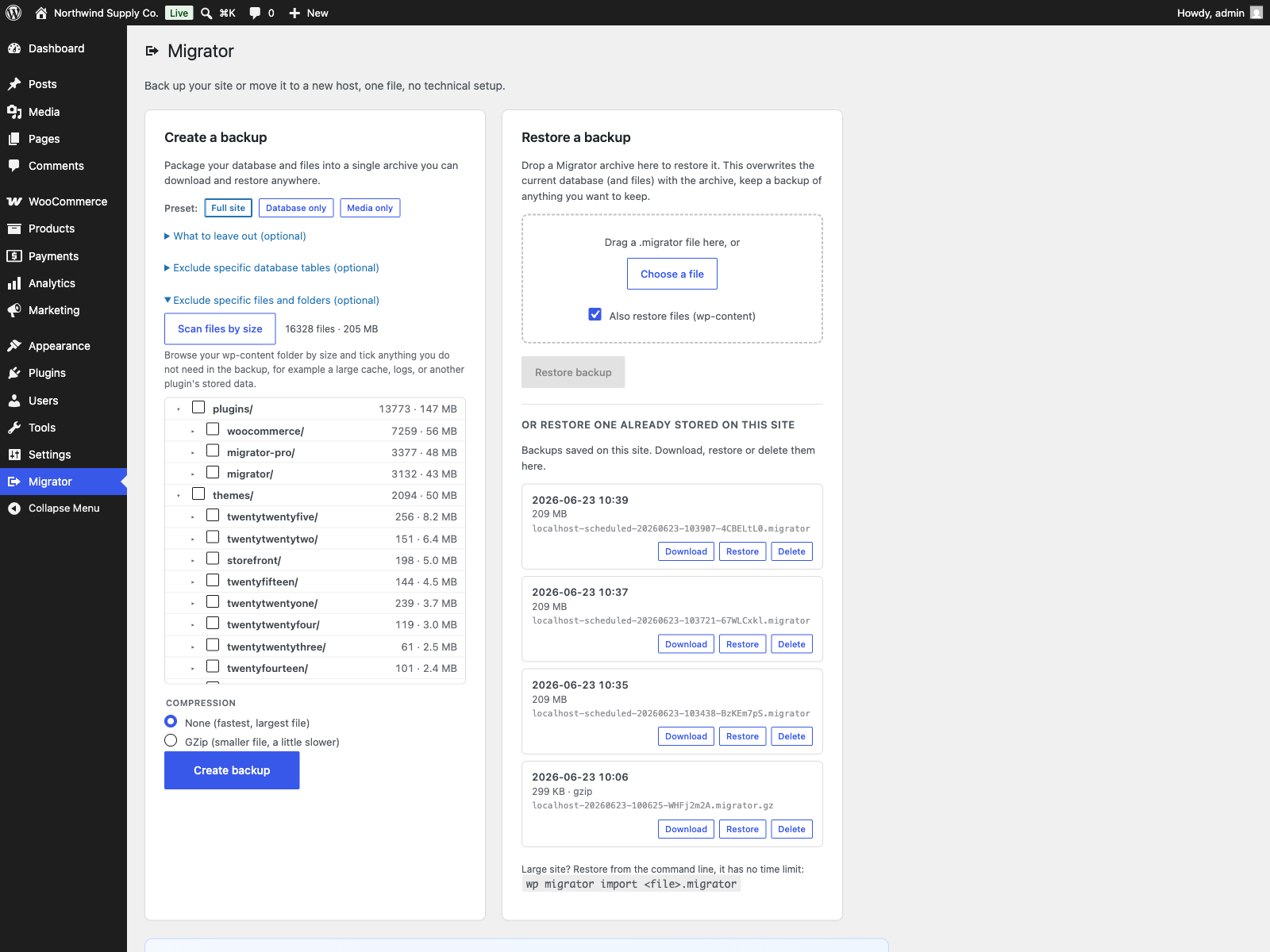
  • Added a file-size explorer to the backup screen: scan wp-content, see each folder’s size and file count, and tick folders or large files to leave out of the backup. Builds on the existing path exclusions.

0.1.0

  • First release.
  • One-file backup of the database (tables, views, triggers and stored routines) and all of wp-content.
  • Restore to the same site, or migrate to a new host with serialization-safe URL and path rewriting.
  • Selective backup: leave out media, themes, plugins, cache, spam comments, post revisions, transients, WooCommerce sessions or Action Scheduler tables.
  • In-browser resumable export with a progress bar and a direct download, plus drag-and-drop restore.
  • WP-CLI export and import for sites too large for the browser.
  • Safety first: a pre-import database snapshot with automatic rollback if a restore fails, per-item checksums, and a refusal to import across a mismatched table prefix.