
Mô tả
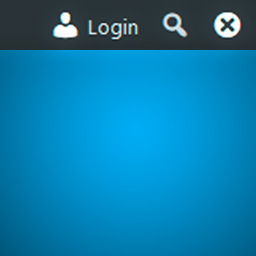
Show WordPress toolbar (formerly admin bar) with a login button on front end for remembered (previously logged in) browsers. Miscellaneous show/hide/remember toolbar options.
Features:
* Force display toolbar and adds “Login” button and “Forget Browser (Hide)” buttons to front end on remembered browsers.
* Remember browser timeout option (cookie expire timeout)
* Remember user option (user roles support)
* Options to show or hide toolbar separately for logged in and logged out (but remembered) users.
* Uninstall option to remove plugin settings on plugin deactivation
Ảnh màn hình

Toolbar Login Button options page 
In front end, a “Login” button and a “Forget Browser (Hide)” button will appear on a browser that logged out but remembered (previously logged in). 

Cài đặt
- Upload the plugin files to the
/wp-content/plugins/toolbar-login-buttondirectory, or install the plugin through the WordPress plugins screen directly. - Activate the plugin through the ‘Plugins’ screen in WordPress
- Use the Settings->Toolbar Login Button screen to configure the plugin
Đánh giá
Không có đánh giá nào cho plugin này.
Người đóng góp & Lập trình viên
“Toolbar Login Button” là mã nguồn mở. Những người sau đã đóng góp vào plugin này.
Những người đóng góp
Dịch “Toolbar Login Button” sang ngôn ngữ của bạn.
Muốn tham gia phát triển?
Duyệt code, check out SVN repository, hoặc theo dõi nhật ký phát triển qua RSS.
Nhật ký thay đổi
1.1.0
- Added plugin action links (settings link)
- Removed PHP and WordPress version check code as WordPress has this functionality built-in now
- Moved plugin class to plugin.php
1.0.0
- First public version
0.0.1
- Added browser remember option (cookie expire timeout)
- Added user remember option (user roles support)
- Added redirect after login option
- Added uninstall option
- Added translation support