

Mô tả
Easily display WordPress Gutenberg Editor saved reusable blocks anywhere via widget.
Easy Setup
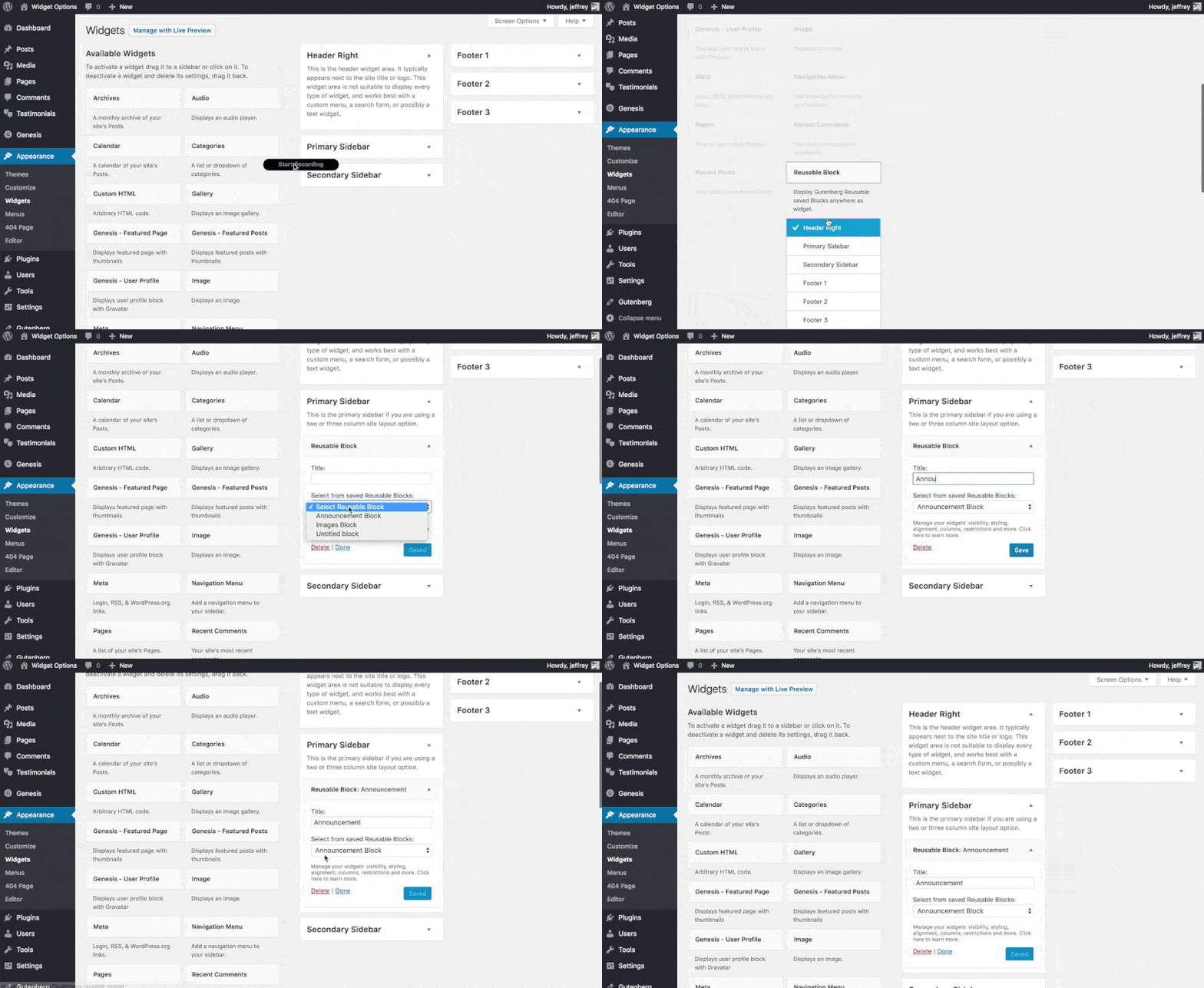
After plugin activation, Reusable Block widget will be available under Appearance > Widgets, just drag and drop to any desired widget area.
Extensible
If you want to upgrade your widgets usage. You can use Modal Pop-up & Sliding Widget Options to display your widgets as modal pop-ups, slide-ins and/or sliding widgets. Powered with triggers like exit-intent, on load and on scroll you can increase your user engagement easily.
Ảnh màn hình
Cài đặt
- Upload the full directory into your wp-content/plugins directory
- Activate the plugin at the plugin administration page
- Go to Appearance > Widgets then drag and drop “Reusable Block” to any widget area
Hỏi đáp
- Installation Instructions
-
- Upload the full directory into your wp-content/plugins directory
- Activate the plugin at the plugin administration page
- Go to Appearance > Widgets then drag and drop “Reusable Block” to any widget area
Đánh giá

19 Tháng 4, 2023
It’s silly that WP core still doesn’t allow reusable blocks in widget areas in 2023, but thankfully this plugin gets it done.

20 Tháng 7, 2020
Great plugin. If you want to add gutenberg re-usable blocks to widgets this does it well. Tested and works straight out the box, no complaints

23 Tháng 1, 2020
1 trả lời
This plugin rocks because it allows to design your widgets in Gutenberg!

17 Tháng 7, 2019
1 trả lời
A very nice plugin to use until WordPress team add support for blocks in widgets.

2 Tháng 4, 2019
Created an account specifically to leave this review.
Love the implementation, was happy to see all js initiated as expected.

7 Tháng 3, 2019
This worked as intended in my case and allows my client to modify their header Call-To-Action via Gutenberg Block.
Using:
WP Version: 5.1
Framework: Genesis Framework
Người đóng góp & Lập trình viên
“Reusable Gutenberg Blocks Widget” là mã nguồn mở. Những người sau đã đóng góp vào plugin này.
Những người đóng góp
Dịch “Reusable Gutenberg Blocks Widget” sang ngôn ngữ của bạn.
Muốn tham gia phát triển?
Duyệt code, check out SVN repository, hoặc theo dõi nhật ký phát triển qua RSS.