
Mô tả
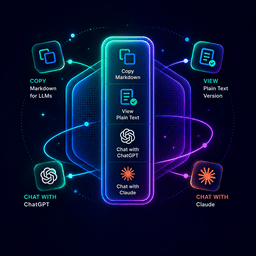
AJW — AI Markdown Page Widget adds a polished floating action panel to your WordPress pages, letting readers instantly interact with your content using AI tools.
What it does:
- Copy as Markdown — Copies the full page as clean Markdown to the clipboard. Auto-generates on first use and caches for speed.
- View as Markdown — Every enabled page gets a plain-text URL at
yoursite.com/page-slug/md/ready for AI tools. - Ask in ChatGPT — Opens ChatGPT pre-loaded with a prompt to read and discuss the page.
- Ask in Claude — Opens Claude pre-loaded with a prompt to read and discuss the page.
- Custom actions — Add your own AI tools with custom icons, labels, and URL templates.
Key Features:
- Full admin settings page — position (left/right), enabled post types, all actions
- Drag-and-drop action reordering
- Custom icons via WordPress media library
- Dynamic URL placeholders:
[md_url]and[page_url]auto-update per page - Markdown meta box on every post/page editor — generate, edit, or regenerate
- Auto-regeneration — when page content changes, Markdown updates automatically on save
- Clean
.md/endpoint — serves plain text with noindex headers, generates on first visit if not cached [ajwa_widget]shortcode to embed inline anywhere- WordPress Widget support for any widget area
- Animated gradient border on the widget to draw user attention
URL Templates
In action link fields, use these placeholders:
[page_url]— replaced with the page permalink[md_url]— replaced with the Markdown URL
Example: https://chatgpt.com/?q=Read [md_url] so I can ask questions about it
Ảnh màn hình


Cài đặt
- Upload the
ajw-ai-markdown-page-widgetfolder to/wp-content/plugins/ - Activate via Plugins Installed Plugins
- Go to Settings AJW Widget to configure
- Go to Settings Permalinks and click Save Changes to activate the
.md/endpoint
Hỏi đáp
-
The /md/ URLs return 404
-
Go to Settings Permalinks and click Save Changes to flush rewrite rules.
-
How is the Markdown generated?
-
The plugin converts HTML content through a custom converter handling headings, bold, italic, links as
[text](url), ordered and unordered lists, blockquotes, code blocks, and tables. Images are replaced with alt text. All HTML tags are stripped safely usingwp_strip_all_tags(). -
Can I manually edit the Markdown content?
-
Yes. The meta box textarea on each post/page is fully editable. If the page content changes on save, the field auto-regenerates.
-
Can I add tools beyond ChatGPT and Claude?
-
Yes. In Settings click Add Action, set type to External Link, and use
[md_url]in the URL field. -
Does it work with custom post types?
-
Yes. Any public post type appears in settings and can be enabled.
-
Does it work in the block editor (Gutenberg)?
-
Yes. The meta box appears at the bottom of the block editor screen.
Đánh giá
Không có đánh giá nào cho plugin này.
Người đóng góp & Lập trình viên
“AJW — AI Markdown Page Widget” là mã nguồn mở. Những người sau đã đóng góp vào plugin này.
Những người đóng góp
Dịch “AJW — AI Markdown Page Widget” sang ngôn ngữ của bạn.
Muốn tham gia phát triển?
Duyệt code, check out SVN repository, hoặc theo dõi nhật ký phát triển qua RSS.
Nhật ký thay đổi
1.0.0
- Initial release