

Mô tả
The official AgentaOS plugin for WooCommerce, made and supported by AgentaOS.
AgentaOS is the merchant of record for AI agents. It sells on your behalf, so each sale’s VAT or sales tax, the buyer’s invoice and chargebacks are handled for you, and the money is paid to your own bank account.
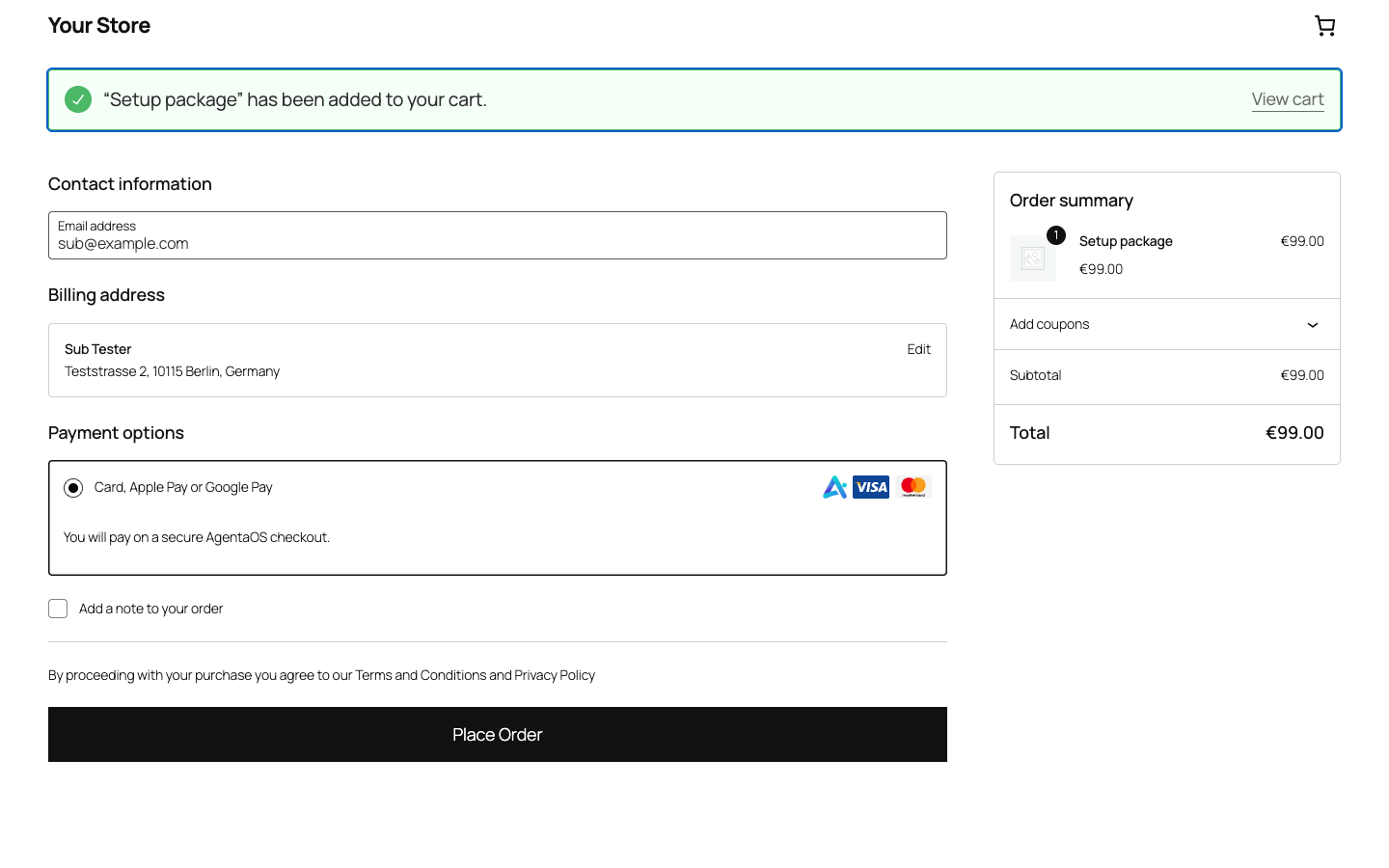
This plugin adds AgentaOS to WooCommerce. The buyer pays on the secure AgentaOS checkout by card, Apple Pay or Google Pay (or bank transfer for EUR) and comes back to your order confirmation page. Orders are marked paid only when AgentaOS confirms the payment.
It works where Stripe and PayPal do not take sellers, including North Macedonia, Serbia, Kosovo, Albania, Bosnia and Herzegovina and Montenegro, and you can sell as an individual: no company is needed.
What you get
- Tax handled. AgentaOS is the legal seller of each sale. It adds the buyer’s VAT or sales tax at checkout and files it.
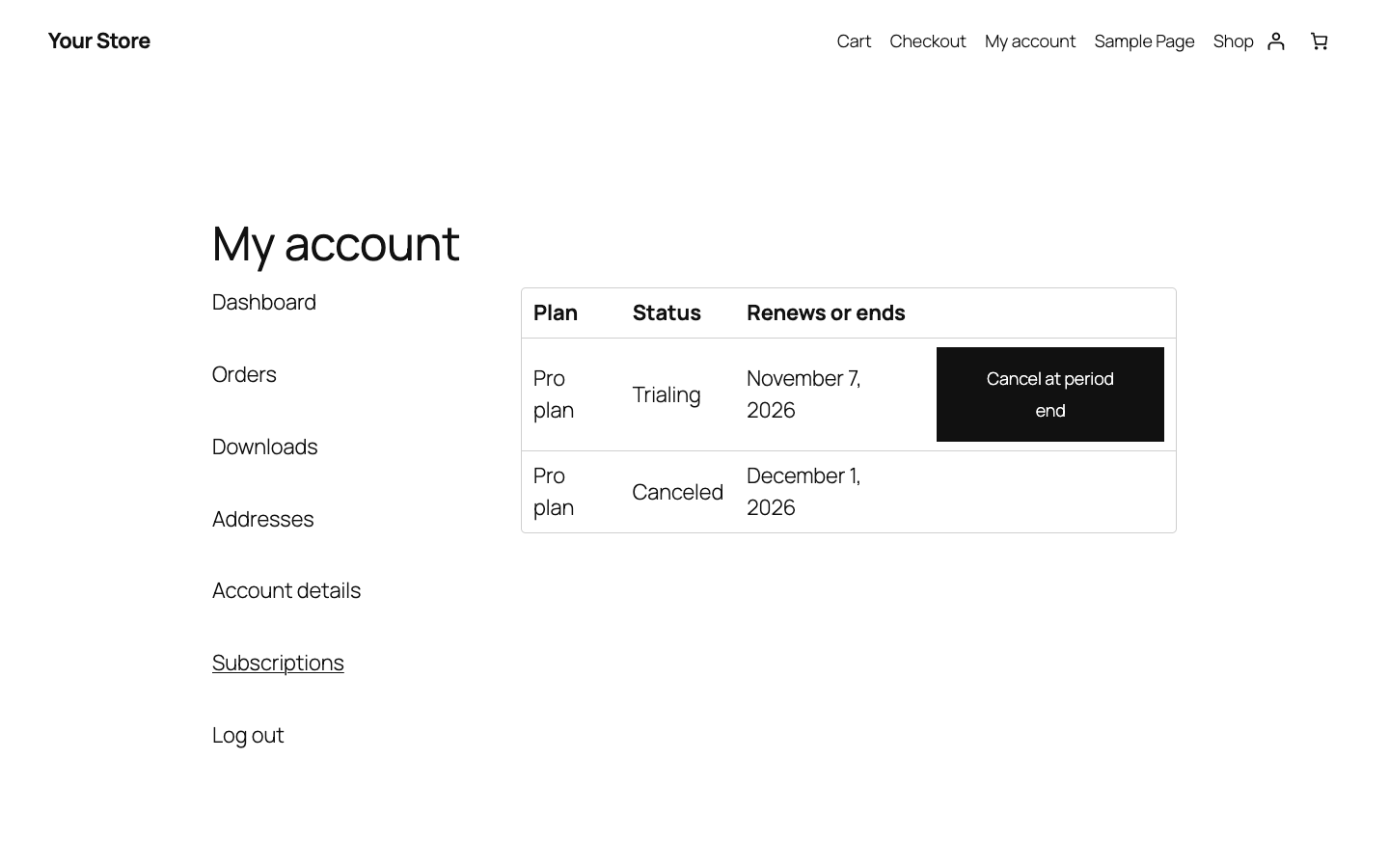
- Subscriptions built in, no WooCommerce Subscriptions extension needed. Tick “AgentaOS subscription” on a product, choose monthly or yearly and an optional free trial. AgentaOS bills every renewal; each renewal appears in WooCommerce as a paid order. Customers see and cancel their subscriptions under My Account.
- Your local currency. Stores priced in MKD, RSD, ALL or BAM are charged in EUR (or USD). BAM uses the fixed rate of 1.95583 per euro; for MKD, RSD and ALL you set the rate, and the buyer sees the amount in EUR before paying.
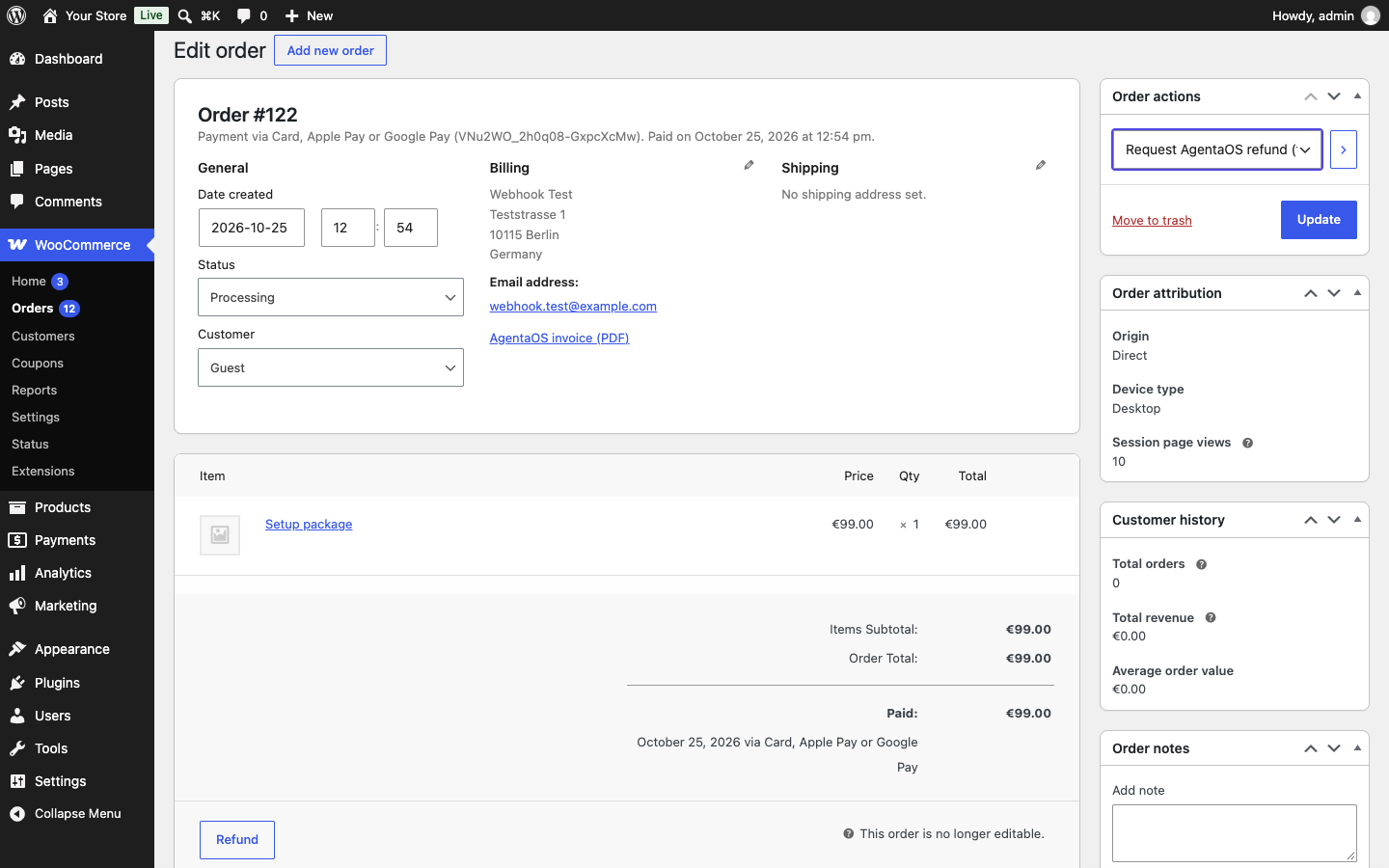
- The buyer’s invoice on the order. AgentaOS issues the tax invoice as the seller; you, and your customer on their order page and in My Account, can download the paid receipt as a PDF. You do not need an invoice plugin, and should not use one: AgentaOS’s invoice is the buyer’s tax invoice.
- Refunds and disputes on the order. Request a refund from the order screen; the order is marked refunded once AgentaOS has refunded the buyer. Disputes put the order on hold and release it when you win.
- Buy now button (optional) on digital product pages, straight to checkout.
- AgentaOS and card logos next to the payment method at checkout. An optional “Powered by AgentaOS” line, off by default, can be turned on in the settings.
- Test and live keys side by side, with a Test connection button.
- Paid to your bank, in EUR or USD, twice a month.
- Connect your AI agent. AgentaOS is the merchant of record for AI agents. The settings page shows how to connect Claude, ChatGPT or Cursor to your AgentaOS account in a minute, with no key to paste. Then ask in plain language: how many active subscribers you have, who paid this week, or to send a buyer their receipt again.
Digital products and digital services
AgentaOS sells productized digital offerings:
- Software, apps, SaaS, APIs and AI agents
- E-books, templates, downloads and digital content
- Online courses and memberships
- Small standard setup or onboarding packages that come with a digital product
- Productized service packages, on AgentaOS accounts approved for them
Custom or per-client work, and physical or shipped goods, are not allowed under the AgentaOS terms (https://agentaos.ai/terms). In WooCommerce, mark digital products as Downloadable and services as Virtual: the payment method only appears when every product in the cart is virtual or downloadable, and the plugin checks the order again before it creates the checkout.
Taxes
AgentaOS adds the buyer’s VAT or sales tax at its checkout. Turn off taxes in WooCommerce (Settings, General) so buyers are not charged twice; the plugin warns you while WooCommerce taxes are on.
For developers
Three hooks let you add your own behaviour without changing the plugin:
agentaos_checkout_body(filter): change the request that creates the AgentaOS checkout. Arguments: the request body, the order.agentaos_payment_confirmed(action): AgentaOS confirmed a payment and the order is paid. Arguments: the order, the AgentaOS checkout id.agentaos_renewal_created(action): a subscription renewal was charged and recorded as a paid order. Arguments: the renewal order, the first order, the event data.
External services
This plugin connects to the AgentaOS API (https://api.agentaos.ai), run by Aristokrates OÜ (Estonia), to take payments. It sends data only when one of these happens:
- A buyer places an order with this method: the amount and currency (or the subscription plan), a description with the order number and store name, the buyer’s email, name, company and billing country, your store’s return, cancel and webhook URLs, and the WooCommerce order ID and order key. AgentaOS uses them to create the checkout, calculate tax and issue the invoice.
- The buyer returns to the order confirmation page: the plugin reads that checkout’s status.
- You save a product marked as an AgentaOS subscription: its name, price, currency, interval, trial length, your webhook URL and the WooCommerce product ID, to create the AgentaOS plan.
- A customer cancels a subscription in My Account: the subscription ID.
- You request a refund: the sale’s transaction ID. Every 6 hours, while refunds or disputes are open, the plugin reads your recent sales’ statuses.
- You or your customer open an order’s invoice: the checkout’s status and that invoice’s receipt PDF.
- You click Test connection: one authenticated read.
AgentaOS sends payment, renewal, subscription and dispute events (webhooks) to your store.
Terms of service: https://agentaos.ai/terms
Privacy policy: https://agentaos.ai/privacy
Ảnh màn hình



Cài đặt
- Install and activate the plugin. WooCommerce must be active.
- Create a free account at https://app.agentaos.ai.
- In AgentaOS, open Settings, Developers, API Keys and copy a secret key (sk_test_… to try it, sk_live_… for real payments).
- In AgentaOS, open Settings, Developers, Webhooks. Set the webhook URL to the address shown in the plugin settings (it ends in /wp-json/agentaos/v1/webhook), then click Reveal signing secret and copy the whsec_… value.
- In WordPress, open WooCommerce, Settings, Payments, AgentaOS. Choose Test or Live, paste the key and secret, tick Enable, save, and click Test connection.
- If your store currency is MKD, RSD or ALL, enter the exchange rate.
Hỏi đáp
-
Is this the official AgentaOS plugin?
-
Yes. It is made and supported by AgentaOS (Aristokrates OÜ, Estonia). For help, write to contact@agentaos.ai.
-
Do I need a company?
-
Not in most of the countries AgentaOS supports. AgentaOS is the merchant of record, so you can sell as an individual. See https://agentaos.ai/countries for your country.
-
Which currencies can my store use?
-
EUR and USD are charged as they are. MKD, RSD, ALL and BAM are converted to EUR (or USD for MKD, RSD and ALL). Other store currencies are not supported. A merchant exchange rate stops working 90 days after you save it, so update it at least monthly.
-
How do subscriptions work?
-
Each subscription product gets a matching AgentaOS plan when you save it. A customer buys one plan per checkout. AgentaOS charges every renewal and sends a signed webhook; the plugin then creates a paid renewal order. If you change the price, interval or trial, new customers get a new plan and existing subscribers keep theirs.
-
Do I need WooCommerce Subscriptions?
-
You do not need the WooCommerce Subscriptions extension: subscriptions are built into this plugin and billed by AgentaOS. They are on by default. Untick Subscriptions in the plugin settings to hide the “AgentaOS subscription” option; existing subscribers keep renewing and can still cancel.
-
Does my store need HTTPS?
-
Yes. AgentaOS only sends buyers back to secure (https://) addresses, so a store on plain http:// cannot take payments; the plugin settings show a warning. Most hosts turn on HTTPS for free.
-
Can I test on my own computer?
-
Yes, with a test key (sk_test_…) and the test card 4242 4242 4242 4242. Because AgentaOS needs an https address it can reach, give your local site a public https address with a tunnel such as Cloudflare Tunnel or ngrok, and use that address as the WordPress site address while you test.
-
How do refunds work?
-
AgentaOS refunds the full amount, VAT included, after a short review (usually the same day, at most 2 business days). Use the order action “Request AgentaOS refund”; the plugin checks every 6 hours and records the refund in WooCommerce once AgentaOS has made it.
-
How is an order marked as paid?
-
AgentaOS sends a signed webhook to your store. The plugin checks the signature with your webhook secret, the amount, the currency and the order, then marks the order paid. If the buyer reaches the confirmation page first, the plugin also asks AgentaOS for the payment status.
-
Can my AI agent set this up?
-
Partly. With the AgentaOS MCP server connected to Claude, ChatGPT or Cursor, your agent can answer questions about your sales, subscribers and receipts, and manage your AgentaOS account; you paste the API key and webhook secret into WooCommerce yourself. The settings page shows how to connect it. See https://docs.agentaos.ai/mcp/setup.
Đánh giá
Không có đánh giá nào cho plugin này.
Người đóng góp & Lập trình viên
“AgentaOS Payments for WooCommerce” là mã nguồn mở. Những người sau đã đóng góp vào plugin này.
Những người đóng góp
Dịch “AgentaOS Payments for WooCommerce” sang ngôn ngữ của bạn.
Muốn tham gia phát triển?
Duyệt code, check out SVN repository, hoặc theo dõi nhật ký phát triển qua RSS.
Nhật ký thay đổi
2.1.0
- Checkout style “Over your store”: the AgentaOS checkout opens over your store instead of on a new page. If your site is not yet approved in AgentaOS, buyers go to the hosted checkout as before.
2.0.0
- Subscriptions billed by AgentaOS, with renewal orders and a Subscriptions page in My Account.
- Stores in MKD, RSD, ALL and BAM, charged in EUR or USD.
- Refund requests from the order screen; disputes hold the order.
- Test and live keys, Test connection button, webhook health check.
- Subscriptions can be turned off in the settings; existing subscribers keep renewing.
- The buyer’s AgentaOS invoice (receipt PDF) on the order screen, the order page and My Account.
- Connect your AI agent: setup for Claude, ChatGPT, Cursor and Claude Code on the settings page.
- Developer hooks: agentaos_checkout_body, agentaos_payment_confirmed, agentaos_renewal_created.
- Warning when the store is not on HTTPS.
- Optional Buy now button.
- AgentaOS, Visa and Mastercard logos at checkout; optional “Powered by AgentaOS” link (off by default).
- Retries when the AgentaOS API has a brief outage, without duplicate checkouts.
1.1.0
- Digital products and digital services only, checked in the cart and again before checkout.
- Accepts a payment that includes the buyer’s VAT on top of the order total.
- Warning when WooCommerce taxes are on.
1.0.0
- First release: hosted checkout, signed webhooks, block checkout and HPOS support.