

Mô tả
Admin and Site Enhancements (ASE) giúp bạn dễ dàng cải thiện các quy trình làm việc của quản trị và các khía cạnh của trang web trong khi thay thế nhiều plugin thực hiện điều đó.
Phiên bản Pro với gói trọn đời (LTD) có sẵn tại www.wpase.com.
Đây là hướng dẫn sử dụng ASE Free phiên bản 7.1.5 bởi Jakson.
Đây là hướng dẫn chi tiết về ASE Free phiên bản 7.0.3 bởi Pascal Claro.
Người dùng nói gì
ASE dễ dàng thay thế hàng chục plugin mà tôi cài trên mỗi dự án trang web. Siêu nhẹ và dễ sử dụng. ~NetzzJD
“Tôi đã mua gói trọn đời và cảm thấy thật bất ngờ với chất lượng, và phiên bản miễn phí thay thế rất nhiều plugin khác nữa. YÊU THÍCH ĐIỀU NÀY!” ~Jacob Wonder
“ASE là một plugin tuyệt vời! Tiết kiệm thời gian và tiền bạc. Cảm ơn bạn!” ~Iulian Baciu
TÍNH NĂNG & MODULES
75 modules in total:
57 free modules (31 has Pro features) | 18 Pro modules
Quản lý nội dung
- [ASE Pro] Custom Content Types. Conveniently register custom post types (CPT), custom taxonomies, custom field groups and options pages that integrates with Bricks, Breakdance, Oxygen and Elementor, and also compatible with Gutenberg and various block themes and plugins. This is an alternative for ACF Pro, Meta Box, Toolset, Pods, JetEngine or ACPT.
- [ASE Pro] Post Type Switcher. Easily switch the post type of one or more posts to a different post type.
- Content Duplication. One-click duplication of pages, posts and public CPTs. ASE Pro enables duplication only for certain user roles and certain public and non-public post types, and adds location option for duplication link.
- Content Order. Enable custom ordering of hierarchical post types. ASE Pro enables ordering of non-hierarchical post types, including media / attachments. Reordering and changing the parent of child posts is supported, as well as applying the custom order on the frontend including for adjacent posts navigation.
- [ASE Pro] Xắp sếp mục phân loại. Bật việc sắp xếp tùy chỉnh các mục phân loại từ nhiều phân loại khác nhau trong wp-admin và trên giao diện người dùng.
- Media Files Visibility Control: Limit media files visibility so only administrators can see all media files. Non-administrator users will only see media files they uploaded themselves in the media library and in the modal window to add/insert media. ASE Pro adds an option to specify which non-administrator user roles will have such limitation.
- [ASE Pro] Danh mục Media. Thêm danh mục cho thư viện media và bật tính năng kéo và thả để phân loại các mục media.
- Thay thế media. Dễ dàng thay thế bất kỳ loại tệp media nào bằng một tệp mới mà không làm hỏng các liên kết hiện có. ASE Pro cho phép thay thế media từ chế độ xem lưới của media.
- Tải lên SVG. Cho phép một số hoặc tất cả các vai trò người dùng tải lên các file SVG, sau đó sẽ được làm sạch để đảm bảo an toàn.
- Tải lên AVIF. Bật tải lên file AVIF trong Media.
- [ASE Pro] Public Preview for Drafts. Enable public preview for draft and scheduled posts from some or all public post types.
- External Permalinks. Enable pages, posts and/or custom post types to have permalinks that point to external URLs. ASE Pro adds an option to enable only on / except on certain post types, or on all post types.
- Mở tất cả liên kết bên ngoài trong tab mới. Buộc tất cả các liên kết đến trang web bên ngoài mở trong tab trình duyệt mới thông qua thuộc tính target=”_blank”.
- Cho phép các mục menu điều hướng tùy chỉnh mở trong tab mới. Cho phép các mục menu điều hướng tùy chỉnh có các liên kết mở trong tab trình duyệt mới thông qua thuộc tính target=”_blank”.
- Auto-Publish Posts with Missed Schedule. Trigger publishing of scheduled posts marked with “missed schedule”, anytime the site is visited.
Giao diện quản trị
- Dọn dẹp thanh quản trị. Gỡ bỏ các mục mặc định khác nhau khỏi thanh quản trị. ASE Pro bật tính năng gỡ bỏ các mục thanh quản trị từ các plugin khác.
- [ASE Pro] Admin Bar Custom Elements. Add custom menu and submenu items to the admin bar.
- Hide Admin Notices. Clean up admin pages by moving notices into a separate panel easily accessible via the admin bar. ASE Pro adds the option to completely hide notices for non-admins.
- Tắt tiện ích bảng tin. Dọn dẹp và tăng tốc bảng điều khiển bằng cách tắt hoàn toàn một số hoặc tất cả các tiện ích.
- Ẩn thanh quản trị. Ẩn thanh quản trị trên giao diện người dùng cho tất cả hoặc một số vai trò người dùng. ASE Pro cũng cho phép ẩn thanh quản trị trên backend cho tất cả hoặc một số vai trò người dùng.
- [ASE Pro] Admin Logo. White label your admin area by showing your brand logo in the admin bar or the (top of) admin menu.
- Menu Admin rộng Hơn. Cung cấp thêm không gian cho menu quản trị để có thể chứa các mục rộng hơn.
- Admin Menu Editor / Organizer. Customize the order of the admin menu and optionally change menu item title or hide some items. ASE Pro enables always hiding menu items for some or all user roles, add custom menu and submenu items, reorder submenu items and always allow eligible users to view and access a menu item.
- [ASE Pro] Admin Columns Manager. Manage and organize columns in the admin listing for pages, posts and custom post types. Supports columns for ASE, ACF and Meta Box custom fields.
- Hiển thị bộ lọc phân loại tùy chỉnh. Hiển thị bộ lọc bổ sung trên các bảng danh sách cho các phân loại tùy chỉnh có cấu trúc phân cấp. ASE Pro thêm tuỳ chọn để hiển thị bộ lọc bổ sung cho các phân loại không phân cấp.
- Cải thiện bảng danh sách. Nâng cao tính hữu ích của các trang danh sách của các loại nội dung khác nhau bằng cách thêm / xóa cột và các phần tử, ví dụ: cột ảnh đại diện, tóm tắt, ID.
- Các cải tiến giao diện quản trị khác nhau: Nhiều cải tiến nhỏ cho các phần khác nhau của giao diện quản trị.
- Media bật cuộn vô hạn: Bật lại cuộn vô hạn trong chế độ xem lưới của Media.
- Display Active Plugins First: Display active plugins at the top of the plugins list.
- [ASE Pro] Bảo tồn cấu trúc phân loại: Bảo tồn cấu trúc trực quan của danh sách các mục phân loại trong công cụ soạn thảo classic.
- [ASE Pro] Enable Dashboard Columns Settings: Set dashboard columns layout between 1 to 4 columns in Screen Options.
- [ASE Pro] Add User Role Slug(s) to Admin Body Classes: Useful for when you need to modify the admin area only for certain user role(s).
- [ASE Pro] Add Usermame to Admin Body Classes: Useful for when you need to modify the admin area only for certain user(s).
- Văn bản chân trang quản trị tùy chỉnh: Tuỳ chỉnh văn bản bạn thấy ở chân trang của các trang wp-admin. ASE Pro bật tính năng tải lên / chèn phương tiện.
Log In/Out & Register
- Thay đổi URL đăng nhập. Làm cho URL đăng nhập dễ nhớ và an toàn hơn bằng cách tùy chỉnh nó. ASE Pro thêm khả năng tương thích với quy trình đăng nhập trên các trang WooCommerce, tức là tài khoản và thanh toán, và chuyển hướng 404 tùy chỉnh trên các URL đăng nhập mặc định.
- Loại ID đăng nhập. Giới hạn ID đăng nhập chỉ cho tên người dùng hoặc địa chỉ email.
- [ASE Pro] Công cụ tùy chỉnh trang đăng nhập. Dễ dàng tuỳ chỉnh thiết kế của trang đăng nhập.
- Site Identity on Login Page. Use the site icon and URL to replace the default WordPress logo with link on the login page.
- Log In/Out Menu. Enable log in, log out and dynamic log in/out menu item for addition to any menu. ASE Pro adds an option to customize the “Log In” and “Log Out” text.
- Registration Column. Show users registration date. ASE Pro makes the column sortable.
- Last Login Column. Log when users last logged in and show it in a column in the users list table. ASE Pro makes the column sortable.
- Redirect After Login / Logout. Set custom redirect URL for all or some user roles after login / logout. ASE Pro adds an option to set separate redirect URL for each role.
Mã tùy chỉnh
- [ASE Pro] Trình quản lý đoạn mã. Thêm và quản lý một cách tiện lợi các đoạn mã CSS / SCSS, JS, HTML và PHP để chỉnh sửa nội dung, thiết kế, hành vi và chức năng trang web của bạn.
- CSS Tùy chỉnh cho quản trị.
- CSS giao diện người dùng tùy chỉnh.
- Chèn mã <head>, <body> và <footer>. Dễ dàng chèn các thẻ <meta>, <link>, <script> và <style> để theo dõi, phân tích, v.v.
- Class Body tùy chỉnh.
- Quản lý ads.txt và app-ads.txt.
- Quản lý robots.txt.
Vô hiệu hóa thành phần
- Disable Gutenberg for some or all applicable post types. Optionally disable frontend block assets. ASE Pro adds an option to disable only on / except on certain post types, or on all post types.
- Tắt bình luận. Tắt bình luận cho một số hoặc tất cả các loại nội dung công khai. ASE Pro thêm một tuỳ chọn để tắt chỉ trên / ngoại trừ trên một số loại nội dung nhất định, hoặc trên tất cả các loại nội dung.
- Disable REST API. Disable REST API access for non-authenticated users and remove URL traces from <head>, HTTP headers and WP RSD endpoint. ASE Pro adds an option to enable access only for some, authenticated user roles, e.g. administrators, and also a way to exclude certain API routes from being disabled.
- Tắt nguồn cấp dữ liệu. Tắt tất cả các nguồn cấp dữ liệu RSS, Atom và RDF.
- Disable Embeds. Prevent your site content from being embedded on other sites. Prevent embedding of non-whitelisted sites in your site. Disable all, related JavaScript. Removes support for the embed block.
- Tắt tất cả cập nhật. Tắt hoàn toàn cập nhật lõi, giao diện và plugin cũng như cập nhật tự động. Sẽ tắt cả kiểm tra cập nhật, thông báo và email.
- Disable Author Archives. Return 404 (Not Found) error when trying to load author archives. Remove or disable links to author archives. Remove authors archives from the sitemap.
- Disable Smaller Components. Prevent smaller components from running or loading. Those are generator <meta> tag, version number, Windows Live Writer (WLW) manifest <link> tag, Really Simple Discovery (RSD) <link> tag, WordPress shortlink <link> tag in <head>, and also dashicons CSS and JS files, emoji support, jQuery Migrate, block-based widgets settings screen, native lazy load of images, application passwords, site admin email verification screen, user email notification after password change and plugin / theme editor.
Bảo mật
- Limit Login Attempts. Prevent brute force attacks by limiting the number of failed login attempts allowed per IP address. ASE Pro adds IP whitelisting, which is also useful to unblock users.
[ASE Pro] CAPTCHA Protection. Support for ALTCHA self-hosted version (GDPR-compliant, open source, free), Google reCaptcha v2 and v3, and Cloudflare Turnstile for WordPress and WooCommerce default forms (login, password reset, registration and comment forms).
[ASE Pro] Two-Factor Authentication (2FA). Add an extra verification step during login for some or all user roles with grace period settings and the option to apply different 2FA settings for each user role. Supported methods are authenticator app (TOTP), recovery codes and email. - Che giấu đường dẫn tác giả. Che giấu các URL trang tác giả được công khai mà hiển thị đường dẫn cố định / tên người dùng.
- Bộ làm mờ địa chỉ email. Làm mờ địa chỉ email để ngăn chặn các bot spam thu thập chúng. ASE Pro bật việc xuất liên kết mailto: đã được làm mờ và cũng tự động làm mờ các địa chỉ email trong nội dung bài viết.
- Tắt XML-RPC. Bảo vệ trang web của bạn khỏi các cuộc tấn công brute force, DOS và DDOS thông qua XML-RPC. Cũng tắt trackback và pingback.
Tối ưu hóa
- Image Upload Control. Resize newly uploaded, large images to a smaller dimension and delete originally uploaded files. BMPs and non-transparent PNGs will be converted to JPGs and resized. ASE Pro enables setting custom JPG conversion quality as well as an option for conversion to WebP with custom conversion quality. You can also disable generation of some or all intermediate sizes.
- Revisions Control. Prevent bloating the database by limiting the number of revisions to keep for some or all post types. ASE Pro adds an option to enable revisions control “only for”, “except for” or “for all” post types.
- Kiểm soát sức khỏe trang web. Sửa đổi khoảng thời gian của API sức khỏe WordPress hoặc tắt nó trên các trang admin, màn hình tạo/sửa bài viết và/hoặc giao diện người dùng.
Tiện ích
- [ASE Pro] Site Backup and Migration. Backup files and database, restore from backups, and migrate or sync to another server.
- Giao hàng Email. Đặt tên người gửi và email tùy chỉnh. Không bắt buộc sử dụng dịch vụ SMTP bên ngoài để đảm bảo rằng các email thông báo và giao dịch từ trang web của bạn được gửi đến hộp thư đến. ASE Pro thêm tuỳ chọn để chỉ định tên và email trả lời tùy chỉnh, địa chỉ Bcc và tuỳ chọn để ghi lại việc giao hàng email.
- [ASE Pro] Form Builder. Enable the drag-and-drop creation of various types of forms (contact, feedback, booking, application, proposal, admission, support, survey, etc.) on the frontend to collect information from site visitors or users or members. 33 field types are available, including Net Promoter Score (NPS), Likert, Matrix of Uniform and Variable Dropdowns and CAPTCHA fields. Support custom form styles, multi-columns layout, email notification, auto responder, entries management and webhooks for sending submission data to Zapier, n8n, etc.
- [ASE Pro] File Manager. A comprehensive file manager for WordPress with folder tree navigation, file and folder operations, and code editing capabilities.
- [ASE Pro] Ảnh đại diện người dùng từ trang web. Bật việc sử dụng bất kỳ ảnh nào từ media của WordPress làm ảnh đại diện người dùng.
- Nhiều Vai trò người dùng. Bật việc gán nhiều vai trò trong quá trình tạo và sửa tài khoản người dùng.
- Bảng kích thước ảnh. Hiển thị một bảng cho thấy và liên kết đến tất cả kích thước có sẵn khi xem một ảnh trong media. ASE Pro thêm một nút tiện lợi để sao chép URL ảnh khi nhấp chuột.
- Xem quản trị dưới vai trò. Xem các trang quản trị và trang web (đã đăng nhập) như một trong những vai trò người dùng không phải quản trị viên.
- Bảo vệ bằng mật khẩu. Bảo vệ toàn bộ trang web bằng mật khẩu để ẩn nội dung khỏi tầm nhìn công khai và các bot / trình thu thập thông tin của công cụ tìm kiếm. ASE Pro thêm tính năng cho phép danh IP an toàn và bỏ qua thông qua tham số URL, và cũng áp dụng các yếu tố thiết kế từ mô-đun Ccông cụ tùy chỉnh trang đăng nhập.
- Maintenance Mode. Show a simple maintenance message. ASE Pro adds option to set custom page and browser tab title, use WYSIWYG editor, use pattern, image, solid color background, apply custom CSS, and also add the option to use an existing page created with the block / classic editor or a page builder as the maintenance page. It also adds an option to exclude certain URLs (wildcard support) and allow non-admins to access the frontend.
- [ASE Pro] Redirect Manager. Easily manage various types of redirects / redirections (3xx, 4xx, 5xx codes) with support for wildcards and regular expressions (regex).
- Chuyển hướng 404. Thực hiện chuyển hướng 301 (vĩnh viễn) đến trang chủ cho tất cả các trang 404 (không tìm thấy). ASE Pro thêm tuỳ chọn để thiết lập URL chuyển hướng tùy chỉnh.
- Hiển thị tóm tắt hệ thống. Hiển thị phần mềm máy chủ web, phiên bản PHP, phần mềm cơ sở dữ liệu và địa chỉ IP của máy chủ trong bảng tin “Tóm tắt”. ASE Pro cũng hiển thị kích thước của trang web, cơ sở dữ liệu và thư mục gốc, wp-content, plugin, giao diện và thư mục tải lên.
- Trạng thái hiển thị của công cụ tìm kiếm. Hiển thị trạng thái thanh quản trị và thông báo quản trị khi các công cụ tìm kiếm được thiết lập để không khuyến khích lập chỉ mục trang web. ASE Pro thêm một cách để ngăn chặn các trang dev / staging có hiển thị công cụ tìm kiếm được bật.
ASE Pro
Gói trọn đời (LTD) có sẵn tại www.wpase.com.
LANGUAGES
ASE has been translated into 30+ languages. You can help translate ASE into your language(s).
Ảnh màn hình
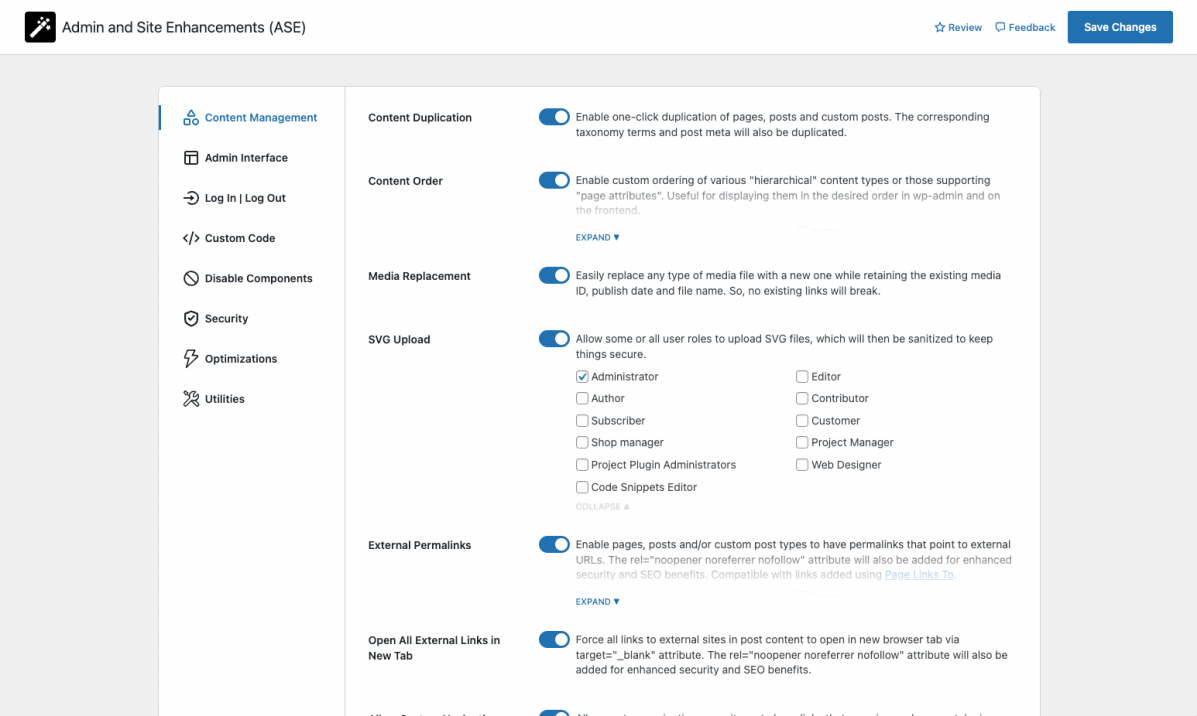
Quản lý nội dung 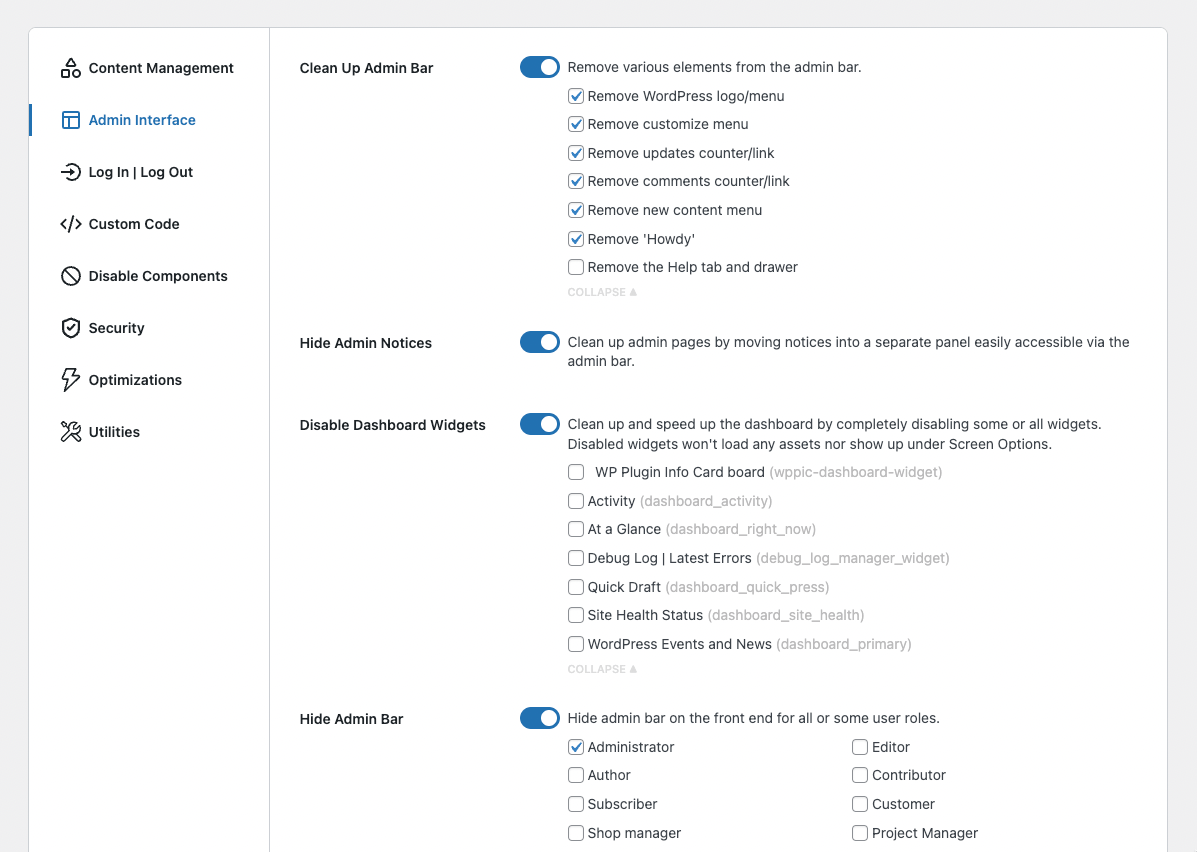
Giao diện quản trị 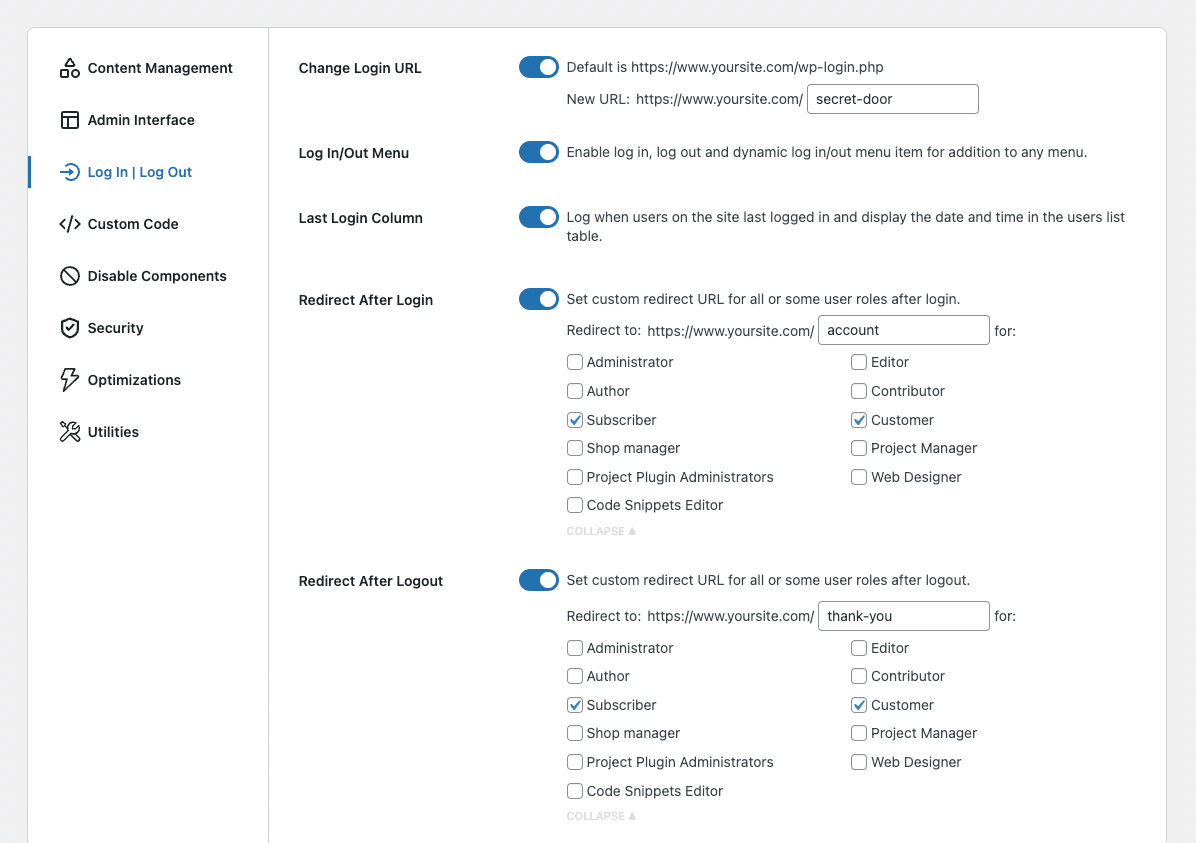
Đăng nhập/Đăng xuất 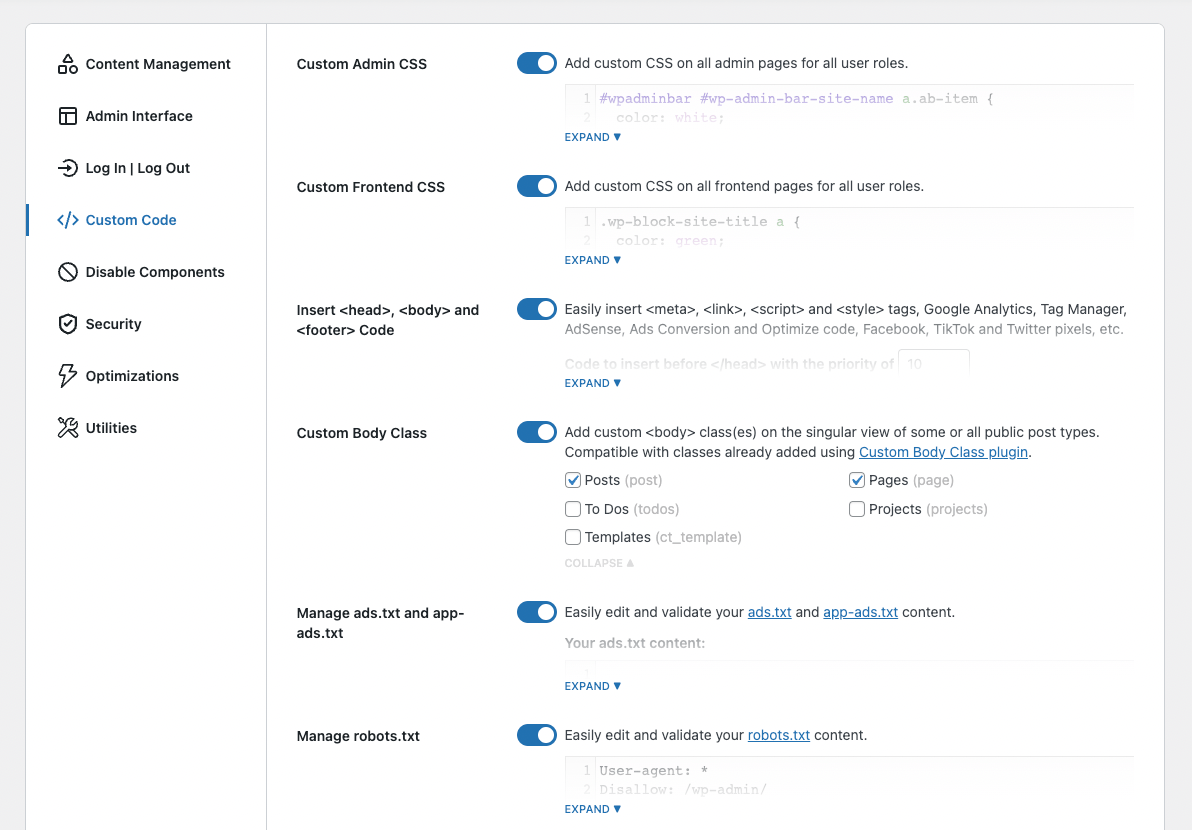
Mã tùy chỉnh 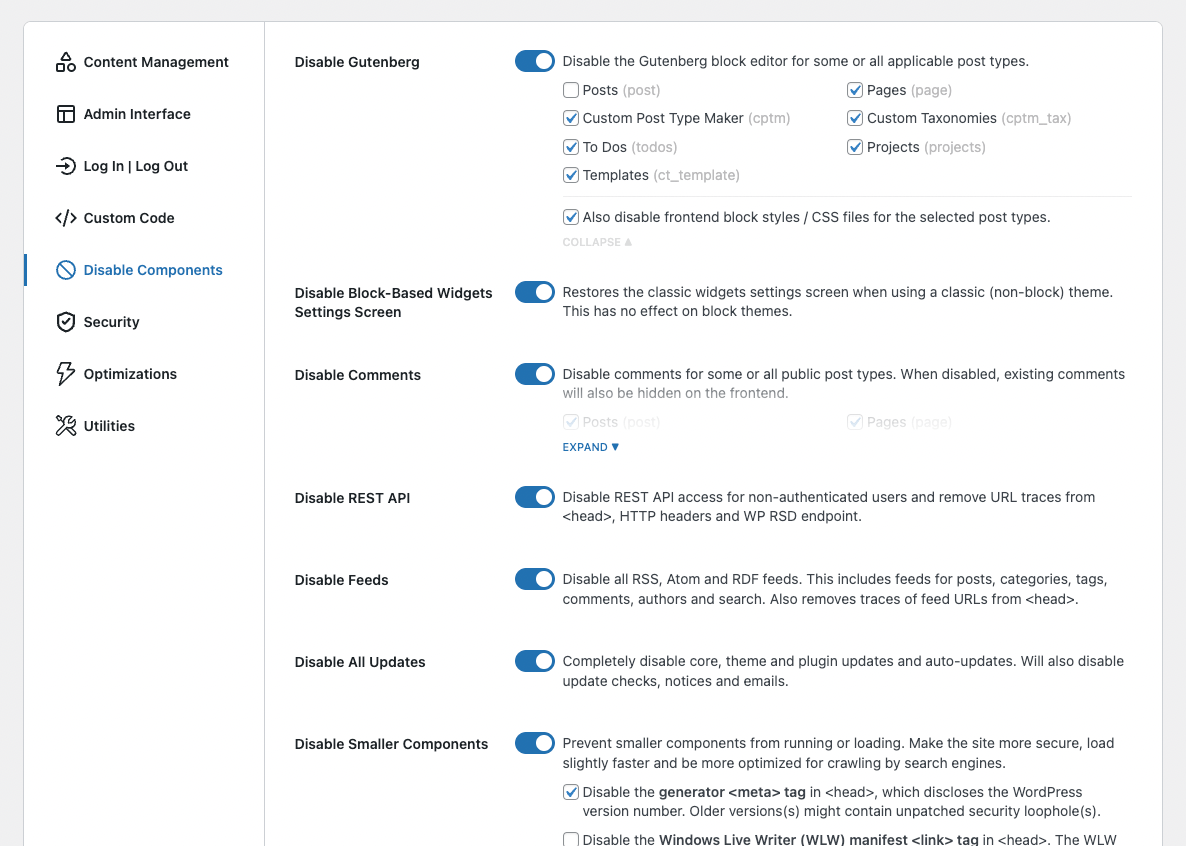
Vô hiệu hóa thành phần 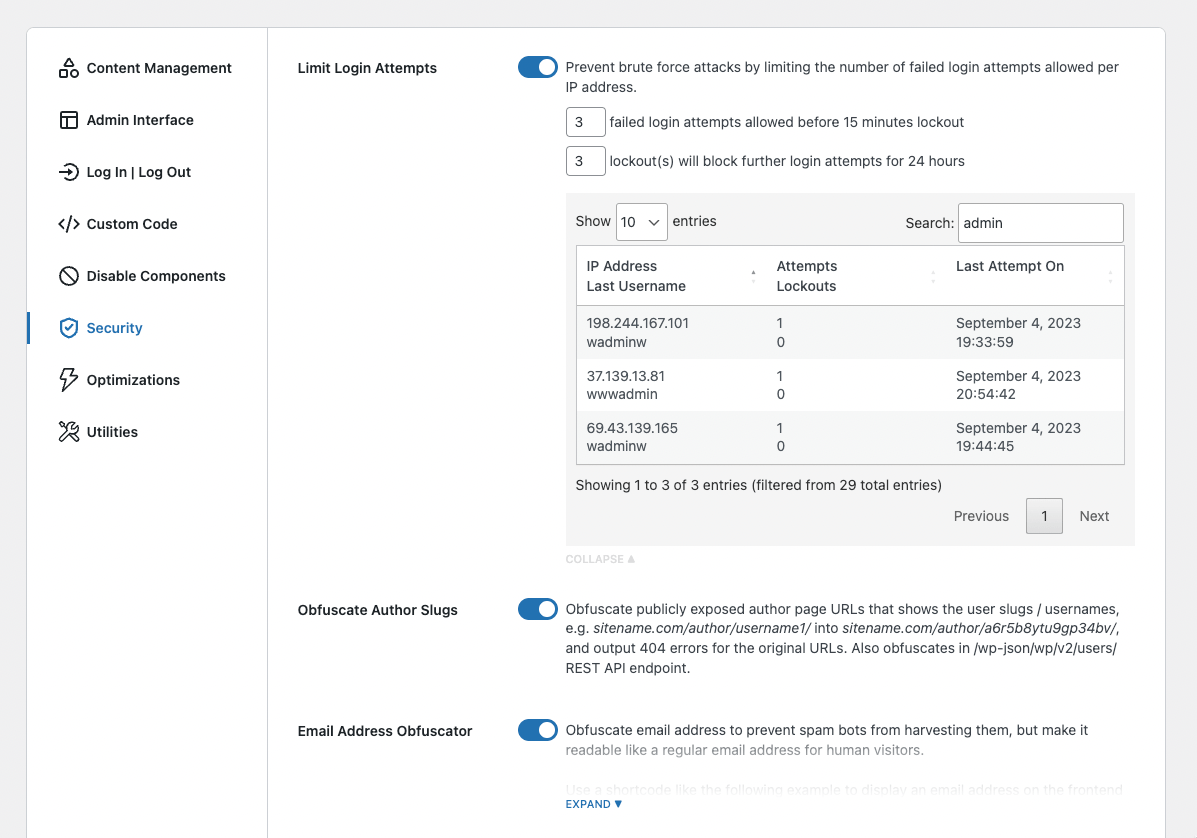
Bảo mật 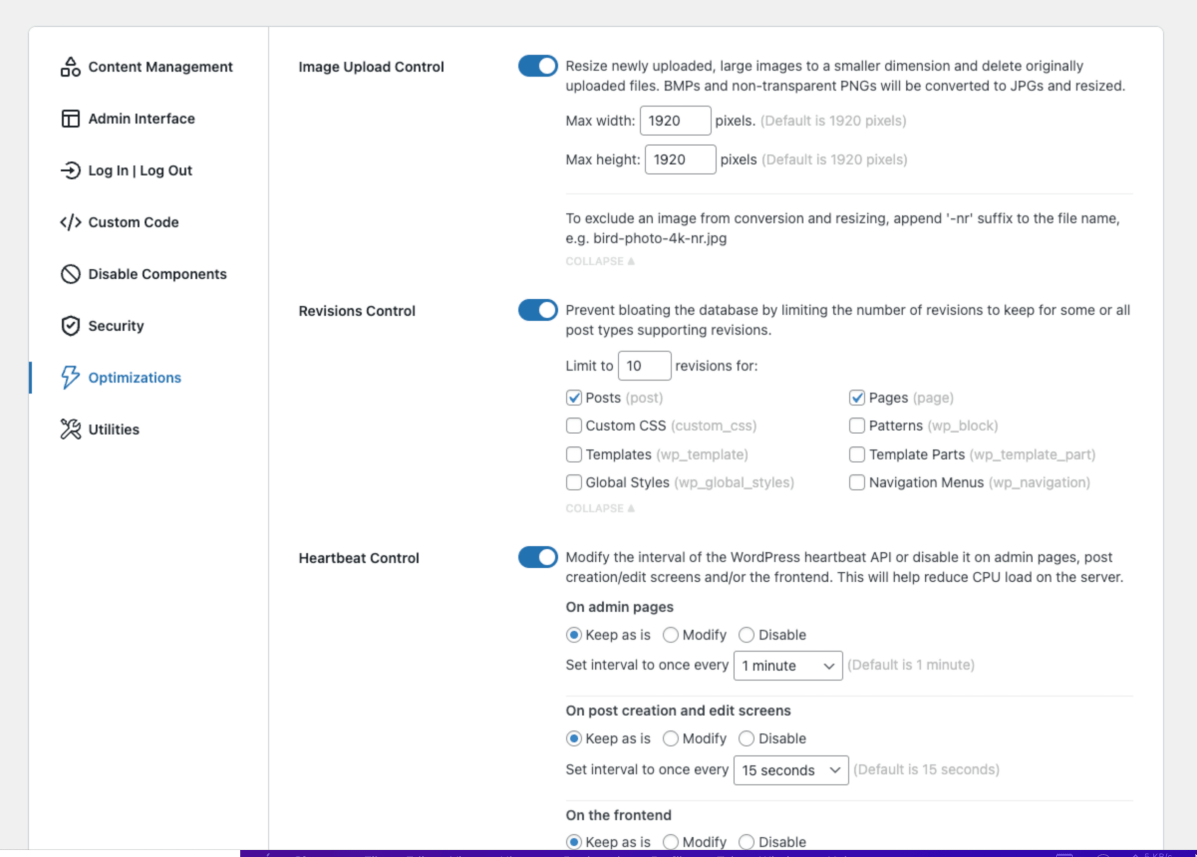
Tối ưu hóa 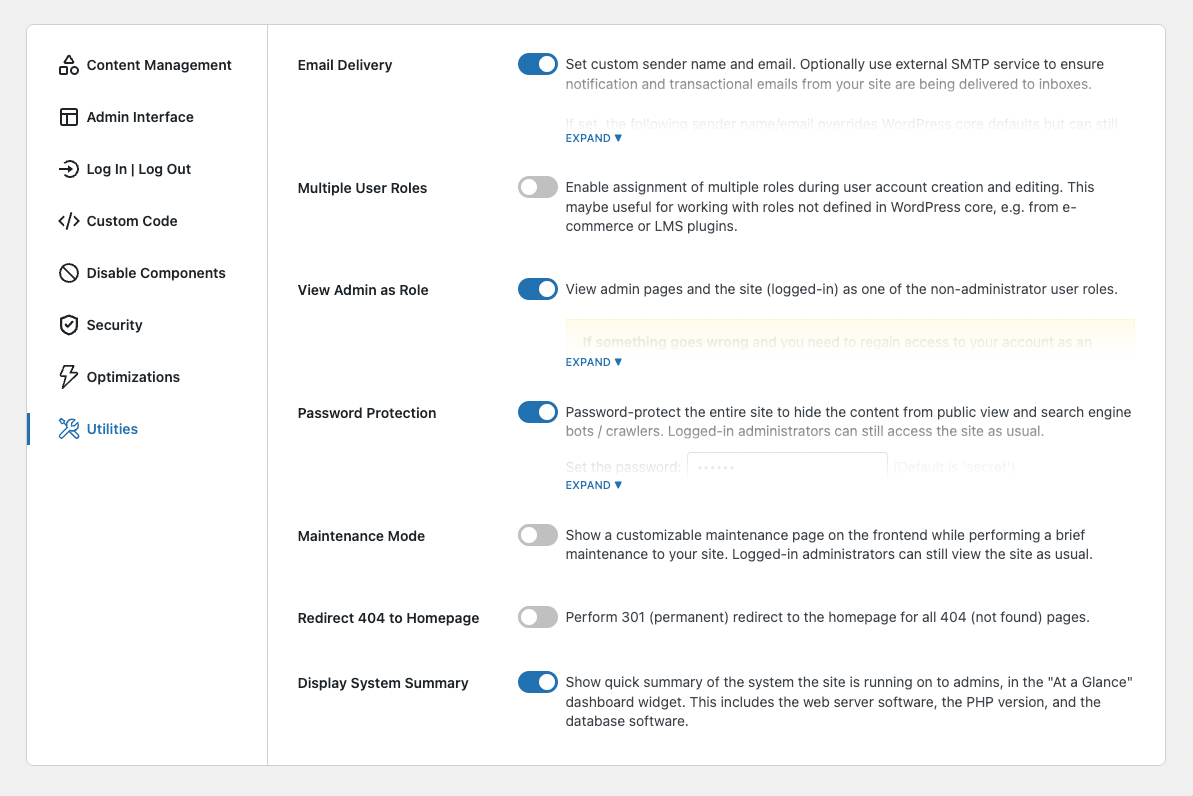
Tiện ích 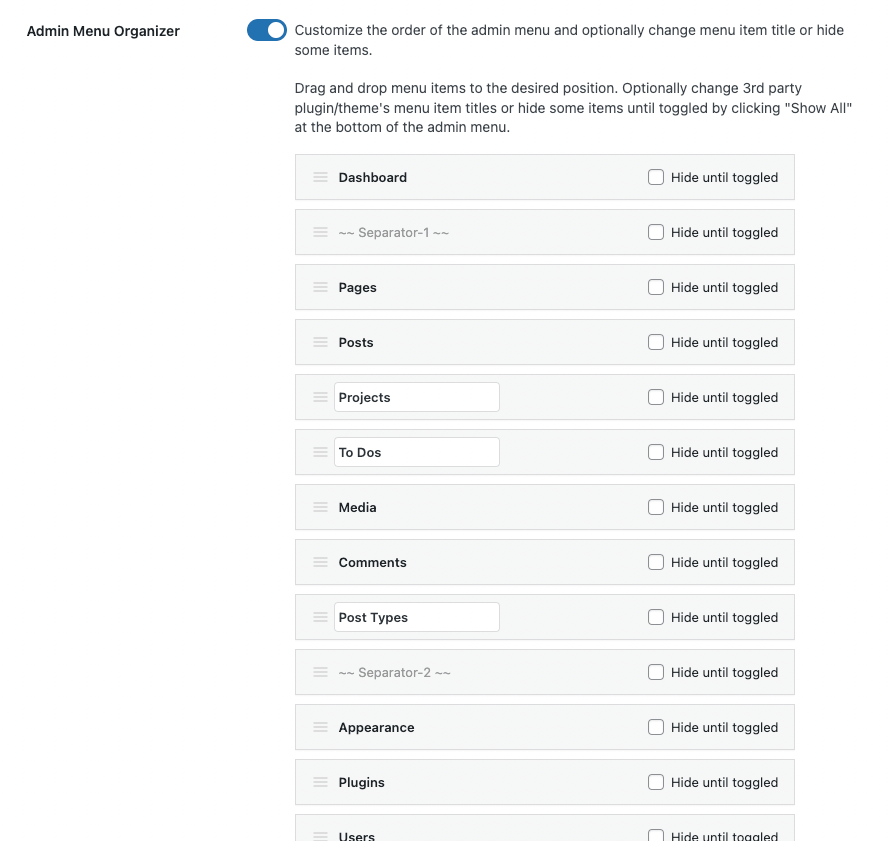
Mô-đun Tổ chức Menu Quản trị 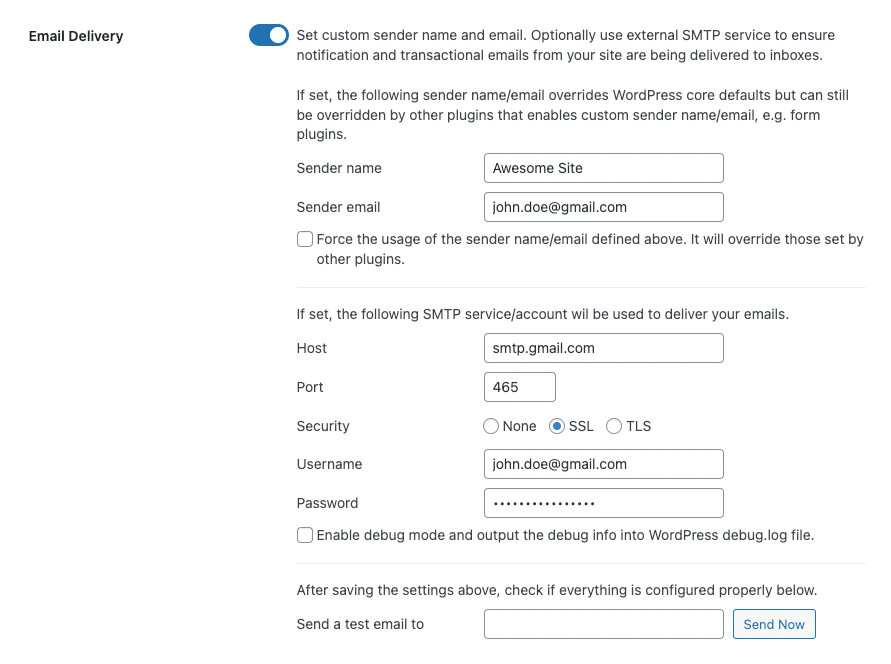
Mô-đun Giao hàng Email
Hỏi đáp
-
Làm cách nào để đặt lại cài đặt/cấu hình ASE?
-
Nếu vì lý do gì mà bạn cần xóa ASE và đặt lại cài đặt/cấu hình, vui lòng làm theo các bước sau:
- Truy cập trang web của bạn thông qua FTP và xóa thư mục plugin ASE tại /wp-content/plugins/admin-site-enhancements/.
- Đăng nhập vào trang web của bạn thông qua URL mặc định, /wp-admin/ hoặc /wp-login.php
- Cài plugin SQL Buddy, mở nó ra, và nhấp vào bảng wp_options
- Sử dụng biểu tượng bộ lọc nhỏ ở đầu các hàng bảng wp_options và lọc theo “option_name” => “chứa” => “admin_site_enhancements”. Bạn sẽ nhận được 3 tùy chọn. Nhấp vào mỗi tùy chọn và nhấn biểu tượng “Xóa” ở góc dưới bên phải.
- Cài đặt lại và cấu hình lại ASE nếu cần.
Bạn có thể bỏ qua bước 1 và 2 nếu bạn vẫn có quyền truy cập vào bảng điều khiển wp-admin của mình.
-
ASE có hoạt động với đa trang web không?
-
ASE does not officially support multisite. Please use at your own risk. That said, several users have reported that it works fine on their multisite when activated on each sub-site and not through network activation.
Đánh giá


Người đóng góp & Lập trình viên
“Admin and Site Enhancements (ASE)” là mã nguồn mở. Những người sau đã đóng góp vào plugin này.
Những người đóng góp
“Admin and Site Enhancements (ASE)” đã được dịch qua 26 ngôn ngữ. Cảm ơn những người tham gia dịch vì đóng góp của họ.
Dịch “Admin and Site Enhancements (ASE)” sang ngôn ngữ của bạn.
Muốn tham gia phát triển?
Duyệt code, check out SVN repository, hoặc theo dõi nhật ký phát triển qua RSS.
Nhật ký thay đổi
Admin and Site Enhancements (ASE) v1.0.0 was released on October 17, 2022. Since then, there have been 86 major releases (e.g. 1.1.0 ) and 192 minor releases (e.g. 4.9.1), for a total of 278 releases.
Mỗi phiên bản điểm thường tương ứng với việc thêm một mô-đun/tính năng mới. Mỗi mô-đun/tính năng thường tương đương với một (hoặc nhiều) plugin đơn mục đích. Mỗi bản vá thường chứa một hoặc nhiều bản sửa lỗi hoặc cải tiến cho các mô-đun/tính năng hiện có.
Nâng cấp lên ASE Pro ngay bây giờ. Gói trọn đời (LTD) có sẵn.
8.7.1 (2026.04.27) – ASE Free and Pro
-
[IMPROVED in Free and Pro] Disable Components >> Disable Smaller Components: added an option to disable user email notification after password change.
-
[IMPROVED in Pro] Utilities >> Site Backup and Migration:
- Added “Upload a Backup Archive” and “Transfer a Backup Archive from URL” actions in the emergency restore script.
- Added checks in the “Restore” tab and emergency restore’s “Upload a Backup Archive” and “Transfer a Backup Archive from URL” actions so archive for another site with different domain will be rejected. Props to David M.C. for prompting this improvement.
- Improved the robustness and reliability of sync operation. Props to David M.C. for prompting this improvement.
- Scoped media sync: when syncing “Selected post types only”, the “Media Library” component now will auto-select a new option “Only files used by selected posts”, so there is no need to sync the whole media library for this scenario. Props to David M.C. for prompting this improvement.
- Scoped terms sync: when selecting to sync only certain post type posts, it’s now possible to also sync only taxonomy terms in use / related to those posts.
- Scoped custom field values sync: when selecting to sync only certain post type posts (whose CPT is configured by ASE), it’s now possible to also sync only custom field values related to those posts.
- Add option to sync all or some custom post type configurations created via ASE’s Custom Content Types module in the “Settings >> Custom Post Types” admin page.
- Add option to sync all or some custom taxonomy configurations created via ASE’s Custom Content Types module in the “Settings >> Custom Taxonomies” admin page.
- Add option to sync all or some custom field group configurations created via ASE’s Custom Content Types module in the “Settings >> Custom Field Groups” admin page.
-
[IMPROVED in Pro] Content Management >> Custom Content Types >> Custom Field Groups: when no specific placement rules have been selected for a custom field group, the associated meta box will no longer show up in unrelated locations, e.g. all post types post edit screen.
-
[TRANSLATION in Free and Pro] ASE is now being translated into 38 languages:
- Thêm bản dịch mới/cải tiến cho:
- ASE Free: Updated Portuguese (Brazil), Polish, Norwegian, Indonesian.
- ASE Pro: Updated Arabic, Indonesian, Danish.
- Nhiều chuỗi đã được quốc tế hóa. @Người dịch, vui lòng truy cập các trang dự án tương ứng cho phiên bản Miễn phí và Pro để dịch các chuỗi mới, nếu bạn chưa làm điều đó.
- Bạn có muốn giúp dịch hoặc cải thiện bản dịch không? Vui lòng truy cập https://translate.wpase.com để biết thêm thông tin.
- Chinese (China): ASE Free and Pro (completed). Props to @bricksvip et al. Current status: 12 strings untranslated.
- Portuguese (Brazil): ASE Free and ASE Pro (completed). Props to Valdemir M., Dennis F., denisgomesfranco, Denison C. and @ofmarconi. Current status: 0 strings untranslated.
- Hungarian: ASE Free and Pro (completed). Props to R. József G. et al. Current status: 41 strings untranslated.
- Vietnamese: ASE Free and Pro (completed). Props to Hoang N.Q. et al. Current status: 8 strings untranslated.
- Italian: ASE Free and Pro (completed). Props to Fabio P. et. al. Current status: 28 strings untranslated.
- Dutch: ASE Free and Pro (completed). Props to Toine R and Peter S. et al. Current status: 0 strings untranslated.
- Korean: ASE Free and Pro (completed). Props to @chazmlab et al. Current status: 1 strings untranslated.
- German (Formal): ASE Free and Pro (completed). Props to @markussss, Bastian S. et al. Current status: 50 strings untranslated.
- French: ASE Free and Pro (completed). Props to Stéphan G., @jeanfrancoisdelvin, @srossignol, @lucashw, @skippy43, @anlip, @agencefacton, @injsbx et al. Current status: 0 strings untranslated.
- Polish: ASE Free and Pro (completed). Props to Jaroslaw K., Dziubek and Dariusz Z. et al. Current status: 0 strings untranslated.
- Norwegian: ASE Free and Pro (completed). Props to Alf O.F. et al. Current status: 0 strings untranslated.
- Czech: ASE Free and Pro (completed). Props to Jan S. et al. Current status: 65 strings untranslated.
- Spanish (Spain): ASE Free and Pro (completed). Props to @marcorubiol et al. Current status: 0 strings untranslated.
- Slovak: ASE Free and Pro (completed). Props to Dominik K. et al. Current status: 12 strings untranslated.
- Indonesian: ASE Free and Pro (completed). Props to @pakacil, Wawan S. et al. Current status: 9 strings untranslated.
- Portuguese (Portugal): ASE Free (completed) | ASE Pro (partial). Props to Ricardo C. et al. Current status: 0 strings untranslated.
- Ukrainian: ASE Free (completed) | ASE Pro (partial). Props to Irina et al. Current status: 28 strings untranslated.
- Urdu: ASE Free (completed) | ASE Pro (partial). Props to Ayyaz A. et al. Current status: 98 strings untranslated.
- Swedish: ASE Free (completed) | ASE Pro (partial). Props to Robert M. and Tor-Bjorn F.. Current status: 29 strings untranslated.
- Danish: ASE Free (completed) | ASE Pro (partial). Props to Morten E.L., Helgi P. and Kurt M.A. et al. Current status: 1 strings untranslated.
- Arabic: ASE Free (completed) | ASE Pro (completed). Props to Mohammed J., Yaser M., et al. Current status: 1 strings untranslated.
- Romanian: ASE Free (completed) | ASE Pro (partial). Props to Dan C., @ravishi and @catalinx777. Current status: 34 strings untranslated.
- Turkish: ASE Free (completed). Props to @saeead, @serdaroztrk et al. Current status: 1 strings untranslated.
- Chinese (Taiwan): ASE Free (completed). Props to @gordon168 and Hedula. Current status: 1 strings untranslated
- Spanish (Chile): ASE Free (completed). Props to @srgio. Current status: 8 strings untranslated.
- Serbian: ASE Free (partial). Props to Igor E. and @plug-n-play. Current status: 8 strings untranslated.
- Albanian: Props to @algertpateqi. Current status: 7 strings untranslated.
- Persian: ASE Free (completed). Props to @saeead et al. Current status: 40 strings untranslated.
- Russian: ASE Free (completed). Props to @sergey369, @pfgr et al. Current status: 3 strings untranslated.
- Bosnian: ASE Free (completed). Props to @plug-n-play et al. Current status: 37 strings untranslated.
- Croatian: ASE Free (completed). Props to @plug-n-play. Current status: 41 strings untranslated.
- Japanese: ASE Free (completed). Props to @zionote et al. Current status: 1 strings untranslated.
- Catalan: ASE Free and Pro (completed). Props to @agendablanca, @lluishospital et al. Current status: 12 strings untranslated.
- Bengali (Bangladesh): ASE Free (completed) and Pro (partial). Props to Ruhani R.. Current status: 9 strings untranslated.
- Bulgarian: ASE Free (completed) and Pro (partial). Props to Svetoslav S.. Current status, 8 strings untranslated.
- Greek: ASE Free (completed) and Pro (completed). Props to Stelio C.. Current status: 0 strings untranslated.
- Dutch (Belgium): ASE Free (completed). Props to Pieterjan D.. Current status, 0 strings untranslated.
- Azerbaijani: ASE Free (completed). Props to Saeid BGrn. Current status, 0 strings untranslated.