
Mô tả
A. Smith Health Monitor scans your active plugins and gives each one a health score based on update status, compatibility, performance impact, and known conflict patterns. It flags common patterns such as running multiple caching or SEO plugins at the same time, which can contribute to site issues.
Key Features
- Plugin Health Scores – Each active plugin gets a score (0-100) based on update freshness, WordPress compatibility, active installs, support resolution rate, and rating.
- Conflict Detection – Detects multiple plugins in the same category (caching, SEO, security, backup, minification) that commonly cause conflicts.
- Performance Profiling – Measures each plugin’s footprint: file count, disk size, registered hooks, autoloaded options, and estimated memory usage. Labels plugins as lightweight, moderate, or heavy.
- Safe Mode – One-click conflict isolation testing. Temporarily hides all plugins except one to help identify which is causing issues. No database changes — uses WordPress filters. Auto-expires after 15 minutes.
- PHP Error Detection – Scans your debug log for plugin-related errors and groups them by source plugin.
- Hook Congestion Alerts – Warns when many plugins are hooked into sensitive WordPress hooks like
the_contentorwp_head. - Email Health Reports – Scheduled email digests (daily/weekly/monthly) with your site’s health score, issues, and recommendations.
- Actionable Recommendations – Prioritized suggestions to resolve conflicts, update plugins, and improve performance.
How It Works
- Install and activate the plugin.
- Visit Health Monitor in your admin menu.
- View your overall health score and per-plugin report cards.
- Click Run New Scan for a fresh analysis.
- Use Test in Safe Mode to isolate any suspicious plugin.
Privacy
Scans run locally on your site and are cached in WordPress transients. Optionally, you can enable “Allow enhanced plugin metadata lookup” in Settings to fetch public ratings and update data for your active plugins from the WordPress.org plugin directory. This option is disabled by default. No data is sent to A. Smith Media servers.
Pro Features (Optional Add-On)
The free version is fully functional on its own. A Pro add-on is available separately at asmith.media/health-monitor with:
- Auto-rollback on detected conflicts
- Real-time conflict monitoring dashboard
- Performance history and trends (Chart.js graphs)
- Slack and email alert notifications
- White-label reports for agencies
- PDF health report export
Ảnh màn hình

Dashboard with overall health score and plugin cards 
Conflict detection showing multiple caching plugins 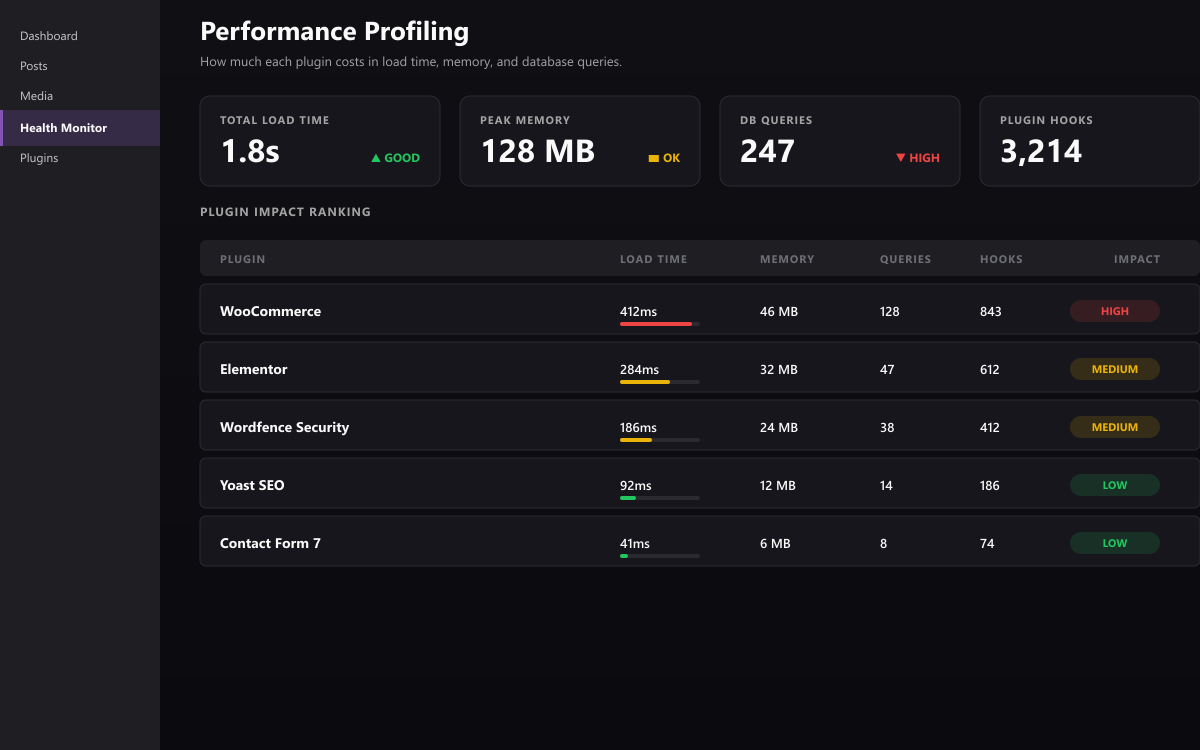
Performance profiling with impact labels 
Safe Mode indicator in admin bar 
Email health report
Cài đặt
- Upload the
asmith-health-monitorfolder to/wp-content/plugins/. - Activate the plugin through the Plugins menu.
- Go to Health Monitor in the admin menu to view your dashboard.
Hỏi đáp
-
Does this plugin slow down my site?
-
Scans run on-demand or via a daily cron event. Results are cached in transients so repeated page loads do not re-run the scan.
-
Does Safe Mode actually deactivate my plugins?
-
No. Safe Mode uses a WordPress filter (
option_active_plugins) to temporarily hide plugins from the active list. No database changes are made. It auto-expires after 15 minutes. -
Does the free version require an account or external service?
-
No account is required and no data is sent to A. Smith Media. By default, the plugin works entirely on your site. You can optionally opt in to fetch plugin ratings and update metadata from the public WordPress.org plugin directory via the Settings screen.
-
What PHP version is required?
-
PHP 7.4 or higher. WordPress 6.0 or higher.
Đánh giá
Không có đánh giá nào cho plugin này.
Người đóng góp & Lập trình viên
“A. Smith Health Monitor” là mã nguồn mở. Những người sau đã đóng góp vào plugin này.
Những người đóng góp
Dịch “A. Smith Health Monitor” sang ngôn ngữ của bạn.
Muốn tham gia phát triển?
Duyệt code, check out SVN repository, hoặc theo dõi nhật ký phát triển qua RSS.
Nhật ký thay đổi
1.0.0
- Initial release
- Plugin health scoring (0-100)
- Conflict detection for caching, SEO, security, backup, and minification plugins
- Performance profiling with impact labels
- Safe Mode for conflict isolation testing
- PHP error log scanning
- Hook congestion detection
- Email health report digests
- Optional WordPress.org plugin directory metadata lookup (opt-in)