
Mô tả
Have not you experienced unjust access to wp-login.php? If this plug-in is used, a unique login page will be arranged to your site, and unlawful access will be reduced.
Some features:
- This plugin allows you to change wp-login.php to a login page with a unique name (multisite sub-directory type is supported).
- Create a login page for administrators only, and separate it from the login page for users with other roles.
- Disables login by email address.
- When an administrator logs in, the site administrator is notified by email.
- Selects the response when the wp-login.php page is requested.
- Restrict the functions that can be used, such as login via XML-RPC.
- Restrict REST APIs related to users.
- Disable the author archive page.
- Controls the author information of oEmbed.
Support
- Japanese – https://elearn.jp/wpman/column/login-rebuilder.html
Translators
- Japanese(ja) – Takenori Matsuura
You can send your own language pack to me.
Please contact to me.
- https://12net.jp/ (ja)
- email to takenori.matsuura[at]gmail.com
- @tmatsuur on twitter.
Contributors
Credits
This plug-in is not guaranteed though the user of WordPress can freely use this plug-in free of charge regardless of the purpose.
The author must acknowledge the thing that the operation guarantee and the support in this plug-in use are not done at all beforehand.
Contact
email to takenori.matsuura[at]gmail.com
twitter @tmatsuur
Ảnh màn hình
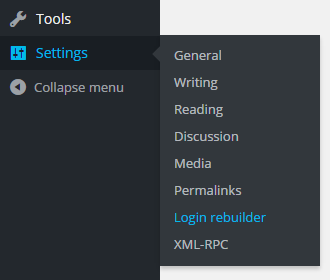
This plug-in menu. 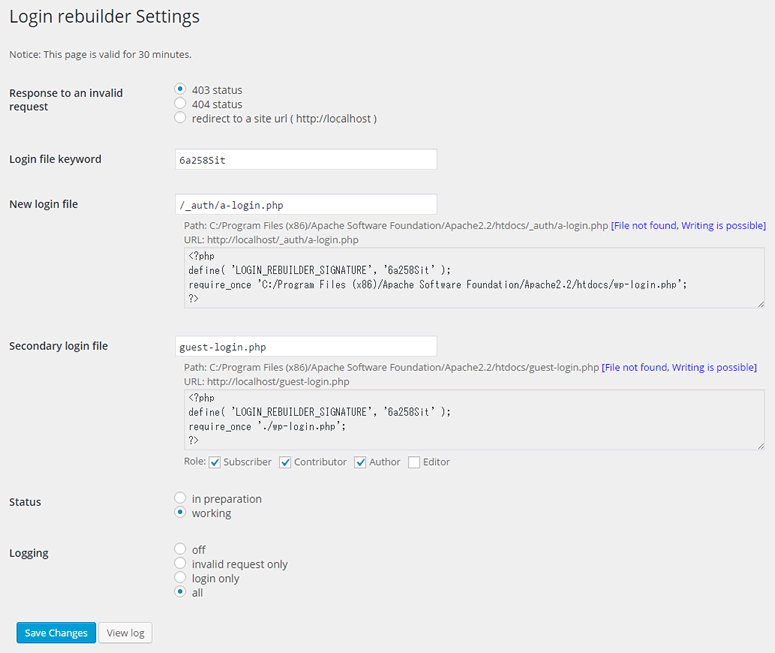
This plug-in settings. 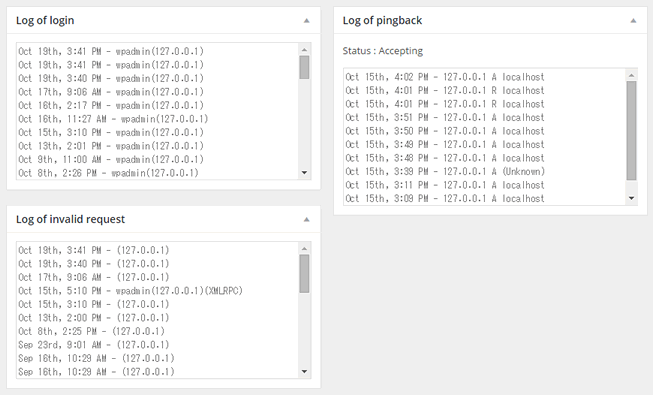
Widget on the dashboard. 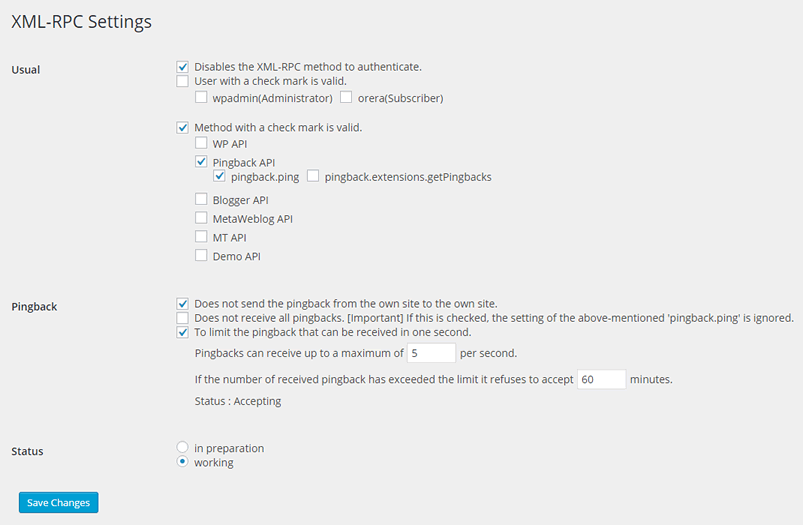
This plug-in XML-RPC settings. 
Other settings. 
Lock file settings. 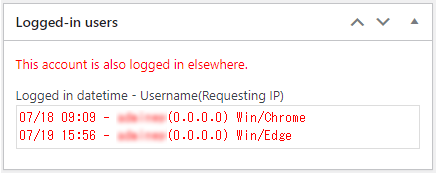
Widget to display currently logged in users.
Cài đặt
- A plug-in installation screen is displayed on the WordPress admin panel.
- It installs it in
wp-content/plugins. - The plug-in is made effective.
- You will find
Login rebuildersubmenu inSettingsmenu. - Please enter
New login file, and chooseworking. Next, please clickSave Changesbutton. Login file for subscriberis optional. It becomes a page to which only subscribers can log in there.
Hỏi đáp
-
Is a `wp-login.php` file unnecessary?
-
wp-login.php is used in this plug-in. Please do not delete
wp-login.php. -
Even if it accessed a `wp-admin` directory, it became impossible to login.
-
Even if it accesses a
wp-admindirectory before login, it becomes impossible to log in, when this plug-in is effective. It is for not telling outside about a new login page. -
A new login page can be used even if this plug-in is invalid.
-
Please delete the file, when a new login page becomes unnecessary.
-
It became impossible to login from a new login page.
-
Please delete the new login page file, this plug-in returns during preparation.
-
Can I set the login page of the only administrators?
-
If it is version 1.4.0 or later, you can choose the role of non-administrator for the
Secondary login file. -
Does this plugin support Nginx?
-
Yes, this plugin works well on Nginx.
Đánh giá


Người đóng góp & Lập trình viên
“Login rebuilder” là mã nguồn mở. Những người sau đã đóng góp vào plugin này.
Những người đóng góp
Dịch “Login rebuilder” sang ngôn ngữ của bạn.
Muốn tham gia phát triển?
Duyệt code, check out SVN repository, hoặc theo dõi nhật ký phát triển qua RSS.
Nhật ký thay đổi
2.8.8
- Bug fix: Fixed an issue where the reset permission check was incorrectly changed on pages other than the alternative login page.
2.8.7
- Bug fix: The issue has been fixed, and the password can now be reset.
2.8.6
- Bug fix: Adjusted what is applied to internally stored hostnames when SERVER[‘SERVER_ADDR’] does not exist.
2.8.5
- Bug fix: Adjusted what is applied to internally stored hostnames when SERVER[‘HTTP_HOST’] does not exist.
2.8.4
- Bug fix: Fixed a bug that prevented the settings page from displaying.
2.8.3
- Bug fix: Changed to apply ‘Unknown’ to internally stored hostname when $_SERVER[‘HTTP_HOST’] does not exist.
- Tweaked widget showing logged in users.
2.8.2
- Bug fix: Fixed escaping for “login file keywords” on the settings page.
Bug fix: Fixed the handling of session tokens for user information displayed in widgets.
2.8.1
- Bug fix [important]: The “Login file keyword” in the settings page has been changed to perform escaping since escaping was omitted.
In addition, the “Login file keyword” has been sanitized when it is saved. - Changed: Moved “Status” to the top of the settings page.
2.8.0
- A widget has been added to the dashboard that displays a currently logged in users.
Login statuses added to the “log of login” widget have been moved to a new widget. - The process of saving logs at login has been changed from the “login_redirect” action to the “set_logged_in_cookie” action.
- User agent has been added to the contents of the “Log of login” widget.
- The “Logged-in users” widget and the “Log of login” widget are updated periodically.
2.7.4
- For administrators only, the “log of login” widget now displays login status.
2.7.3
- Adjusted some translated text.
Bug fix: Incorrectly used functions have been corrected.
2.7.2
- Bug fix: Fixed a bug where the URL of the login page could not be rewritten correctly under certain conditions when using multisite.
2.7.1
- Added the ability to notify the site administrator when a login page is requested by an IP address that has never logged in before.
Bug fix: Fixed a problem with the delivery test of the notification email when an administrator logs in.
2.7.0
- The access log of the login page is now saved and can be viewed in the dashboard.
2.6.9
- Extended the ability to send login notification emails, allowing the site administrator’s email address to be specified in CC / BCC.
Bug fix: Fixed an issue where “Custom” was not translated in some versions.
2.6.8
- Bug fix: If you restrict browsing to the Author page, send status 404.
2.6.7
- If you restrict browsing to the Author page, no “users” sitemap is created. (WordPress 5.5. 0 or later)
2.6.6
- Bug fix: Fixed a bug that caused an error related to type hints in some PHP versions.
2.6.5
- New: Displays the date and time of the log data in any format.
2.6.4
- Bug fix: Fixed a bug where the nonce element in the logfile download form had duplicate ids.
2.6.3
- Bug fix: Fixed an issue that occurred when used in combination with some plugins.
2.6.2
- Changed: For “subdomain” multi-sites, it is now possible to include directories in login file pathnames.
2.6.1
- Bug fix: URL of the login page has been corrected so that it does not contain “??”.
2.6.0
- New: Added the function to restrict REST API / Users.
2.5.1
- Bug fix: Fixed an issue where valid IP address could not be stored in the log under certain conditions.
2.5.0
- New: Added authentication lock by specified file.
2.4.4
- Bug fix: Activation fails in a multisite environment where program files are installed in a subdirectory.
2.4.3
- The ‘wp-login.php’ has been changed so that ‘confirmaction’ is passed through only in version 4.9.6 or later.
2.4.2
- Set the original confirmation URL in the body of the user request mail.
2.4.1
- New: Add oembed setting.
- Changed: Display the user name after urldecode at login log.
2.4.0
- New: Add
Access to author page: Access to the author page can be restricted.
2.3.0
- New: Log data can now be downloaded.
2.2.0
- New: Add other settings: Notify by email when the administrator login.
2.1.0
- New: Add other settings: The error message when login, is changed to the ambiguous content(WordPress Version 4.5 or later effective). / Authentication using a email address and a password is prohibited.
2.0.0
- New: XML-RPC settings. (WordPress Version 3.5 or later effective)
1.4.5
- Bug fix [important]: Changed the process of AJAX request.
1.4.4
- Added the widget that displays the log on the dashboard for administrators.
1.4.3
wp_secondary_login_urlmethod added.
1.4.2
- Bug fix [important]: Changed the process of AJAX request.
1.4.1
- Bug fix: A parameter of the function was adjusted.
1.4.0
Login file for subscriberhas changed the name toSecondary login file.Secondary login filewill function as the login file for subscribers in the same way as before. In addition, the administrator can choose the role of login possible user.
1.3.1
- Bug fix: Password reset available.
1.3.0
- Login file is able to place in any directory.
1.2.3
- Changed the specification for the validity period of the property page.
1.2.2
- When expired, Display the reload button.
1.2.1
- Property page is now valid for 30 minutes.
1.2.0
- Bug fix [important]: It was coped with about CSRF.
- New: Added logging.
1.1.3
- Bug fix:
1.It corrected so that a post password could be used.
1.1.2
- Bug fix:
1.A source code for debugging was deleted.
1.1.1
- Bug fix:
1.Avoid fatal errors with a few plugins that were incorrectly calling functions too early.
1.1.0
- Login page for subscriber is available.
1.0.3
- Bug fix:
1.A few array key name was corrected.
2.The URL of properties form was corrected.
1.0.2
- Bug fix:
1.The fault which has not recognized an alternative login file correctly in a part of server environments was coped with.
1.0.1
- Bug fix:
1.Wrong URL was corrected at plugins.php.
2.The operation at the time of invalid access became normal.
1.0.0
- The first release.