

Mô tả
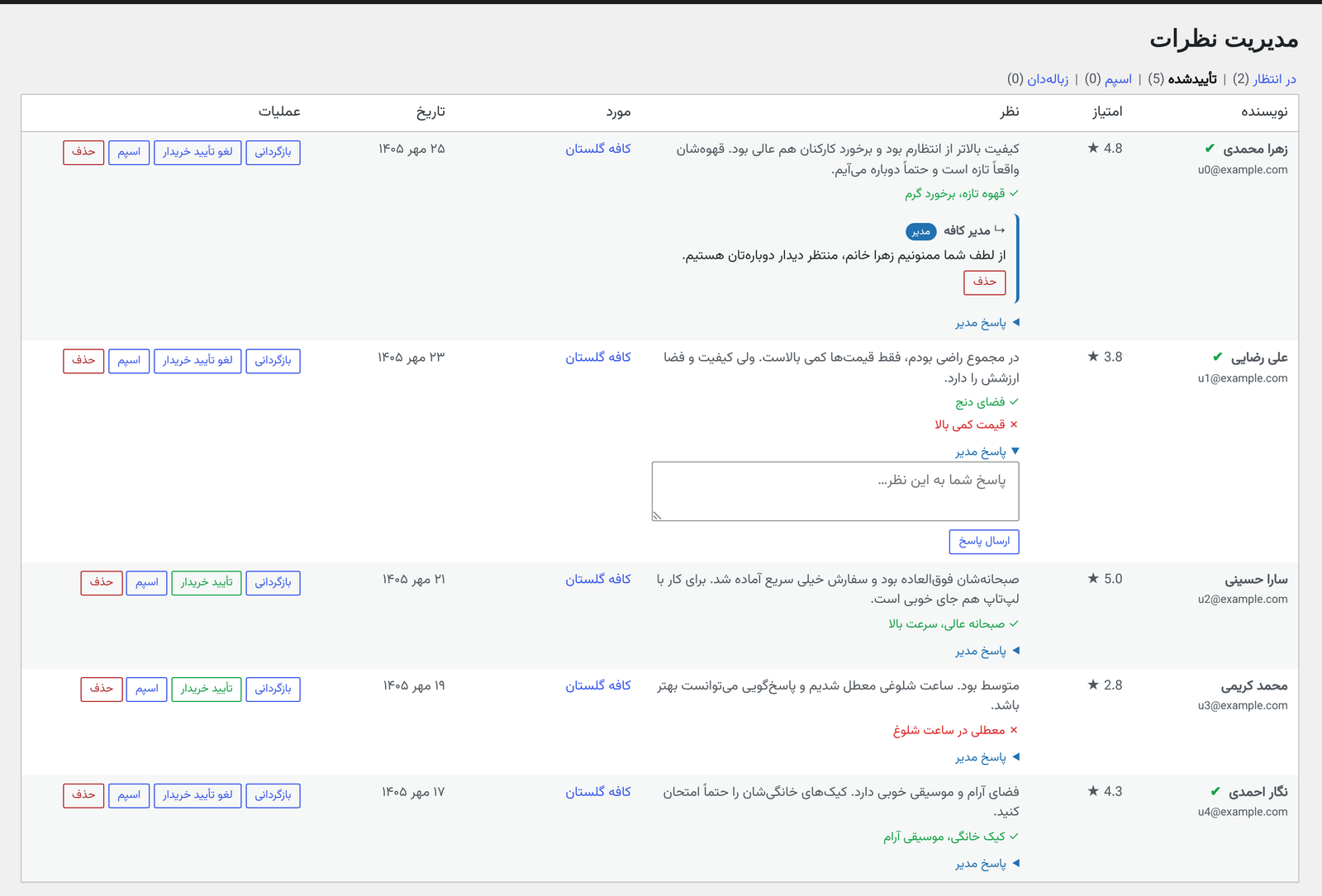
OmoReviews replaces the basic comment box with a complete review system. Visitors rate each aspect separately, list pros and cons, and say whether they recommend the business or product. Real buyers get a “verified user” badge, and your average rating can appear as stars in Google results.
The plugin was built for Persian (Farsi), right-to-left websites. Its interface ships in Persian, and every text shown to visitors can be changed from the settings screen.
Ratings and reviews
- Multi-criteria ratings (quality, price, staff and any criteria you define) or a single overall rating
- Pros and cons entered as separate lists
- “I recommend this” option with the overall recommendation rate
- Helpful / not helpful votes, with sorting by most helpful
- Replies from the site owner, shown with their own badge, plus one-level replies from visitors
- Summary bar with average score, star distribution and per-criteria averages
- Load more reviews without reloading the page
Verified user badge
- Automatic for WooCommerce: a review on a product is marked as verified when its author bought that product
- Manual: approve any review as verified from the review management screen, for sites without WooCommerce or for purchases made elsewhere
- Badge text and color are editable
Google star ratings
OmoReviews outputs Schema.org structured data (JSON-LD for the aggregate rating, Microdata on each review) so search engines can show your rating as stars. Choose Product, LocalBusiness or Service as the item type.
Design and settings
- Six layouts: cards, classic, timeline, compact, magazine and grid
- Tabbed settings screen with a live preview
- Per post type options, for example hiding pros and cons or a price criterion on blog posts
- Colors, spacing, sizes, and Google Fonts or an uploaded font
- Edit every text visitors see, including buttons and messages
Moderation and spam
- Approve reviews before they appear, or auto-approve logged-in users
- Approve, unapprove, mark as spam, delete and reply from one screen
- Honeypot field and a minimum interval between submissions
- Optional: turn off default WordPress comments on post types that use OmoReviews
Works with page builders
Reviews appear automatically below the content of the post types you enable. To place them anywhere else, use a shortcode in the Elementor Shortcode widget, the block editor Shortcode block or any page builder.
Shortcodes
[omorev_reviews]full reviews block (summary, form and list)[omorev_rating]rating badge (average, stars and count). Attributes:stars,average,count(0 or 1)[omorev_average]average score only[omorev_count]number of reviews only
All shortcodes accept an optional id attribute, for example [omorev_reviews id="123"]. Without it, the current post is used.
For developers
Template functions: omoreviews_the_reviews(), omoreviews_the_rating_badge(), omoreviews_get_stats(), omoreviews_get_average(), omoreviews_get_count() and more. REST routes live under omorev/v1, and the omorev_review_inserted action runs after each new review.
Source code and full documentation: github.com/Hoseinkhalaj1/OmoReviews
External services
This plugin can load a font from Google Fonts. This only happens if a site administrator chooses “Google Fonts” as the font source in the plugin settings; it is off by default.
- What is sent: when a page with reviews is viewed, the visitor’s browser requests the font stylesheet and files from fonts.googleapis.com and fonts.gstatic.com. Google receives the visitor’s IP address and browser details as part of that request. While choosing a font on the settings screen, the administrator’s browser makes the same request for the preview.
- Service provider: Google LLC
- Google Fonts privacy and data collection
- Google Terms of Service and Privacy Policy
No other external services are used. The plugin does not track visitors and does not send any data to the plugin author.
Privacy
When someone submits a review, the plugin stores in your own database: the name, email address, review text and ratings, the user ID for logged-in users, and the IP address (used to limit repeated submissions). Helpful votes are stored as a one-way hash, not as an IP address. Email addresses are never shown publicly. If you enable moderation, a notification is sent to the site admin email when a new review is waiting.
Ảnh màn hình



Cài đặt
- Install the plugin from Plugins > Add New, or upload the
omoreviewsfolder to/wp-content/plugins/. - Activate it. Two database tables are created for reviews and votes.
- Go to OmoReviews > Settings and choose the post types that should show reviews (Posts are enabled by default).
- Pick a layout, define your rating criteria and save. Reviews now appear below the content of those post types.
Hỏi đáp
-
Is the interface available in English?
-
The interface ships in Persian (Farsi), right-to-left. You can switch the layout to left-to-right and replace every text visitors see from the Texts tab in the settings.
-
Does it require WooCommerce?
-
No. WooCommerce is only used to detect verified buyers automatically. Without it, you can mark reviews as verified by hand.
-
Can guests leave reviews?
-
Yes, unless you enable “require login” in the settings.
-
Does it conflict with WordPress comments?
-
No. Reviews are stored in their own table. You can turn off default comments on the post types that use OmoReviews.
-
My site uses page caching and submitting a review fails
-
The plugin refreshes expired security tokens automatically. If submissions still fail, exclude
/wp-json/omorev/v1/from your caching plugin or CDN. -
Dates are shown in the Gregorian calendar
-
Dates are shown in the Jalali (Persian) calendar when a plugin or theme that provides the
jdate()function is active, such as a Persian date plugin. -
Another SEO plugin also outputs rating data
-
If another plugin outputs an aggregate rating for the same page, turn off structured data in one of them to avoid duplicates. You can turn it off in OmoReviews > Settings > Advanced.
-
What happens to my data if I delete the plugin?
-
Deleting the plugin (not just deactivating it) removes its database tables and settings. Back up your database first if you want to keep the reviews.
Đánh giá
Không có đánh giá nào cho plugin này.
Người đóng góp & Lập trình viên
“OmoReviews” là mã nguồn mở. Những người sau đã đóng góp vào plugin này.
Những người đóng góp
Dịch “OmoReviews” sang ngôn ngữ của bạn.
Muốn tham gia phát triển?
Duyệt code, check out SVN repository, hoặc theo dõi nhật ký phát triển qua RSS.
Nhật ký thay đổi
1.0.0
- First public release.