
Mô tả
Plugin provides a sitemap shortcode. You can use shortcode on any page to display sitemap. You can fully customize your sitemap using plugin settings.
If you have any query then please contact us on our email: contact@divyanshiinfotech.com or visit https://divyanshiinfotech.com/
Ảnh màn hình

Sitemap plugin settings.

Sitemap page shortcode view on page template using 3 column settings.

Sitemap page shortcode view on admin page.
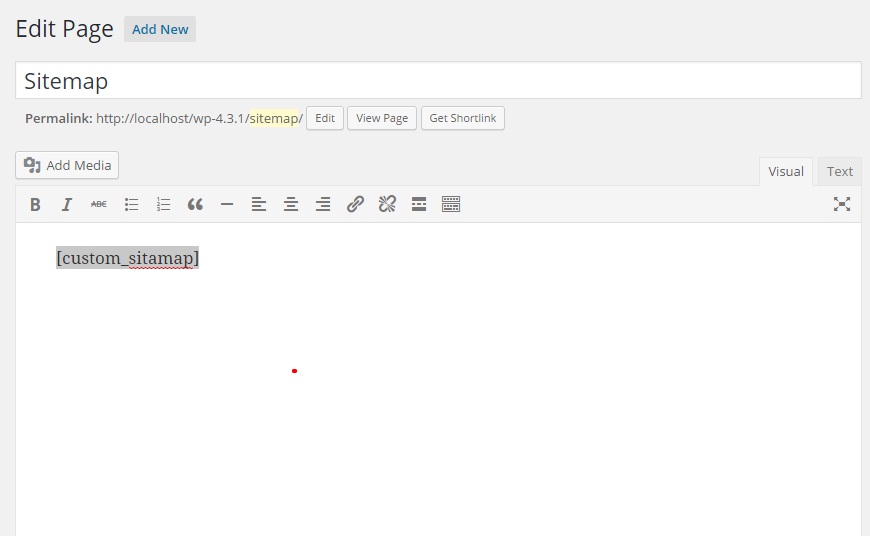
Shortcode added on a sitemap page.

Custom CSS editor screenshot on admin page.
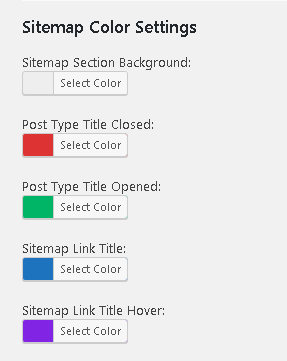
Color settings options on plugin settings.
Cài đặt
- Upload `custom-sitemap-template` plugin to the `/wp-content/plugins/` directory
- Activate the plugin through the ‘Plugins’ menu in WordPress
- Add [sws_sitemap] shortcode on any page where you want to display sitemap.
Hỏi đáp
-
How can we display sitemap on page template
-
You can put plugin shortcode [sws_sitemap] on any page from wordpress admin.
-
Can I customize sitemap layout?
-
Yes you can easily customize sitemap layout as required.
-
Can I exclude any post/page from sitemap?
-
Yes you can exclude any post/page/taxonomy by put its id in exclude named input field from plugin settings page.
-
Is it possible to have two or more columns with the posts/categories in the sitemap?
-
Yes. You can manage 1, 2, 3, 4 or 5 columns from plugin settings to display posts/categories on sitemap page.
Đánh giá

Người đóng góp & Lập trình viên
“Custom Sitemap Shortcode” là mã nguồn mở. Những người sau đã đóng góp vào plugin này.
Những người đóng góp

Dịch “Custom Sitemap Shortcode” sang ngôn ngữ của bạn.
Muốn tham gia phát triển?
Duyệt code, check out SVN repository, hoặc theo dõi nhật ký phát triển qua RSS.
Nhật ký thay đổi
2.7.1
- Release Date: Jan 25, 2025
- Bug fixes.
- Minor plugin updates.
- Default options added.
2.6.2
- Release Date: Mar 27, 2024
- Bug fixes.
- Minor plugin updates.
2.6.1
- Release Date: Jun 29, 2023
- Bug fixes.
- Minor plugin updates.
2.6
- Release Date: Jun 29, 2023
- Bug fixes.
- New shortcode added.
- Deprecated old shortcode.
2.5
- Release Date: Nov 20, 2017
- Add color settings options on plugin settings.
- New screenshot added.
- Bug fixes.
2.4
- Release Date: Aug 30, 2016
- Add column options on plugin settings.
- New screenshots added.
- Add responsive css
- Bug fixes.
2.3.0
- Release Date: Jul 23, 2016
- Bug fixes.
2.2.0
- Release Date: Apr 30, 2016
- Add custom css editor option.
- Bug fixes.
2.1.0
- Release Date: Nov 20, 2015
- Bug fixes.
2.0.1
- Release Date: Oct 03, 2015
- Plugin information added.
2.0.0
- Release Date: Sep 30, 2015
- Update plugin settings using backend options.
- New Shortcode feature added.
- Bug fixes.
1.0.1
- Release Date: Jun 30, 2015
- Screenshots added.
1.0
- Release Date: Jun 18, 2015
- First version of plugin.