

Mô tả
Reviso lets your clients leave feedback on the actual page instead of describing it in an email. You share a review link, they click the element they mean and type a comment, and the comment appears inside your editor with a screenshot and the browser details attached. When the round is done, they mark the page approved and you have a timestamped record.
Everything is stored in your own WordPress database. Reviewers do not need a WordPress account, and nothing is sent to a third-party service unless you switch on an optional integration.
How it works
- Share one link. Create a review for a page and send the link. It works on drafts, on unpublished pages and while your site is in maintenance or coming-soon mode.
- Your client pins feedback. They click any element on the live page, on desktop, tablet or mobile, and leave a comment. For wording changes they can use Suggest mode and type the replacement text in place, like a tracked change.
- You resolve it where you build. Comments appear in Bricks, Elementor or the block editor, anchored to the element. Reply, set a status, accept or reject suggestions, and close the round with a recorded approval.
Built for agencies and freelancers
Reviso was built inside a WordPress agency to end the “can you make the blue bit bigger” email thread. It is native to the Bricks and Elementor builders and the Gutenberg block editor, and works on any WordPress theme.
What the free plugin includes
- Pinned comments on any element, with threaded replies and emoji reactions
- Suggest mode: reviewers propose replacement wording on the page; you accept or reject each one
- Single-page review links that need no login; reviewers can comment with just a name
- Client approvals: a reviewer marks the page approved, recorded with a timestamp
- Statuses and filters: open, in progress, resolved
- Automatic screenshots with page URL, browser, operating system and screen size on every pin, so launch snags arrive as usable bug reports
- Element-anchored pins that survive page edits, with content and position fallbacks
- Builder-native panel that adopts the look of Bricks, Elementor or the block editor
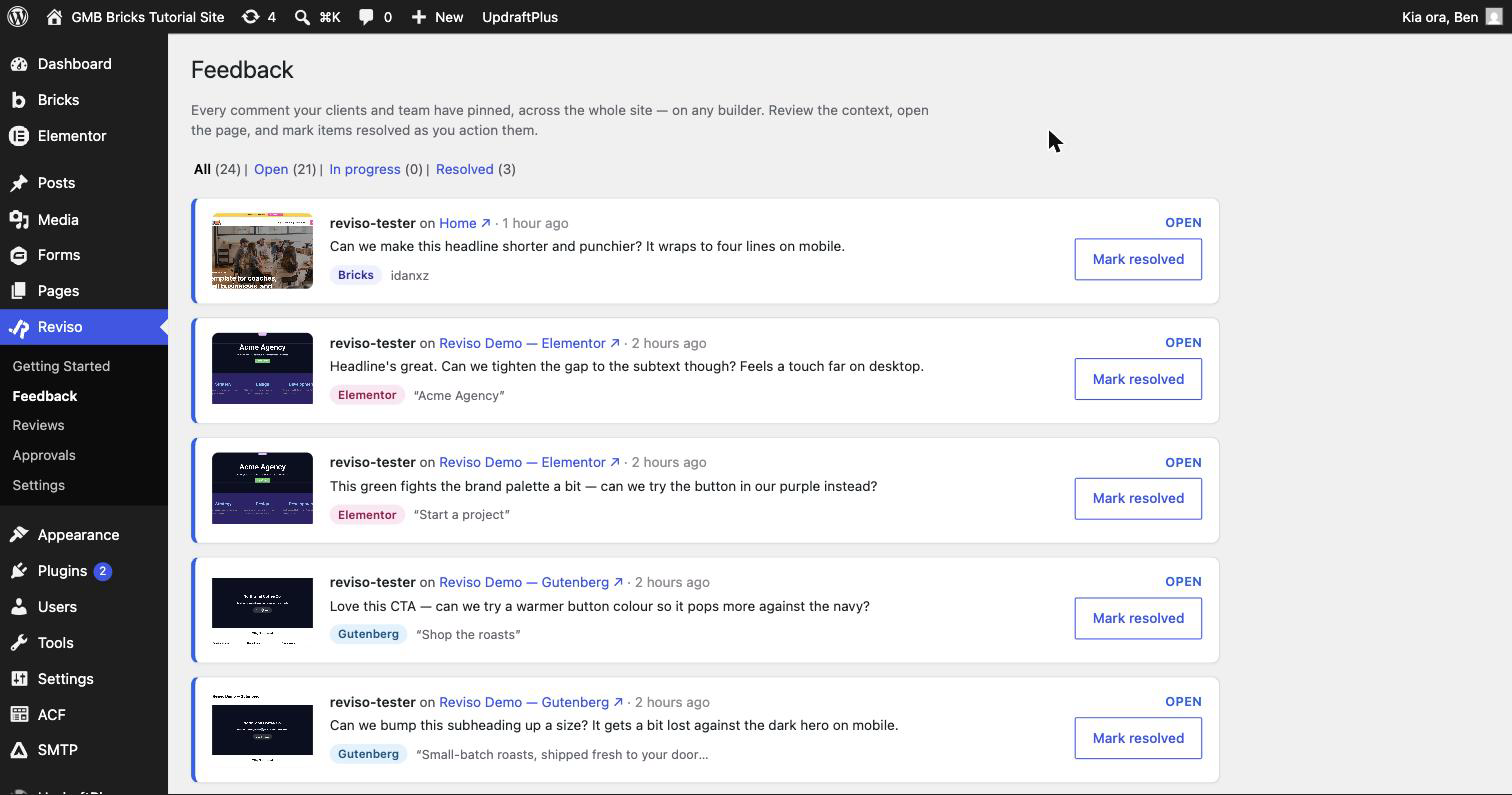
- Feedback dashboard listing every comment across the site
- Internal comments for team-only notes, shared with the client only when you choose
- Email notifications for comments, replies and approvals, with burst-coalescing so a flurry arrives as one email
- Works in maintenance and coming-soon mode for invited reviewers, while the site stays hidden from everyone else
- Cache-proof review links for W3 Total Cache, WP Rocket, LiteSpeed, WP Super Cache, Cache Enabler and SiteGround Optimizer
- Admin-bar quick review to start a review for the page you are looking at
- Close on finish: a review can stop taking comments once the client marks it done, with one-click reopen
- Translations included for German, French and Spanish reviewers
Reviso Pro
The paid add-on (https://getreviso.io/pricing/?utm_source=wporg&utm_medium=readme&utm_campaign=plugin_listing) requires this plugin and adds whole-site reviews across any post type, email-restricted reviews with four reviewer roles, applying accepted suggestions to the page in Bricks with a revertable snapshot, PDF approval certificates, white-label branding, Slack, Discord and webhook integrations, weekly digests, an audit log, and an optional cloud dashboard across sites (Beta). A 14-day trial of Pro is built into the plugin.
Privacy & data
Reviso stores comment data on your own WordPress site. We don’t see your reviewers’ feedback unless you opt in to Reviso Cloud’s AI features (Beta), which relay the items the assistant acts on to getreviso.io (see External services below). Optional anonymous telemetry (off by default) is opt-in. Full details in our privacy policy. Reviso adds a standard generator meta tag naming the plugin version, the same way WordPress does; the filter reviso_generator_tag_enabled removes it.
External services
This plugin can connect to external services run by us (Reviso, getreviso.io). Each is opt-in and described below.
Anonymous usage telemetry (opt-in). When, and only when, you switch telemetry on in Settings Reviso, the plugin sends a small weekly ping to https://getreviso.io. It contains version numbers, which features are enabled, and a random install ID, and never contains your pages, your reviewers’ comments, email addresses, or any personal data. If you installed Reviso by searching inside your WordPress admin, it also includes the search phrase you used (for example “client feedback”), so we can see how people find the plugin; it is recorded once at activation, capped at 60 characters, and is blank if you activated Reviso from your plugins list. It is used to prioritise fixes and features. You can turn it off again at any time, which stops all pings. Terms: https://getreviso.io/terms-of-service/ , Privacy policy: https://getreviso.io/privacy-policy/
Reviso Cloud (opt-in, Beta). An optional hosted service that connects your site to a Reviso Cloud account so you can manage feedback across all your sites from one dashboard and, in Beta, let an AI assistant you authorise help action that feedback. It does nothing unless an administrator connects the site under Settings Reviso Reviso Cloud, and you can disconnect at any time.
- Baseline sync. While connected, the site sends usage metadata to
https://getreviso.io: your site name and address, the account email, your licence tier, and review titles and counts. This alone never sends your feedback content, screenshots, or reviewer details. - AI assistant (Beta). If you use the Reviso Cloud AI tools on a connected site, the specific comments, screenshots, page structure, and reviewer names for the items the assistant reads are sent to
https://getreviso.ioand relayed to the AI agent you connect; with your permission the agent can also write changes back (post replies, resolve comments, edit page content). Only what the assistant acts on is transmitted, and only while you use it.
Terms: https://getreviso.io/terms-of-service/ , Privacy policy: https://getreviso.io/privacy-policy/
Support and reviews
Questions go to the support forum here on WordPress.org, or to the documentation at https://getreviso.io/doc/ . If Reviso has saved you a revision round, a short review here helps other agencies find it.
Ảnh màn hình



Cài đặt
- Install from the WordPress.org plugin directory, or upload the zip, and activate.
- Open any page in Bricks, Elementor or the block editor. The Reviso panel appears bottom-right.
- Create a review from the panel or from the Reviso icon in the front-end admin bar, and share the link with your client.
- Optional: start the 14-day Pro trial from the Reviso welcome screen in WordPress. No card needed.
Hỏi đáp
-
Do my clients need a WordPress account?
-
No. They open the review link and comment as themselves. Reviso asks for a name, and an email address is optional.
-
Which page builders does Reviso work with?
-
It is native to Bricks, Elementor and the Gutenberg block editor, and works on any WordPress theme. Pins anchor to each builder’s elements (Bricks
brxe-*IDs, Elementor element IDs, Gutenberg block IDs), with content and position fallbacks so they survive page edits. -
Can clients suggest wording changes instead of just commenting?
-
Yes. In Suggest mode a reviewer selects the text on the live page and types what it should say instead. You accept or reject the suggestion in one click. Suggesting is free on unlimited sites; with Pro, accepting an edit applies it to the page in Bricks and takes a revertable snapshot first.
-
Yes. A valid review link opens the page for your invited client even while Bricks or Elementor maintenance mode is on. Revoked, expired or out-of-scope links still see the maintenance screen.
-
Can I use Reviso for bug reports and launch QA?
-
Yes. Every pinned comment captures a screenshot plus the page URL, browser, operating system and screen size, so a tester reporting a broken layout gives you the context without a separate bug tracker.
-
Is Reviso a website proofing tool?
-
For live web pages, yes. Reviewers proof the real page in the browser rather than a PDF or a flattened screenshot, then approve it with a timestamped record. It does not proof static images or print artwork.
-
Does the free plugin need a licence key?
-
No. The free plugin is fully functional. A licence key is only needed for the Pro add-on.
-
Is there a trial of Pro?
-
Yes. The plugin includes a 14-day trial of every Pro feature, started from inside WordPress, with no card required.
-
Where is my data stored?
-
In your own WordPress database (
wp_reviso_*tables). Reviso does not transmit your feedback anywhere unless you opt in to Reviso Cloud’s AI features (Beta), which relay the items the assistant acts on to getreviso.io (see External services). The optional anonymous telemetry ping never contains comment content or personal data. -
Does Reviso work with WooCommerce, custom post types or templates?
-
Single-page reviews cover the page you share. Pro adds whole-site reviews across any post type, archives and templates.
Đánh giá


Người đóng góp & Lập trình viên
“Reviso – Client Feedback & Approvals for Bricks, Elementor & Gutenberg” là mã nguồn mở. Những người sau đã đóng góp vào plugin này.
Những người đóng góp
Dịch “Reviso – Client Feedback & Approvals for Bricks, Elementor & Gutenberg” sang ngôn ngữ của bạn.
Muốn tham gia phát triển?
Duyệt code, check out SVN repository, hoặc theo dõi nhật ký phát triển qua RSS.
Nhật ký thay đổi
1.6.5
- Fixed: a review can now include more than one archive page. Previously only the first archive you picked was saved, and any others un-ticked themselves when you saved the scope. All the archives you select now stay selected. If your site uses custom post type archives or category and taxonomy archives, update to keep them all in a review.
Every earlier release is listed in full at https://getreviso.io/changelog/ . This section keeps the current release only, because wordpress.org limits it to 5,000 characters.