
Mô tả
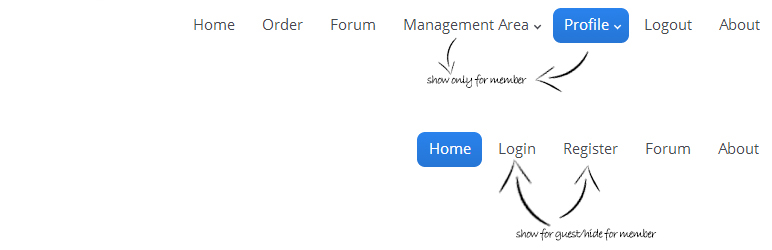
- We make setting up a simple way to your wordpress and lets your visitors (guest/member) know see which menu for them. Don’t worry, it’s simple as abc to set it up!
How to use?
- Go to : Appearance -> Menu -> Screen Options (at top right of ur browser) -> Tick CSS Classess
- Appear menu only to guest : At Menu Structure, CSS Classess (optional) -> forguest
- Appear menu only to member : At Menu Structure, CSS Classess (optional) -> formember
Ảnh màn hình


Cài đặt
Installation
- Upload the file
hide-unhide-menu.zipto the/wp-content/plugins/directory - Activate the plugin through the ‘Plugins’ menu in WordPress
- Please change the settings and enjoy!
Updating
If you had a trouble in updating this plugin, try deactive old version and delete the folder hide-unhide-menu from the /wp-content/plugins/ directory. Then, try download new version and install as usual.
Hỏi đáp
-
- Go to : Appearance -> Menu -> Screen Options (at top right of ur browser) -> Tick CSS Classess
-
- Leave CSS Classess blank
-
How to ask other question?
-
- Email me at
freddie.aziz[at]gmail[dot]com
- Email me at
Đánh giá

3 Tháng 9, 2016
Thank you for this plugin.

3 Tháng 9, 2016
we were looking for the simpliest way possible to hide unhide menus
this does it light weight and perfect !!
Thanks !!
Người đóng góp & Lập trình viên
“Hide/Unhide Menu for Guest/Member” là mã nguồn mở. Những người sau đã đóng góp vào plugin này.
Những người đóng góp

Dịch “Hide/Unhide Menu for Guest/Member” sang ngôn ngữ của bạn.
Muốn tham gia phát triển?
Duyệt code, check out SVN repository, hoặc theo dõi nhật ký phát triển qua RSS.
Nhật ký thay đổi
1.0.4 – 29 April 2024
- New : Tested up to wordpress 6.5.2
1.0.3 – 19 July 2017
- New : Tested up to wordpress 4.8
1.0.2 – 24 February 2014
- New : Tested up to wordpress 4.1.1
1.0.1 – 4 January 2014
- New : First release.