

Mô tả
VentraConnect provides a unified login system for WordPress: Social Login + Magic Link + Email OTP.
- Social Login with 15+ providers (Google, Facebook, X/Twitter, LinkedIn, Microsoft, GitHub, and more)
- Passwordless Login with Magic Link and Email OTP
- Can run in Login only mode (existing users) or Login & Register mode (allow new accounts)
- Guardrails (optional): prevent spam accounts by letting Social Login, Magic Link and Email OTP log existing users in, but optionally blocking them from creating new users. This stops random visitors from turning your login screen into an open registration form, while your normal WordPress registration and any custom onboarding forms continue to work as usual.
Works out-of-the-box on the default WordPress login/registration screens (wp-login.php) and also supports shortcodes for custom pages and page builders.
No proxy servers. No third-party tracking. VentraConnect connects directly to each provider using official OAuth flows.
Modern WordPress login with VentraConnect
Best for
- Sites that want faster logins and fewer abandoned registrations by offering Social Login + passwordless login.
- WooCommerce stores that want modern social + passwordless login on the login, checkout and My Account pages (Pro add-on).
- Sites that are getting spam registrations and want Guardrails to control who can create new accounts from the default
wp-login.phpscreen. - Sites that want to add passwordless login (Magic Link / Email OTP) as an option, without removing the classic username/password login.
Key Features (Free)
Social Login
– 15+ providers (Google, Facebook, X/Twitter, LinkedIn, Microsoft, GitHub, and more)
– Adds login buttons to core WordPress login & registration screens (wp-login.php)
– Shortcodes for custom pages, page builders, and custom login pages
– Account linking + unlinking (connect multiple providers to one WordPress user)
– Optional profile sync (name + avatar)
– Button styles: Light, Dark, Minimal, plus icon-only layouts
Passwordless Login (Magic Link + Email OTP)
- Built-in security: expiry, resend throttling, single-use links, max attempt limits
- Flexible behavior: Login only mode or Login & Register mode (per method)
- Per-method redirect overrides (same page, referrer, homepage, custom URL)
- Custom emails: edit sender name, subject, and message templates
- New: Improved with polished default HTML emails for Magic Link and Email OTP.
Guardrails (Spam & signup control)
– Prevent spam accounts by controlling whether Social Login, Magic Link and Email OTP are allowed to create new users
– Keep your login screen focused on login only, while still letting existing users sign in with all three methods
– Your normal WordPress registration form and other registration/onboarding flows continue to work as usual
Admin Tools
– Basic redirect options for social + passwordless login
– Diagnostics/logging to debug OAuth and login issues
– Email notifications (user + admin) when a new account is created via social login
Pro Add-on (Optional)
The Pro add-on extends the same login system into popular plugins and adds advanced control:
- WooCommerce integration for login, checkout and My Account, with Guardrails-aware flows and context-based shortcodes
- LMS integrations: LearnDash, LifterLMS, LearnPress
- Membership/community integrations: MemberPress, Ultimate Member, Paid Memberships Pro (PMPro), BuddyPress
- Passwordless Mode (Off, Recommended, Strict) to control how aggressively passwords are phased out on supported forms while keeping an admin fallback
- New: Custom-branded Magic Link & Email OTP emails with your logo, accent color, and footer text
- New: Inline Magic Link and Email OTP forms for custom pages, Elementor popups, account dropdowns and custom login layouts.
- Advanced redirect rules
- Analytics & login insights
- Additional diagnostics/logging for complex setups
Pro features require the separate VentraConnect Social Login Pro add-on.
Supported Social Providers
Google, Facebook, X (Twitter), LinkedIn, Microsoft, GitHub, Discord, Reddit, Slack, Twitch, Spotify, TikTok, Amazon, Yahoo, WordPress.com, LINE.
How It Works
- The user clicks a Social Login button, or requests a Magic Link / Email OTP.
- For Social Login, the user authenticates with the provider via official OAuth; for Magic Link / OTP, they verify ownership of their email address.
- VentraConnect receives basic profile or email data and looks for an existing WordPress user.
- If the email matches an existing user, the login methods are linked to that account and the user is logged in. If not, a new user may be created (subject to your Guardrails and registration settings).
External Services
VentraConnect Social Login is an OAuth client only.
During login:
- The user is redirected to the selected provider such as Google or Facebook.
- The provider authenticates the user.
- The provider returns an authorization token to your site.
- VentraConnect retrieves basic profile data:
- Provider user ID
- Email address
- Display name
- Avatar URL
No user data is sent to or stored on servers owned by the plugin author.
All communication happens directly between your WordPress site and the provider official APIs.
Provider Domains Used
Google
accounts.google.com
oauth2.googleapis.com
people.googleapis.com
Facebook
graph.facebook.com
Microsoft
login.microsoftonline.com
graph.microsoft.com
TikTok
open.tiktokapis.com
Reddit
www.reddit.com
oauth.reddit.com
LINE
access.line.me
api.line.me
Slack
slack.com
Discord
discord.com
Twitch
id.twitch.tv
api.twitch.tv
GitHub
github.com
api.github.com
Amazon
www.amazon.com
api.amazon.com
Yahoo
api.login.yahoo.com
WordPress.com
public-api.wordpress.com
LinkedIn
www.linkedin.com
api.linkedin.com
Each provider has its own Terms of Service and Privacy Policy. You are responsible for complying with those terms when enabling a provider.
Ảnh màn hình

WordPress login form with multiple social login button themes: Light, Dark and Minimal. 
Compact icon-only social login layout showing 15+ supported providers. 
VentraConnect general settings for login, registration and redirect options. 
Social provider settings screen to enable and configure login providers. 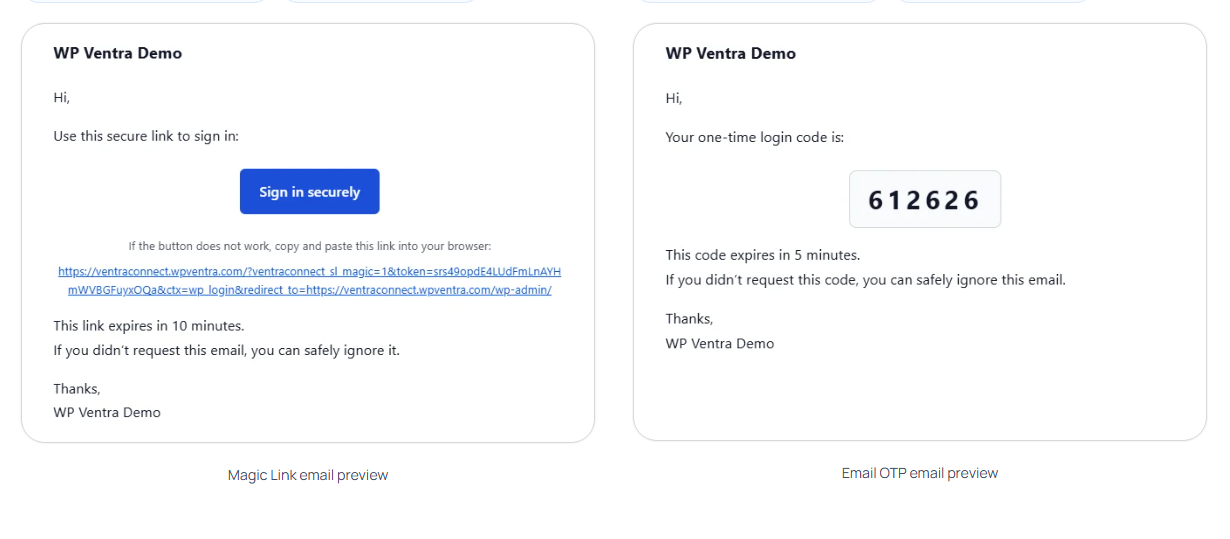
Magic Link and Email OTP email previews for WordPress passwordless login. 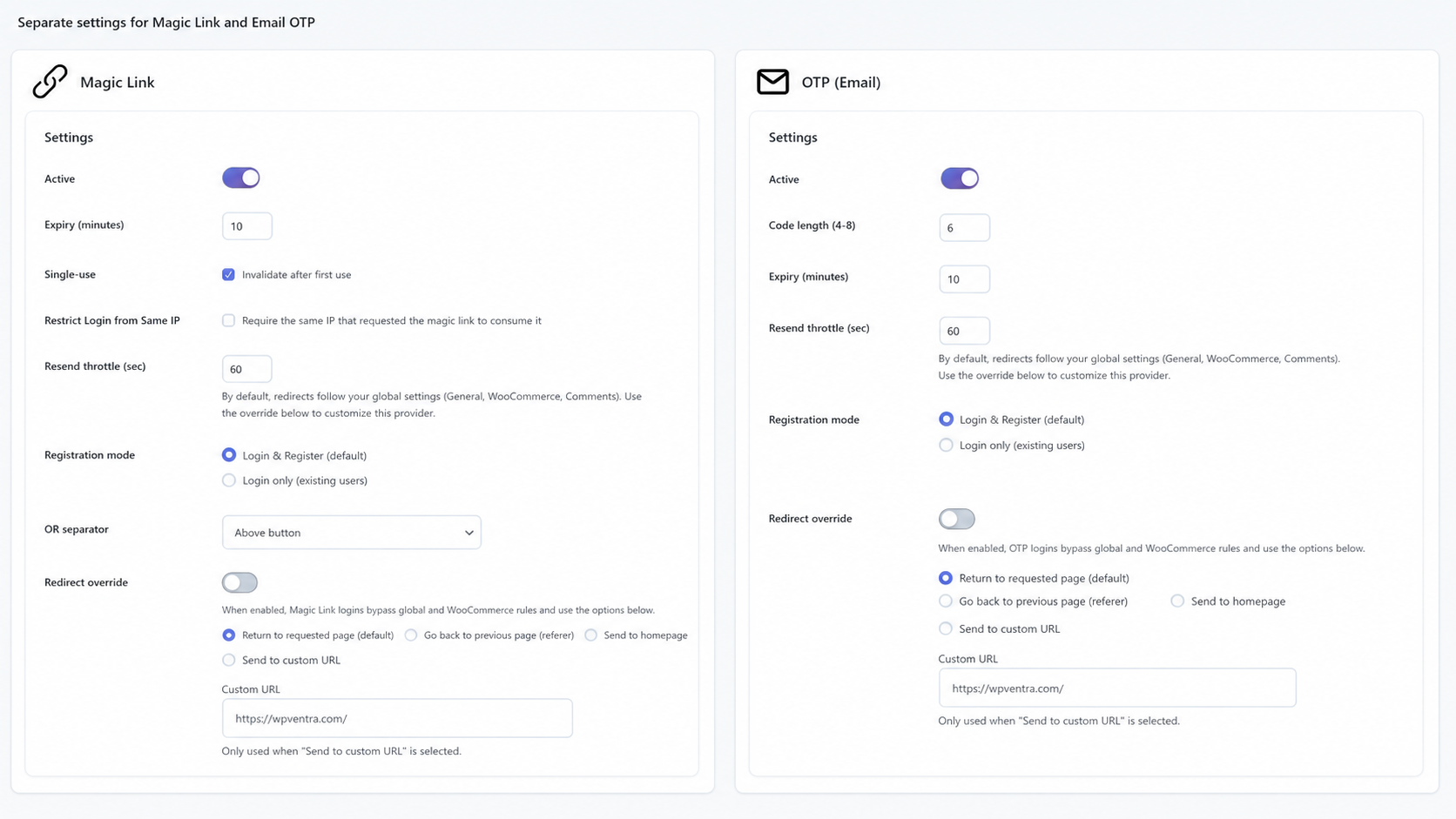
Magic Link and Email OTP settings for expiry, resend rules, registration mode and redirects. 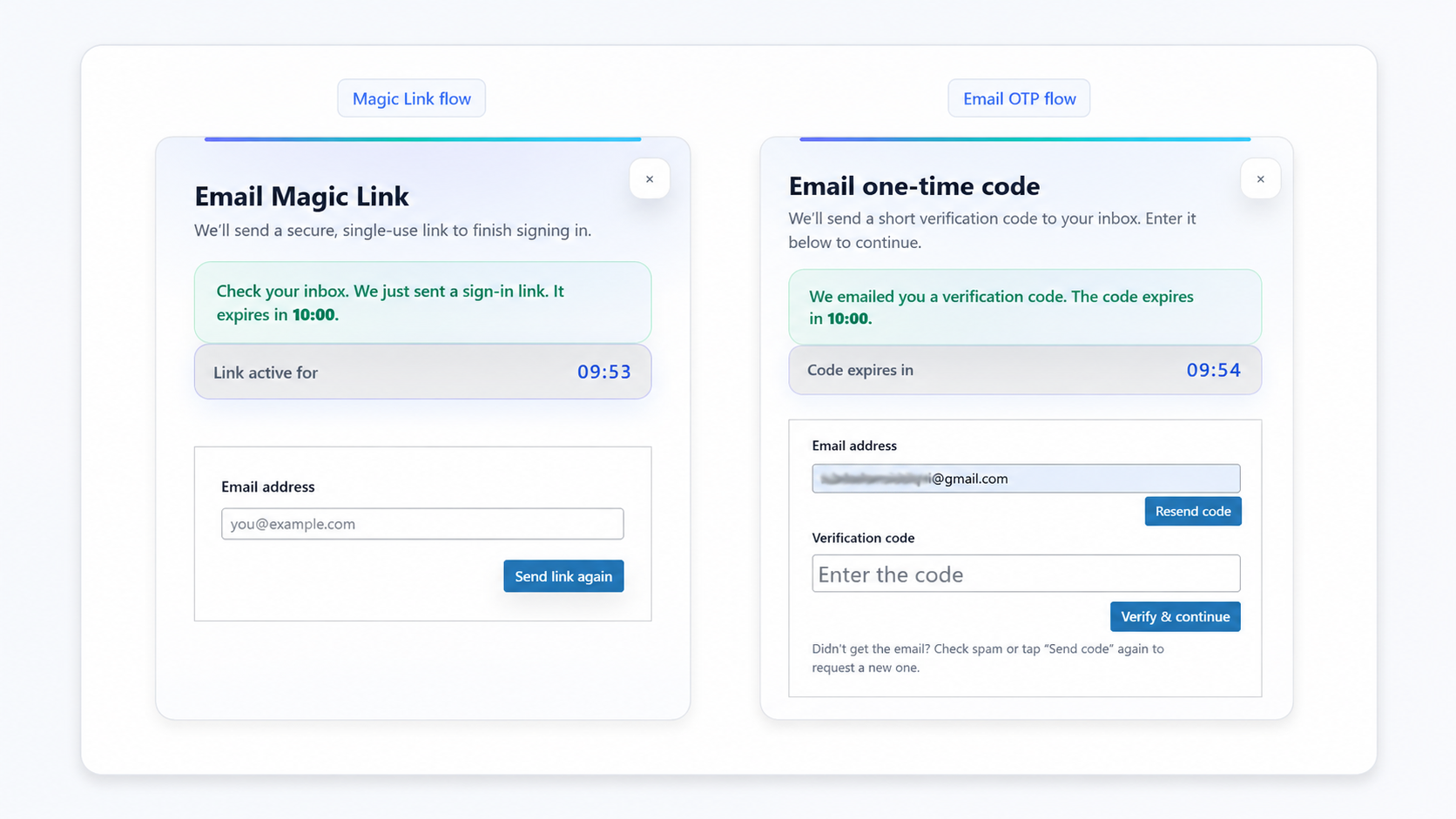
Magic Link and Email OTP modal popup flows for passwordless WordPress login.
Cài đặt
-
Install and activate the plugin
- Plugins Add New search for “VentraConnect Social Login”, or
- Upload the
ventraconnect-social-loginfolder to/wp-content/plugins/.
-
In the WordPress admin, go to VentraConnect.
-
Enable at least one method: Social providers, Magic Link and/or Email OTP.
-
For social login, choose a provider (e.g. Google or Facebook) and add your OAuth credentials.
-
Save changes – the new login buttons will appear on the WordPress login and registration screens (
wp-login.php).
You can also use the shortcode to place them on custom pages or inside page builders.
Hỏi đáp
-
Yes. VentraConnect uses the official OAuth authentication flows provided by each social network.
User credentials are never shared with or stored by your WordPress site. Authentication is handled directly by the provider, and only basic profile data is returned after successful login.VentraConnect connects directly to each provider — there is no third-party proxy server in the middle and no extra tracking layer added by the plugin.
-
Does this plugin replace passwords completely?
-
In the free plugin, no. The classic WordPress username/password login remains available and Social Login, Magic Link and Email OTP are optional login methods you can enable or disable. Users can always fall back to their normal password login.
In the Pro add-on, you also get a Passwordless Mode control (Off, Recommended, Strict) that lets you make passwordless the primary login on supported forms, or hide password fields for normal users while still keeping an emergency password login path for site owners.
-
Does it work with existing WordPress users?
-
Yes. If a login method (Social Login, Magic Link or Email OTP) comes in with an email address that matches an existing user, VentraConnect links that method to the existing WordPress user and logs them in. It does not create duplicate accounts for the same email.
-
Does it create new user accounts?
-
It can. When the email address does not exist yet, VentraConnect can create a new WordPress user – depending on:
- Your passwordless settings for each method (Login only vs Login & Register), and
- Your Guardrails settings (whether new accounts are allowed via these methods).
If Guardrails says “no new accounts” then Social Login, Magic Link and Email OTP can still log existing users in, but cannot create new users.
-
Can I restrict who is allowed to register or create accounts?
-
Yes. Guardrails let you control whether VentraConnect is allowed to create new users via Social Login, Magic Link and Email OTP – especially from the default
wp-login.phpscreen.You can keep those methods for login only and push new registrations through your own process (for example a custom registration page, LMS onboarding, or membership signup flow).
-
Can users register using Magic Link or Email OTP?
-
Yes, if you want. Each passwordless method can run in:
- Login only mode – passwordless is used only for existing users, or
- Login & Register mode – new users can also sign up via Magic Link / Email OTP when registration is open and Guardrails allow new accounts.
Normal WordPress registration continues to work in both cases.
-
Only:
- Provider user ID
- Name
- Email address
- Avatar URL
No passwords are saved, and access tokens are not stored as login credentials.
If you want to display a detailed privacy notice on your login/registration screens, you can use the
ventraconnect_sl_privacy_notice_htmlfilter. -
Where do I get OAuth credentials?
-
Links to each provider’s developer console are shown in the plugin settings.
VentraConnect automatically generates the correct callback URL using WordPress
admin-ajax.php. Always copy the callback URL shown in the settings instead of hard-coding your own. -
Will this slow down my site?
-
No. The plugin only loads its assets where login buttons are displayed, and OAuth / passwordless requests run only during login. There are no external proxy calls or background requests added to normal page loads.
-
Does it work with WooCommerce, LMS or membership plugins?
-
The free plugin works wherever the default WordPress login/registration forms are used, plus any custom page where you place the shortcode.
The Pro add-on adds deep integrations for WooCommerce (login, checkout and My Account), LMS plugins (LearnDash, LifterLMS, LearnPress) and membership/community plugins (MemberPress, Ultimate Member, Paid Memberships Pro, BuddyPress). These integrations respect Guardrails, support account linking from profile screens, and include context-based shortcodes to place login exactly where it makes sense in those flows.
-
Can I add login to custom pages or custom login screens?
-
Yes. The free plugin provides a shortcode that you can use on custom pages, in page builders and on custom login pages. As long as the page is part of your WordPress site and renders the shortcode, Social Login + Magic Link + Email OTP will work there.
-
Do you offer a Pro version?
-
Yes. VentraConnect Social Login Pro is an optional add-on for sites that need:
- Deep WooCommerce, LMS and membership/community integrations
- Passwordless Mode (Off, Recommended, Strict) to make passwordless primary on supported forms
- Advanced redirect control
- Analytics and additional diagnostics
The free plugin already includes Social Login (15+ providers), Guardrails and passwordless login (Magic Link + Email OTP) on core WordPress login/registration screens and any custom pages where you place the shortcode. Pro lets you extend the same login foundation into WooCommerce, LMS course flows and membership registration/account screens, instead of juggling multiple separate plugins.
-
Does VentraConnect include inline Magic Link and Email OTP forms?
-
Yes. VentraConnect Pro includes inline Magic Link and Email OTP form shortcodes for custom pages, Elementor popups, account dropdowns, WooCommerce account popups, membership login pages, LMS login pages, and other custom login layouts.
The free plugin can show Magic Link and Email OTP as login method buttons through the main VentraConnect shortcode and supported standard login flows. Those buttons open the normal VentraConnect passwordless modal flow.
VentraConnect Pro inline forms work differently. They place the actual Magic Link or Email OTP form directly inside your layout, so users can request a Magic Link or enter an Email OTP without first clicking a separate “Continue with Magic Link” or “Continue with Email OTP” button.
Available Pro inline shortcodes:
[ventraconnect_magic_link_form]
[ventraconnect_email_otp_form]
Inline forms use your existing VentraConnect settings for expiry, resend behavior, registration mode, Guardrails, email validation, rate limits, and redirects.
Setup guide:
https://wpventra.com/docs/inline-magic-link-email-otp-forms/ -
Can I customize Magic Link and Email OTP emails?
-
Yes.
In the free plugin, you can edit the sender name, subject, and message content for Magic Link and Email OTP emails. VentraConnect also includes polished default HTML email templates for both methods, with a clear sign-in button for Magic Link and a code-focused layout for Email OTP.
In the Pro add-on, you can also brand those emails with your own logo, accent color, and footer text.
Đánh giá


Người đóng góp & Lập trình viên
“Social Login, Magic Link & Email OTP – Passwordless Login by VentraConnect” là mã nguồn mở. Những người sau đã đóng góp vào plugin này.
Những người đóng góp

Muốn tham gia phát triển?
Duyệt code, check out SVN repository, hoặc theo dõi nhật ký phát triển qua RSS.
Nhật ký thay đổi
1.3.1
- New: Added polished default HTML email templates for Magic Link and Email OTP.
- Improvement: Magic Link emails now include a styled sign-in button and visible raw-link fallback.
- Improvement: OTP emails now use a clearer code-focused layout.
- Compatibility: Pro users can now apply logo, accent color, and footer branding to Magic Link and OTP emails.
1.2.1
- Fix: Corrected the plugin version display on the Support & Resources tab.
- Tweak: Improved translation support for provider sidebar labels in admin.
- Tweak: Minor internal code cleanup.
1.2.0
- New: Magic Link and Email OTP passwordless login are now available in the free plugin
on core WordPress login/registration screens and shortcode-based login pages. - Improved: Added per-method redirect overrides for Magic Link and Email OTP (same page,
referer, homepage, custom URL), with stronger redirect validation. - Security: Hardened redirect handling and clarified how default redirect URLs interact
with passwordless overrides. - Tweak: Updated readme and UI labels to reflect the new Free vs Pro split.
1.1.0
- Improved: Unified account guardrail checks into a shared helper so social login behaves more consistently across core WordPress login screens and WooCommerce My Account (pro).
- Improved: The
ventraconnect_sl_can_create_userfilter is now applied in a single place before any new account is created, making it easier to customise or lock down account creation rules. - Tweak: Internal refactors to the guardrail system to better support Pro-only passwordless login methods, without changing behaviour for sites using the free plugin only.
1.0.5
- Security: Hardened validation, escaping and capability checks around social login flows and settings pages in line with WordPress.org review feedback.
- Security: Reduced or removed debug output and ensured sensitive data is not exposed in logs by default.
- Tweak: Minor internal code cleanups to better align with WordPress.org plugin guidelines.
1.0.4
- Tweak: Updated readme and plugin listing copy to clarify Free vs Pro features and improve discoverability. No functional changes.
1.0.3
- New: Account guardrail option to allow or block new user creation on core WordPress login/registration screens when using social login.
- New: Email notifications for admin and user when a new account is created via social login.
- Tweak: UI and settings layout improvements in the admin.
- Tweak: Confirmed compatibility with WordPress 6.9.
1.0.2
- Fix: Prevent rare “Class VentraConnect\SocialLogin\Providers\Facebook not found” fatal on some hosting environments.
1.0.1
- Fix: Shortcode
redirect_toparameter is now respected and no longer overridden by the global redirect setting. - Fix: Default login vs registration redirect URLs are applied correctly after social login.
- Fix: Redirects are now more reliable when HOME/SITEURL or www/non-www hosts differ.
- Tweak: Hardened OAuth callback/state handling to make popup and REST-based flows more robust.
1.0.0
- Initial release.