
Mô tả
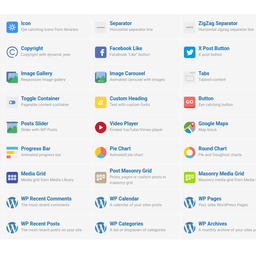
This WordPress plugin adds a module to WPBakery Page Builder plugin, bringing back the old school style of editor elements icons that WPBakery used in versions prior to 8.0.
If, like me, you fall in love with interfaces you’ve used for decades, then this plugin can be useful for you if you don’t feel comfortable with the new ‘Add Element’ popup icons in WPBakery Page Builder introduced after version 8.0.
After installing the plugin, you can enjoy the old icon style again in both the backend and frontend WPBakery Page Builder editors. You can always switch it on or off in the Module interface on the WPBakery Page Builder settings page.
Source file code you can find on our GitHub plugin page
Ảnh màn hình

Restore old style icons of WPBakery Page Builder 
Remember, as this plugin is just a regular WPBakery module you can always switch it on/off in WPBakery modules settings.
Cài đặt
- Upload the plugin folder to the ‘/wp-content/plugins/’ directory.
- Activate the plugin through the ‘Plugins’ menu in WordPress admin dashboard.
Đánh giá

Người đóng góp & Lập trình viên
“Add Old School Elements Icons Module for WPBakery Page Builder” là mã nguồn mở. Những người sau đã đóng góp vào plugin này.
Những người đóng góp
Dịch “Add Old School Elements Icons Module for WPBakery Page Builder” sang ngôn ngữ của bạn.
Muốn tham gia phát triển?
Duyệt code, check out SVN repository, hoặc theo dõi nhật ký phát triển qua RSS.
Nhật ký thay đổi
1.0
- Initial release.