
Mô tả
Removes the @user autocomplete feature from the block editor. By default on Gutenberg, when you type @, the block editor performs a search through the users of your WordPress install to suggest you to “@-mention” them (see animated screenshot below for a demo of the default feature). It can be annoying when you are writing email addresses in the editor. This plugin removes the feature from the editor.
Ảnh màn hình
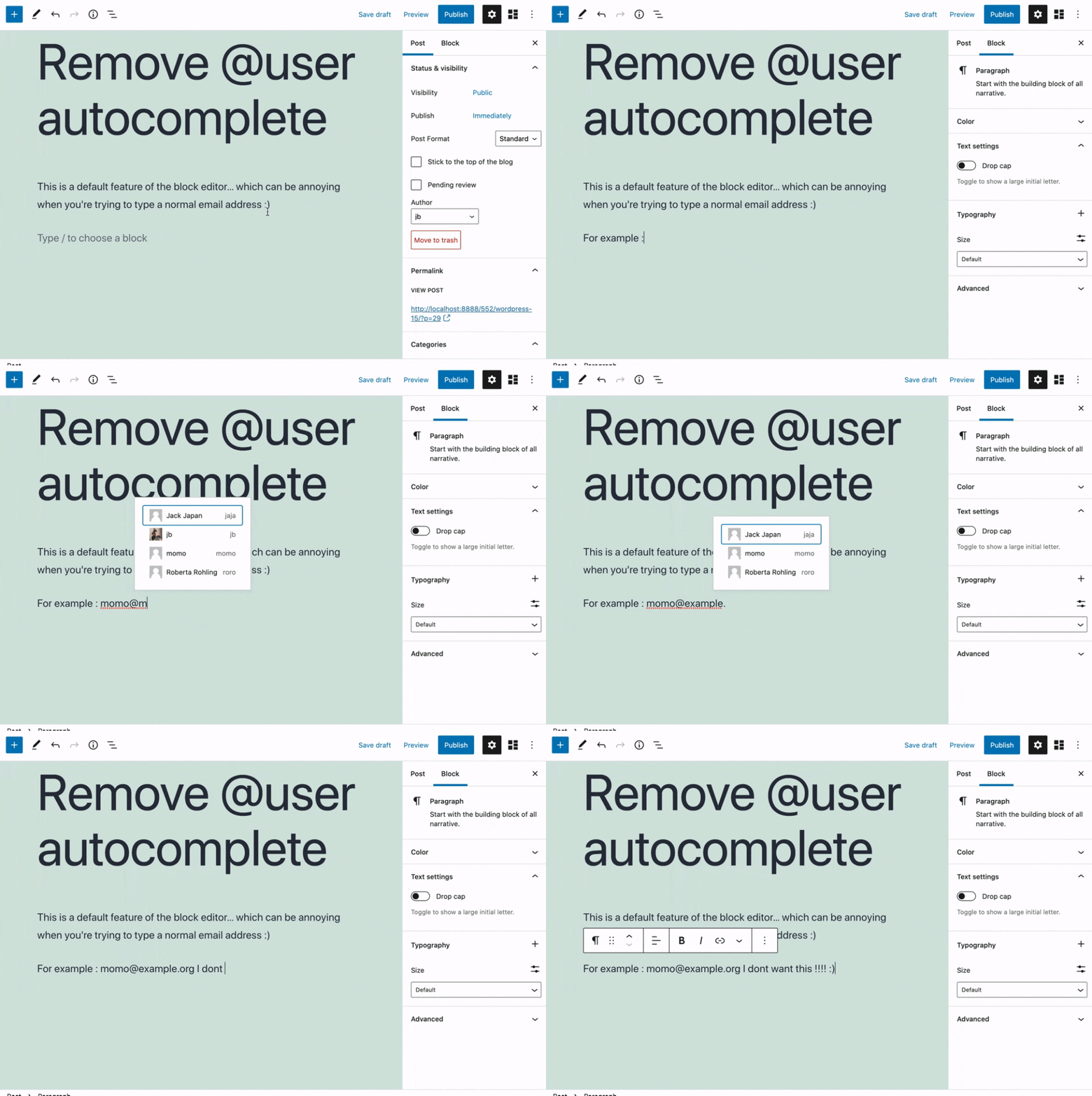
This plugin removes the default Gutenberg user autocomplete feature.
Cài đặt
- Install the plugin and activate it in your WordPress Admin.
- That’s all! No settings needed.
Đánh giá


Người đóng góp & Lập trình viên
“Remove @User Autocomplete from Block Editor” là mã nguồn mở. Những người sau đã đóng góp vào plugin này.
Những người đóng góp
“Remove @User Autocomplete from Block Editor” đã được dịch qua 1 ngôn ngữ. Cảm ơn những người tham gia dịch vì đóng góp của họ.
Dịch “Remove @User Autocomplete from Block Editor” sang ngôn ngữ của bạn.
Muốn tham gia phát triển?
Duyệt code, check out SVN repository, hoặc theo dõi nhật ký phát triển qua RSS.
Nhật ký thay đổi
0.1
- Plugin initial release. Works fine 🙂