WordPress.org

tiếng Việt

  • Giao diện
  • Plugin
  • Tin tức
    • Tài liệu hướng dẫn
    • Diễn đàn
  • Giới thiệu
  • Facebook #WPVN
  • Tải WordPress
Tải WordPress
WordPress.org

Plugin Directory

WP Guest Bar

  • Gửi một plugin
  • Yêu thích của tôi
  • Đăng nhập
  • Gửi một plugin
  • Yêu thích của tôi
  • Đăng nhập

WP Guest Bar

Bởi Marco Milesi
Tải về
  • Chi tiết
  • Đánh giá
  • Cài đặt
  • Nhà phát triển
Hỗ trợ

Mô tả

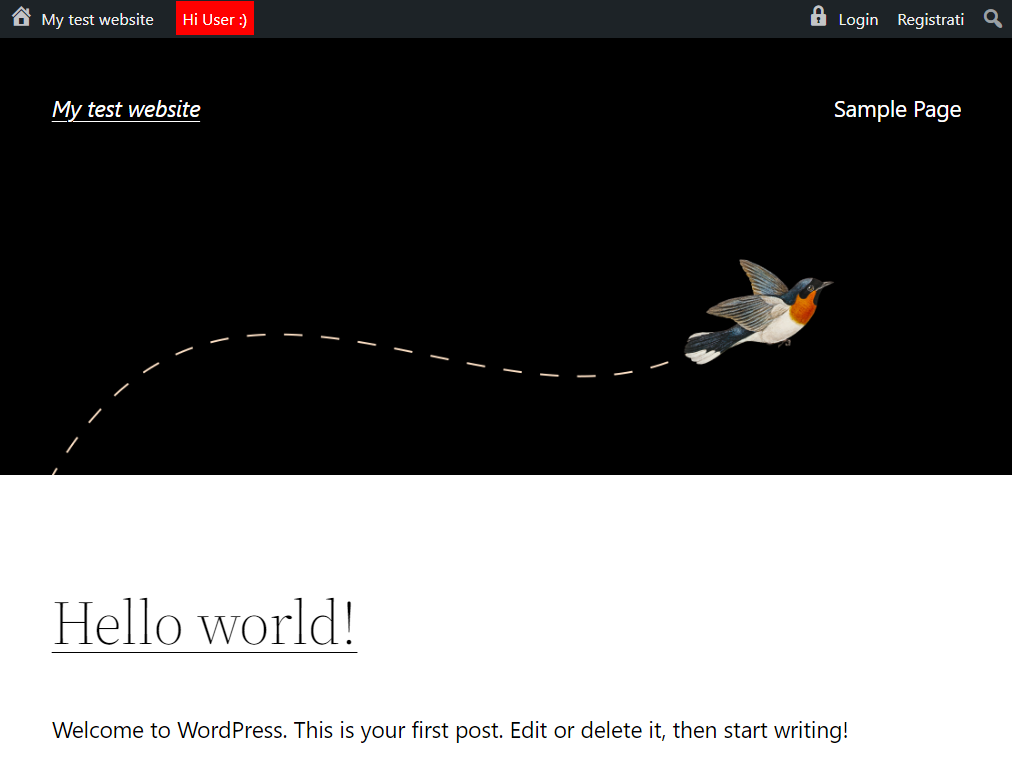
WP Guest Bar displays a customizable WordPress admin bar for non-logged-in users.

Inspired by BuddyPress, it provides quick links (e.g., Log In and Register) for guests, improving user engagement and site navigation.

Features

  • Home icon with site name and link (mobile-friendly)
  • Login link with icon (mobile-friendly)
  • Register link (if enabled)
  • Customizable message area for guests
  • WPML compatible and fully translatable
  • Lightweight and performance-optimized

Demo: wpgov.it

Perfect for BBPress forums or any site looking to encourage user registration and interaction.

Ảnh màn hình

  • Desktop UI with custom message
  • Responsive mobile UI

Cài đặt

  1. Upload the entire folder to /wp-content/plugins/ or install via the WordPress plugin screen.
  2. Activate the plugin through the ‘Plugins’ menu in WordPress.
  3. Configure settings as needed and enjoy!

Hỏi đáp

Can I customize the guest bar message?

Yes, you can set a custom message for guests in the plugin settings.

Is it compatible with my theme?

WP Guest Bar is designed to work with most themes. For advanced customization, you may use custom CSS.

Đánh giá

Không có đánh giá nào cho plugin này.

Người đóng góp & Lập trình viên

“WP Guest Bar” là mã nguồn mở. Những người sau đã đóng góp vào plugin này.

Những người đóng góp
  • Marco Milesi

Dịch “WP Guest Bar” sang ngôn ngữ của bạn.

Muốn tham gia phát triển?

Duyệt code, check out SVN repository, hoặc theo dõi nhật ký phát triển qua RSS.

Nhật ký thay đổi

3.0.1 – 2025-05-29

  • [NEW] Added new functions:
    • Add your own logo in the admin bar
    • Add custom links in the admin bar
  • Improved documentation and code structure
  • Updated compatibility for WordPress 6.9

2.3

  • Compatibility check
  • Minor changes

2.2 2024-05-24

  • Compatibility check
  • Minor changes

2.2 20231020

  • Compatibility check
  • Minor bugfix (thanks to R. Mészáros)
  • Minor changes

2.1 20220901

  • Compatibility check
  • Minor changes

2.0 20220213

  • [NEW] Login and registration are now aligned right
  • [NEW] Full mobile support
  • [NEW] Added homepage link with home dashicon
  • [IMPROVED] Major performance improvements
  • [IMPROVED] Complete object-oriented code refactoring
  • WP compatibility check
  • Readme and wordpress.org page improvements

1.2 – 16.07.2015

  • Added option to show a top bar message

1.1.1 – 02.03.2015

  • Minor changes

1.1 – 09.07.2014

  • Removed WordPress logo for non-logged users

1.0 – 09.07.2014

  • First release

Meta

  • Phiên bản 3.0.1
  • Cập nhật lần cuối 6 tháng trước
  • Số lượt cài đặt 10+
  • Phiên bản WordPress 3.3 hoặc cao hơn
  • Đã kiểm tra lên đến 6.9
  • Ngôn ngữ
    English (US)
  • Thẻ
    adminbarguestlogintoolbar
  • Nâng cao

Đánh giá

5 trên 5 sao.
  • 2 5-star reviews 5 sao 2
  • 0 4-star reviews 4 sao 0
  • 0 3-star reviews 3 sao 0
  • 0 2-star reviews 2 sao 0
  • 0 1-star reviews 1 sao 0

Thêm đánh giá của bạn

Xem tất cả đánh giá

Những người đóng góp

  • Marco Milesi

Hỗ trợ

Có điều gì muốn nói? cần giúp đỡ?

Xem diễn đàn hỗ trợ

Ủng hộ

Bạn có muốn hỗ trợ vào sự phát triển của plugin này?

Ủng hộ plugin này

  • Giới thiệu
  • Tin tức
  • Lưu trữ
  • Quyền riêng tư
  • Trưng bày
  • Giao diện
  • Plugin
  • Mẫu khối
  • Học hỏi
  • Hỗ trợ
  • Nhà phát triển
  • WordPress.tv ↗
  • Tham gia
  • Sự kiện
  • Quyên góp ↗
  • Năm cho Tương lai
  • WordPress.com ↗
  • Matt ↗
  • bbPress ↗
  • BuddyPress ↗
WordPress.org
WordPress.org

tiếng Việt

  • Truy cập tài khoản X (trước đây là Twitter) của chúng tôi
  • Visit our Bluesky account
  • Visit our Mastodon account
  • Visit our Threads account
  • Xem trang Facebook của chúng tôi
  • Truy cập tài khoản Instagram của chúng tôi
  • Truy cập tài khoản LinkedIn của chúng tôi
  • Visit our TikTok account
  • Truy cập kênh YouTube của chúng tôi
  • Visit our Tumblr account
Viết code như làm thơ.