
Mô tả
A lightweight plugin that allows you to see active users according to their last login time/date. No need to configure, simply activate When Last and you’re ready to go! This adds a custom column to your WordPress users list of “Last Login” and a timestamp linked to that user.
Features
- Show when last a user has logged into your site.
- Sorts users according to last login time stamp (Ascending/Descending) in the WordPress user list.
- Administrator widget for top 3 users according to login count.
- Integrates with Paid Memberships Pro 1.8+ – Add’s a ‘Last Logged In’ column to the ‘Members List’.
- Generates a login history table under ‘When Last Login’ > ‘All Login Records’.
- Hooks and filters for developers.
- Record the user’s last IP address when logging into your WordPress website (Optional Setting).
- A variety of Premium and Free add-ons available.
Free Add-ons
Premium Add-ons
- When Last Login – Slack Notifications
- When Last Login – User Statistics
- When Last Login – Zapier Integration
When Last Login in your Language
We need your help to translate When Last Login into your locale. To translate When Last Login, simply visit https://translate.wordpress.org/projects/wp-plugins/when-last-login
Track Your Members Better
You are able to track which members login to your site by simply sorting your default user’s list according to when last the user was seen in easily readable text such as “X Min/Hours/Days/Weeks/Months/Years”.
Plugins that When Last Login integrates with
Here is a list of plugins we currently support:
- Paid Memberships Pro
If you have a plugin and would like to integrate with When Last Login, please open a support thread.
Need Help
Something not working as intended or have a question about functionality of When Last Login. Open a support thread
Ảnh màn hình
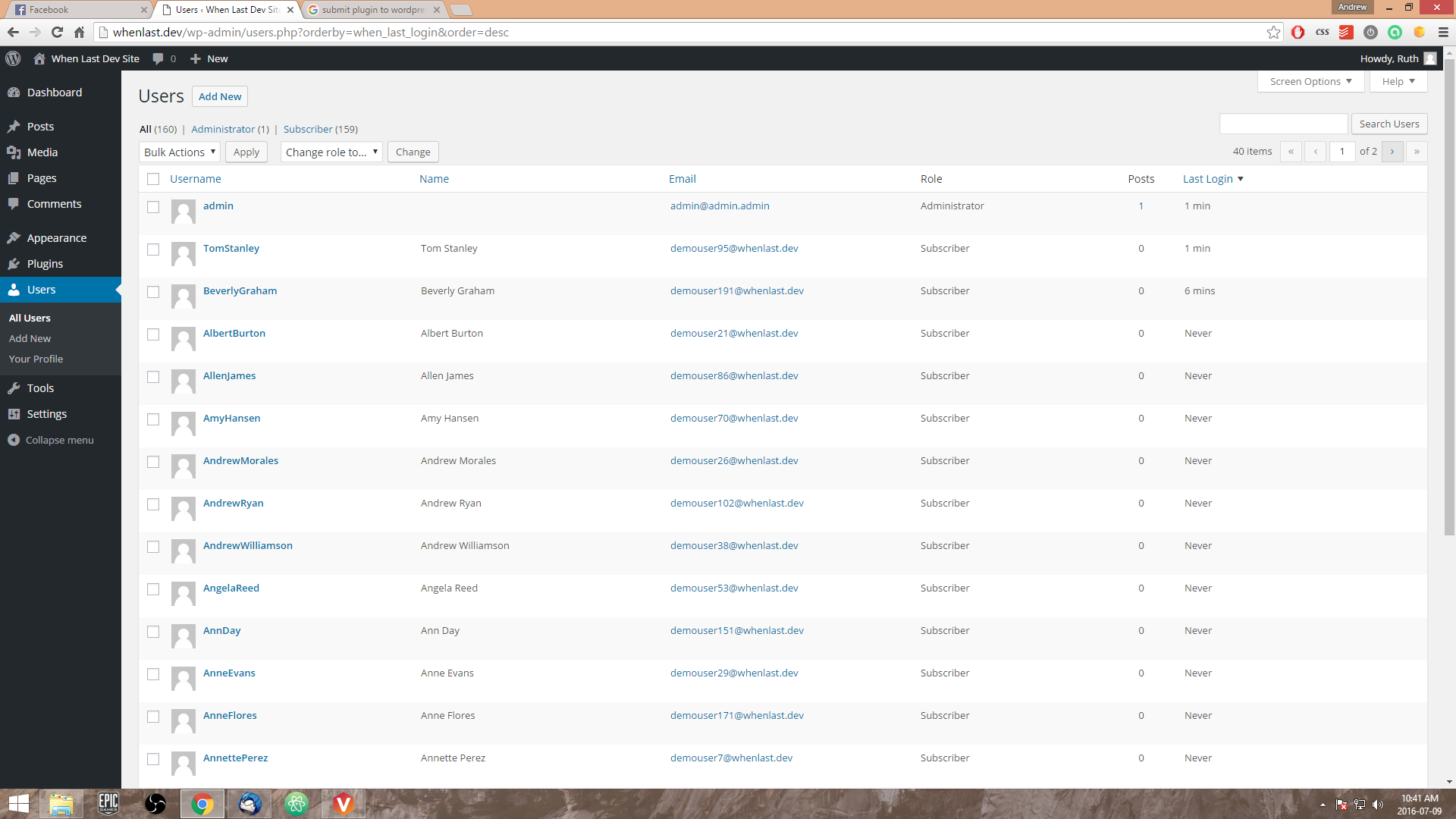
When Last Login - User's list custom last login field with sorting according to "Last Login" time. 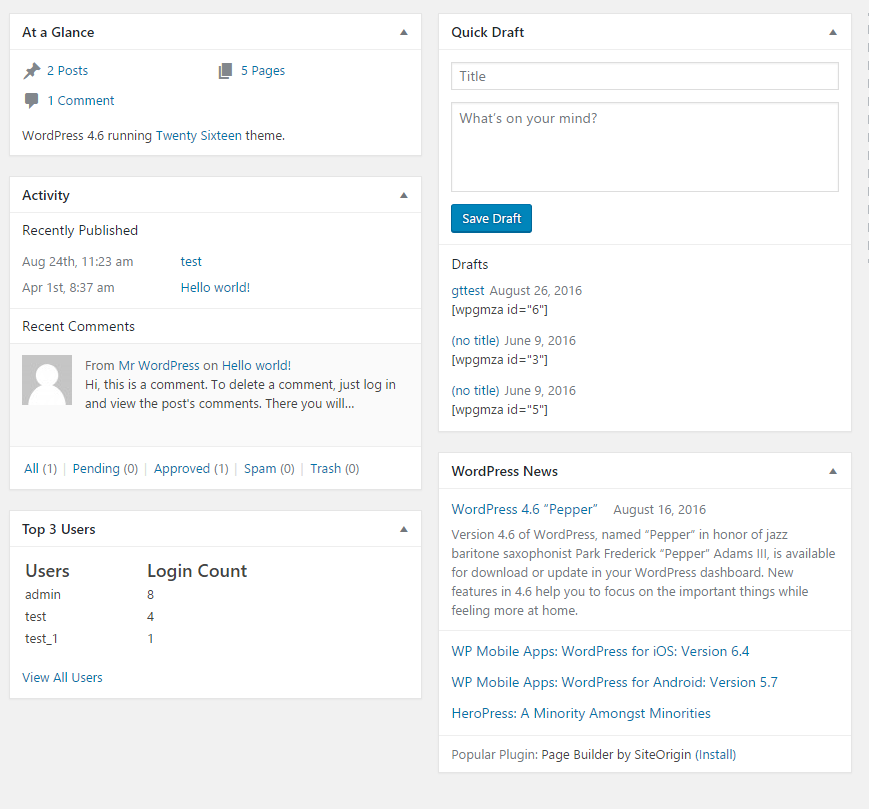
When Last Login - Show top 3 user login (includes 'administrators' in free version)
Cài đặt
- Upload the plugin files to the ‘/wp-content/plugins’ directory, or install the plugin through the WordPress plugins screen directly.
- Activate the plugin through the ‘Plugins’ screen in WordPress.
- Navigate to ‘All Users’ and data will be showing under ‘Last Seen’
- Users that have not yet logged in with ‘When Last’ active will show Never.
Hỏi đáp
-
What does When Last Login do exactly?
-
When Last Login allows you to see when last users have logged into your WordPress website. This is great for big sites that require user management.
-
Is When Last Login GDPR ready?
-
Since version 1.0, we have made it easier to be GDPR compliant. With this being said, you need to take the necessary steps in order to become GDPR compliant – we are not a law firm!
-
Is this plugin free?
-
Yes, When Last Login is a free plugin for WordPress. We are looking into possibilities of creating a Pro version with a lot more features around the user data of WordPress users. We rely heavily on donations to keep all of our plugins free. If you wish to donate, please click on the donation link on the WordPress repository.
-
Where is the When Last Login settings page?
-
The settings page is found under the menu item ‘When Last Login’ within the WordPress dashboard.
-
How can I remove data I no longer need?
-
Inside your WordPress dashboard, navigate to ‘When Last Login’ -> ‘Settings’. Under the ‘Tools’ heading, you will have a couple of actions that you can run, such as clear old login records, clear all login records and clear IP Addresses.
-
I have installed When Last but users are showing “Never” under “Last Login”?
-
This is because users have not logged in since you have activated “When Last Login”. By default we set the “Last Login” to “Never” but this can be easily changed. Once a user logs into your site, their profile will be updated from “Never” to a timestamp.
-
I have updated and lost my ‘Login Records’ link in the WordPress dashboard
-
As of version 0.6 the ‘Login Records’ has been moved under the ‘Users’ link in the admin dashboard.
Version 0.7 introduced a settings page menu item. The ‘Login Records’ can now be found under the ‘When Last Login’ menu item. -
How can I hide the ‘All Login Records’?
-
Inside your WordPress dashboard navigate to ‘When Last Login’ -> ‘Settings’ and deselect this option.
-
How can I hide the ‘Top 3 Users’ widget?
-
Add the following snippet of code to your theme’s functions.php or custom plugin – add_filter( ‘when_last_login_show_admin_widget’, ‘__return_false’ );
Đánh giá


Người đóng góp & Lập trình viên
“When Last Login” là mã nguồn mở. Những người sau đã đóng góp vào plugin này.
Những người đóng góp


“When Last Login” đã được dịch qua 3 ngôn ngữ. Cảm ơn những người tham gia dịch vì đóng góp của họ.
Dịch “When Last Login” sang ngôn ngữ của bạn.
Muốn tham gia phát triển?
Duyệt code, check out SVN repository, hoặc theo dõi nhật ký phát triển qua RSS.
Nhật ký thay đổi
1.2.2 – 2023-02-28
- SECURITY: Added in nonce for hiding the admin notice shown on the settings page.
- BUG FIX: Fixed minor issue where admins weren’t being correctly excluded from the user query for the login widget.
1.2.1 – 2021-09-21
- Enhancement: Removed admin users from being tracked in WLL dashboard statistics.
- Bug Fix: Issue with order by not correctly set in the dashboard statistics.
1.2
- Security: Added nonces to settings page.
- Enhancement: Moved notice from all dashboard pages to only show on dashboard page.
- Enhancement: All login records functionality improvement to support PHP 7.4 – Thanks @walle98
1.1
- Enhancement: Support Privacy Changes coming to WordPress 4.9.6
- Enhancement: Additional Hooks added.
1.0
- Enhancement: Changed admin icon for menu.
- Enhancement: Added in tools to delete existing data from WordPress dashboard.
- Enhancement: Added in IP Anonymization for IP address tracking to support GDPR.
- Bug Fix: Removed IP address column from users table, if not recording IP’s.
- Enhancement/Bug Fix: General speed improvements where possible.
0.9
- Enhancement: Multisite Support – Dashboard widget
- Enhancement: Multisite Support – User activity is now visible in the network admin’s ‘Users’ page
- Bug Fix: Fixed an undefined variable when logging in
0.8
- Enhancement: If enabled, user’s IP address is availableon the ‘Users’ profile page
- Enhancement: If enabled, user’s IP address is recorded on registration
- Improvements to add-ons page
- Enhancement: User IP address is now visible for each login record if enabled
0.7
- New Feature: Settings page introduced
- New Feature: Ability to record a user’s IP address when logging in
- Enhancement: Login Records moved under the ‘When Last Login’ menu item
- New Hook Added: ‘wll_settings_admin_menu_item’
- New Hook Added: ‘wll_logged_in_action’
0.6
- Enhancement: Moved ‘All Login Records’ underneath ‘Users’ link in dashboard.
- Filter: ‘when_last_login_show_records_table’. Accepts boolean (default: true).
- Filter: ‘when_last_login_show_admin_widget’. Accepts boolean (default: true).
0.5
- Enhancement: Ability to see which users have logged in and at what times ( Custom Post Type ) – @jarrydlong
- Bug Fix: return default value for column data if no data is found – @seagyn
- Enhancement: Improved code readability
0.4
- Enhancement: Dashboard widget added to display top users with user count.
0.3
- Enhancement: Implemented multi language support and a couple of language files.
- Language Support: French, Spanish, German and Italian
0.2
- Bug Fixes: fixed missing ‘static’ on function ‘sort_by_login_date’
- Error Handling: Check if ‘Paid Memberships Pro’ is installed, if not return from the function
0.1
- First Release