Chuyển đến phần nội dung
WordPress.org

tiếng Việt

  • Giao diện
  • Plugin
  • Tin tức
    • Tài liệu hướng dẫn
    • Diễn đàn
  • Giới thiệu
  • Facebook #WPVN
  • Tải WordPress
Tải WordPress
WordPress.org

Plugin Directory

SSO OAuth for Discord by path digital

  • Gửi một plugin
  • Yêu thích của tôi
  • Đăng nhập
  • Gửi một plugin
  • Yêu thích của tôi
  • Đăng nhập

Plugin này chưa được cập nhật với 3 phiên bản mới nhất của WordPress. Nó có thể không được hỗ trợ và bảo trì, và có thể xung đột với các phiên bản WordPress mới nhất.

SSO OAuth for Discord by path digital

Bởi path digital
Tải về
  • Chi tiết
  • Đánh giá
  • Cài đặt
  • Nhà phát triển
Hỗ trợ

Mô tả

SSO OAuth for Discord by path digital allows you to hide your website content with Discord SSO and make it only available for your server members.

Ảnh màn hình

  • OAuth2 settings
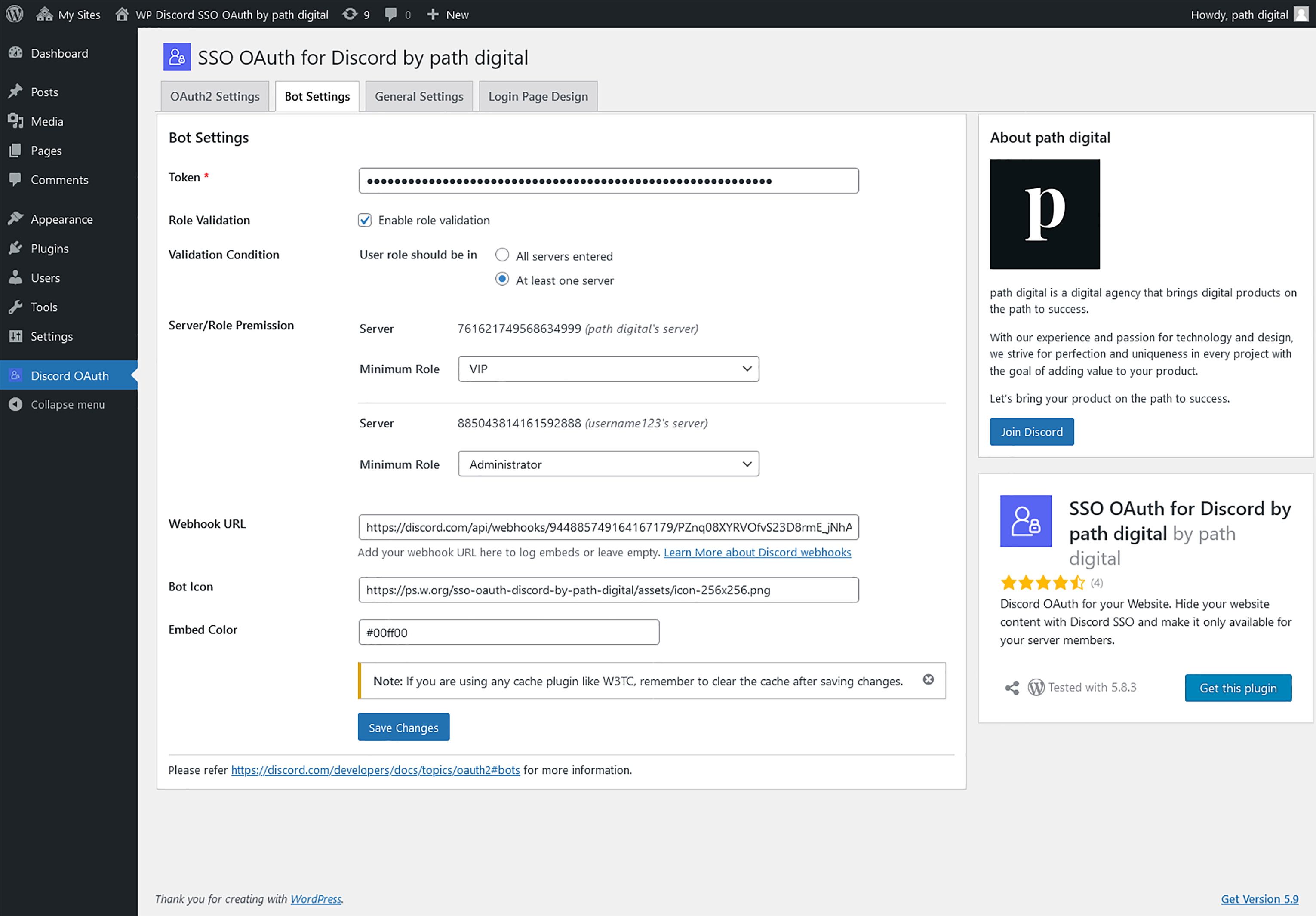
  • Bot settings
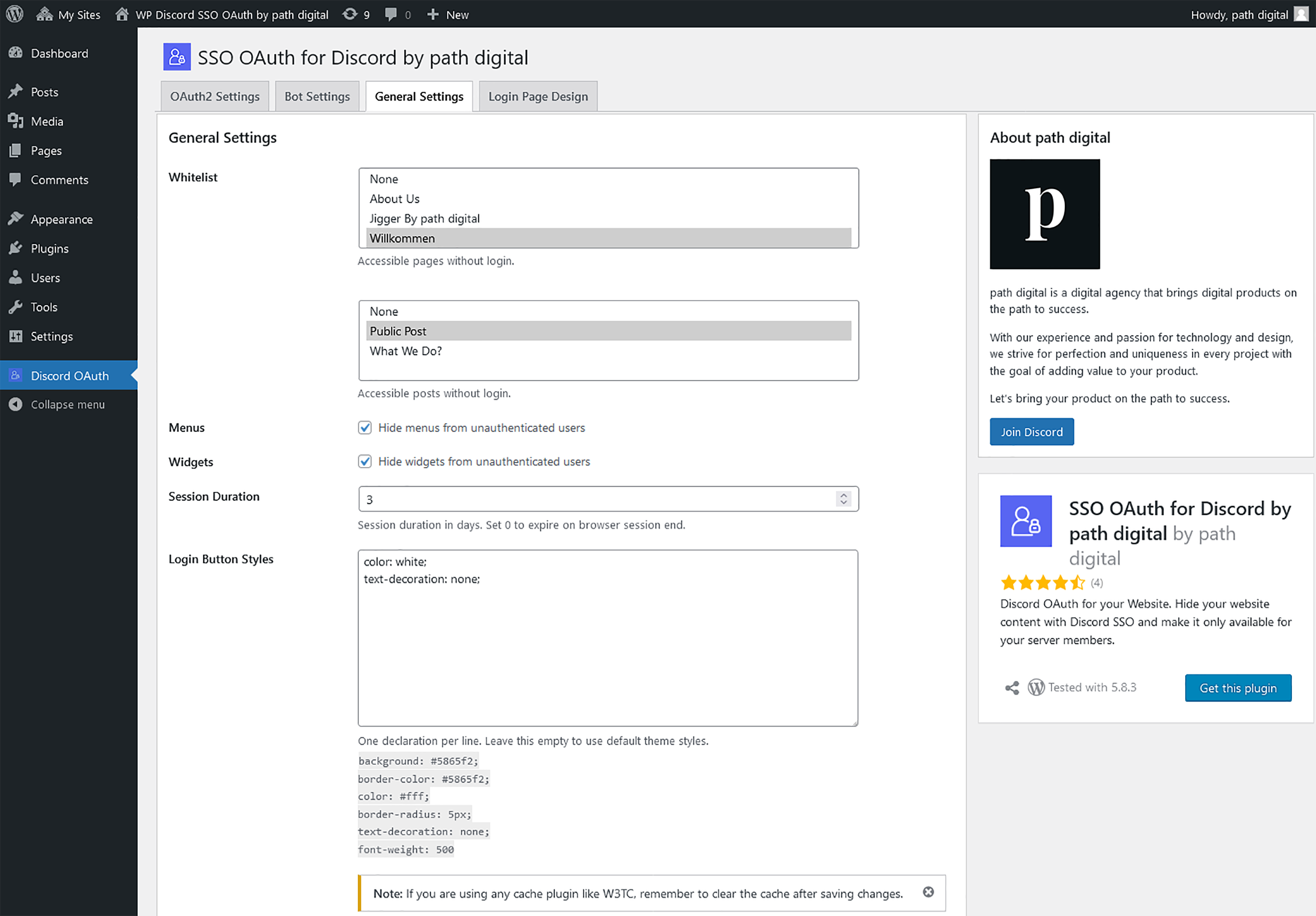
  • General settings
  • Custom login page settings
  • Embed on any page
  • Custom login page
  • Login button on a page
  • Channel embeds via webhook
  • Maintenance mode settings
  • Maintenance page
  • Tools
  • Manage members

Cài đặt

From your WordPress dashboard

  1. Visit Plugins -> Add New
  2. Search for SSO OAuth for Discord and Install the plugin by path digital
  3. Activate the plugin from your Plugins page

From WordPress.org

  1. Download SSO OAuth for Discord by path digital
  2. Unzip and upload the folder directory to your /wp-content/plugins/ directory
  3. Activate the plugin from your Plugins page

Once Activated

  1. Go to Discord OAuth -> OAuth2 Settings, and select the login page you want to show the login button
  2. Create your Discord Application from Applications with the Redirect URL you copied from Configure page
  3. Enter Discord Application data in to the Configuration page and save settings
  4. Visit your website now, if you are not logged in, the website will ask you to login

Hỏi đáp

How can I setup a Discord application?

Visit https://discord.com/developers/applications/ and add a New Application.

From where I can get the Client ID and Client Secret?

Go to your applications and click on the newly created application. Click the OAuth2 tab in the navigation panel, where you can copy both the Client ID and Client Secret.

From where I can get the Token for the Bot?

Click on the newly created application for OAuth2 from applications. Click the Bot tab in the navigation panel and Add Bot to get the Token.

How to get the server ID from Discord

Login to your Discord account, Go to User Settings by clicking on the gear icon next to your username. Go to Advanced Settings in App Settings section and turn ON the Developer Mode. Close the settings page and go to your Discord Dashboard, right click on any server name and Copy ID.

Đánh giá

Fabulous plugin in development

hannibal09 30 Tháng 1, 2023
Great plugin to start with. Most of things working fine. Few of feedback to improve upon When someone log in using Discord but not able to authorised due to server or other rules, he can’t bale to access back general pages as well which were not put behind access system. If the person can be logged out immediately after failed login, this can be resolved. Post button becomes unclickable. if person try to access to post, he should be taken to login page instead of disabling post buttons

Great Plugin with Great Support!

pacted 21 Tháng mười một, 2022
I am looking forward to the future of this plugin! It is developed by a great team that is willing to help you if you encounter issues. Thank you to Tarik and Madhushankarox for resolving the issues I had so quickly.

best discord plugin

Anonymous User 179266 28 Tháng 9, 2022
top notch plugin for discord authentication! Good to see that it is constantly updated.

Best free discord plugin

baldone69 23 Tháng 9, 2022
The only free plugin which can be helpful for your project 10/10 Also the support is super kind and efficent! Baldo

Nice but big room for improvement

paulieee 22 Tháng 9, 2022
This plugin can only display the page after connecting to discord. But the limitation to only some pages does not work, so both logged in and logged out can see everything. Adding “guilds.join” to “Scope” in settings doesn’t work. Also missing is my profile page, logout button and database of logged in users with all information. This plugin would be great if: 1. The developers created a profile page with all the information about the logged-in user. (discord profile picture, role on our server, etc.) 2. The developers created a page for the administrator, where there would be all users who logged in and all their information (ID, discord profile picture, role on our server). Ability to ban users, change their roles, etc.) 3. Developers added a logout button This plugin is well on its way and if it adds these basic features it will be an amazing plugin.

Nice attempt/temp solution

drewbllc 11 Tháng 2, 2022
This plugin really only does one thing and this is let users gain access to the site. It doesn’t allow it to work as a login for wp for itself, so users have to loggin 2x which is pointless, unless I want to lock the ENTIRE site down, which is the next thing.. You can’t select what pages you want locked down. You cant specify multiple roles. You can’t use it to manage users based on certain parameters (add them to server if not in it, etc) Lastly imo is the design. Very ugly to have just a huge block of space on a webpage with a login button added. Would make much better functionality if a paywall (not paid, just the style of page) type thing came up, blurred out the content/added no scroll/no click, and then add the button, that would be much better. Appreciate what he has done of course but I do feel it’s as basic as it can be right now with much room for improvement, and the author has already said he IS NOT doing customization.
Đọc tất cả 8 đánh giá

Người đóng góp & Lập trình viên

“SSO OAuth for Discord by path digital” là mã nguồn mở. Những người sau đã đóng góp vào plugin này.

Những người đóng góp
  • path digital

Dịch “SSO OAuth for Discord by path digital” sang ngôn ngữ của bạn.

Muốn tham gia phát triển?

Duyệt code, check out SVN repository, hoặc theo dõi nhật ký phát triển qua RSS.

Nhật ký thay đổi

3.1.3

  • Bug fixes

3.1.2

  • Bug fixes

3.1.1

  • Fixed typo, “maintenance” to “maintainance” in UI.

3.1.0

  • Added admin option to view all servers the user is in

  • Bug fixes

3.0.5

  • Bug fixes

3.0.4

  • Bug fixes

3.0.3

  • Bug fixes

3.0.2

  • Bug fixes

3.0.1

  • Bug fixes

3.0.0

  • Added maintenance mode page
  • Added option to view active user sessions and manage users
  • Removed menu items of pages with minimum user role for people that don’t have the minimum role
  • Added shortcode to display a logout button

2.5.4

  • Bug fixes

2.5.3

  • Bug fixes

2.5.2

  • Minor code enhancements

2.5.1

  • Bug fixes

2.5.0

  • Added option to whitelist pages for specific user role(s)

2.4.0

  • Added option to whitelist user roles independant from minimum role
  • Minor code enhancements

2.3.1

  • Bug fixes

2.3.0

  • Added option to clear all the active login sessions
  • Updated Discord embeds to post whitelisted logins

2.2.0

  • Added option to set login errors
  • Added option to post failed login attempts embeds on a Discord channel via a Webhook
  • Added option to set the redirect page after a successful login

2.1.1

  • Bug fixes

2.1.0

  • Updated option to hide menus from unauthenticated users
  • Updated option to hide widgets from unauthenticated users

2.0.0

  • Added option to block users by Discord ID
  • Added option to allow user to view specific pages and posts
  • Added option to add a custom login page
  • Added option to post successful login embeds on a Discord channel via a Webhook
  • Disabled admin ajax for non-logged users
  • Minor code enhancements

1.5.1

  • Bug fixes

1.5.0

  • Added option to blacklist servers

1.4.2

  • Bug fixes

1.4.1

  • Bug fixes

1.4.0

  • Added option to set the session duration
  • Moved the login error message to the login page
  • Security enhancements

1.3.1

  • Bug fixes

1.3.0

  • Added custom login button styles support
  • Added option to show/hide menus in login page
  • Added option to show/hide widgets in login page
  • Added functionality to auto create and assign the login page

1.2.1

  • Added server name next to the Server ID in Bot Settings page
  • Added settings link to plugin action links
  • Minor visual improvements to admin pages

1.2.0

  • Added user role validation support
  • Added the ability to enable / disable server validation even if the server list is not empty

1.1.0

  • Bug fixes
  • Skiped server validation for 5 minutes to limit Discord API calls

1.0.2

  • Bug fixes and patches

1.0.1

  • Initial Release

Meta

  • Phiên bản 3.1.3
  • Cập nhật lần cuối 2 năm trước
  • Số lượt cài đặt 10+
  • Phiên bản WordPress 4.0 hoặc cao hơn
  • Đã kiểm tra lên đến 6.3.8
  • Phiên bản PHP 5.4 hoặc cao hơn
  • Ngôn ngữ
    English (US)
  • Thẻ
    discordDiscord Loginloginoauthsso
  • Nâng cao

Đánh giá

4.8 trên 5 sao.
  • 8 5-star reviews 5 sao 8
  • 0 4-star reviews 4 sao 0
  • 1 3-star review 3 sao 1
  • 0 2-star reviews 2 sao 0
  • 0 1-star reviews 1 sao 0

Your review

Xem tất cả đánh giá

Những người đóng góp

  • path digital

Hỗ trợ

Có điều gì muốn nói? cần giúp đỡ?

Xem diễn đàn hỗ trợ

  • Giới thiệu
  • Tin tức
  • Lưu trữ
  • Quyền riêng tư
  • Trưng bày
  • Giao diện
  • Plugin
  • Mẫu khối
  • Học hỏi
  • Hỗ trợ
  • Nhà phát triển
  • WordPress.tv ↗
  • Tham gia
  • Sự kiện
  • Quyên góp ↗
  • Năm cho Tương lai
  • WordPress.com ↗
  • Matt ↗
  • bbPress ↗
  • BuddyPress ↗
WordPress.org
WordPress.org

tiếng Việt

  • Truy cập tài khoản X (trước đây là Twitter) của chúng tôi
  • Visit our Bluesky account
  • Visit our Mastodon account
  • Visit our Threads account
  • Xem trang Facebook của chúng tôi
  • Truy cập tài khoản Instagram của chúng tôi
  • Truy cập tài khoản LinkedIn của chúng tôi
  • Visit our TikTok account
  • Truy cập kênh YouTube của chúng tôi
  • Visit our Tumblr account
Viết code như làm thơ.
The WordPress® trademark is the intellectual property of the WordPress Foundation.