
Mô tả
Sign Me Up
This plugin is a widget that adds a simple sign-up form to your WordPress site, allowing visitors to subscribe to your mailing list. It serves as a front end to phpList, the most popular open-source newsletter manager (over 1.5 million downloads according to their website). The widget connects to phpList via AJAX, which allows a visitor to subscribe without leaving your WordPress page – no refresh or redirect is necessary.
Features:
- Add a simple “sign-up to our newsletter” form to your WordPress site
- Provides a back-end connection to the powerful open-source mailing list manager, phpList
- Maintains the consistent look, feel, and branding of your WordPress site
- Uses AJAX – no page refresh or redirects. Status & feedback are displayed on the same page as the form
- Minimal, elegant, simple. Seamlessly blends in with your theme by incorporating existing styling rules
- Easy customization – change the text of each form element so it says exactly what you want
- Widgetized – easily add it to your site via drag & drop
- Error checking – client side validation via popular jQuery Validation library provides immediate feedback to the user and reduces erroneous data
More information
Ảnh màn hình
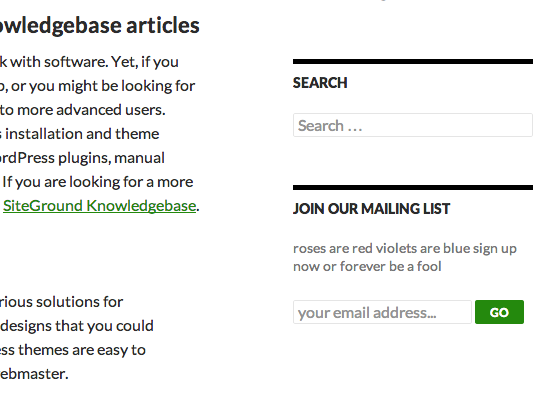
Example of Sign Me Up form installed in WordPress Twenty Fourteen Theme 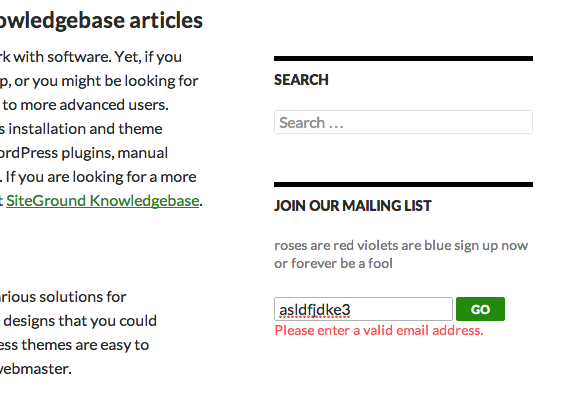
Built-in error checking - ensures email address has a valid format 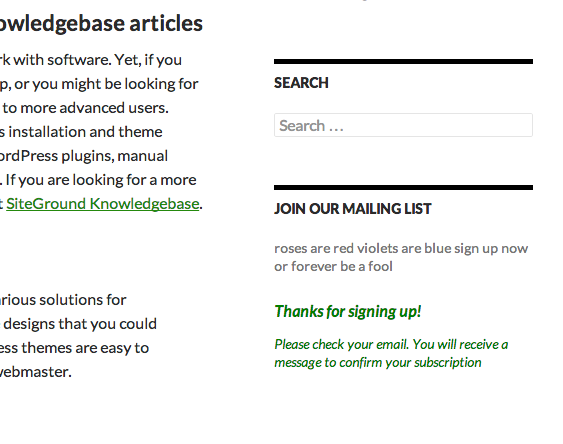
Example response after a successful submission. Message and formatting can be customized via phpList Subscribe Page. 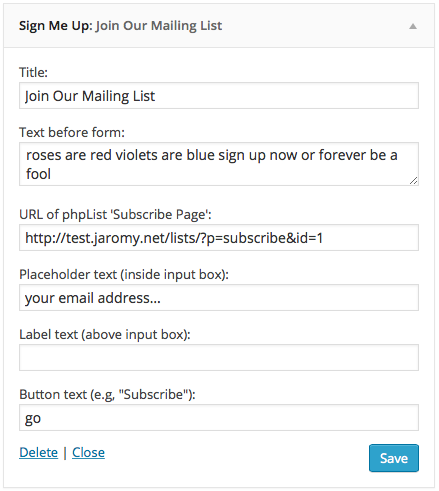
Configuring the form via the Widgets panel in WordPress backend
Cài đặt
Requirements:
- phpList version 3.0.10 or greater (either self-hosted or hosted)
- WordPress version 4.0.1 or greater
To install this plugin:
- Upload the contents of sign-me-up.zip to your plugins directory
- Activate the plugin through the ‘Plugins’ menu in WordPress
- Add the Sign Me Up widget to your site using the Appearance -> Widgets menu.
- Specify your form settings in the widget. For more info head over to: Sign Me Up
- If phpList and WordPress are on separate domains or subdomains, then you will need to modify the .htaccess file on the phpList domain. See Cross-Domains for more details.
- That’s all. You’re done!
Alternatively you can search for the plugin from your WordPress dashboard and install from there.
Hỏi đáp
- Do I need to use phpList?
-
Yes, this plugin specifically designed to use phpList as the mailing list manager to store the email adresses
- Will it work with other mailing list services such as MailChimp?
-
No, this plugin will not work with MailChimp or other mailing list services. It is designed as a free open-source alternative to these paid services. So, instead it works with phpList.
- Can I add additional fields for the user to fill out, such as Name?
-
Unfortunately, no. Currently there is no provision in the AJAX code in phpList to parse these additional parameters. As a workaround,
it is possible to request for these fields (Name, Zip Code, etc) in any of the confirmation emails sent by phpList, or have
the user update their profile with these additional details. - Can I use more than one Sign Me Up widget?
-
You can only have one widget per WordPress page. But, you can setup multiple widgets that each reside on a different page of your website. For example, one widget on the “Contact Us” page, a different widget on the “Latest News” page, etc. This allows you to customize the message of the signup form to whatever content you are displaying on that page.
- How do I customize the response message?
-
The messages for a successful response can be customized via the Subscribe Page in phpList. Unfortunately, the error messages and failed submission messages cannot be customized.
- Can I use the hosted version of phpList?
-
Yes, this should work with no issues. Just make sure that you enable cross-domain AJAX first. For more detailed instructions, see Cross-Domains.
- Can phpList and WordPress live on different domains or subdomains?
-
Yes. Again, just make sure that you have enabled cross-domain AJAX. For more detailed instructions, see Cross-Domains.
- I get the following error: “Unfortunately a network error occurred. Please try again. If this problem persists, please contact the webmaster.”
-
This could be due to a number of issues:
- Cross-domain issues, see Cross-Domains
- WWW-prefix issues, see WWW-prefix
- Old incompatible versions of phpList or WordPress, see Requirements
Đánh giá


Người đóng góp & Lập trình viên

Dịch “Sign Me Up” sang ngôn ngữ của bạn.
Muốn tham gia phát triển?
Duyệt code, check out SVN repository, hoặc theo dõi nhật ký phát triển qua RSS.
Nhật ký thay đổi
1.0
- Initial release
1.1
- Screenshots added
- Fixed incorrect name in readme file
1.2
- Fixed incorrect version number
1.3
- Fixed potential XSS vulnerability in add_query_arg
1.4
- Fixed incorrect version number
1.4.1
- Fixed changelog in readme
1.5
- Changed constructor to PHP 5 syntax; compliant with upcoming WP 4.3 release
1.5.1
- Updated ‘tested up to’ version in readme