
Mô tả
Icon List WordPress plugin provides a powerful and flexible widget to use standard list with icons. It can be used to display variety of information in an easy way with the cool icons. For Example,
- Address / Contact information can be used professionally.
- Social Media information can be displayed easily.
Supported Fonts
Icon List Plugin supports Font Awesome.
Further Useful Stuff
Icon List plugin is developed by marketplace of Premium WordPress Themes DesignOrbital. You may be interested to test our beautiful Free WordPress Themes.
Ảnh màn hình
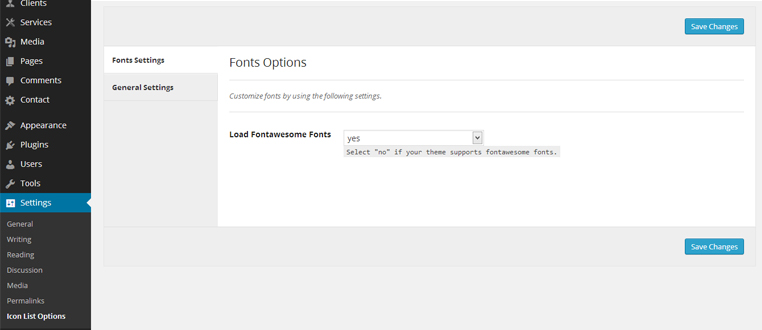
Icon List Plugin Options: You can control the loading of Font Awesome fonts manually. You may disable it, if your theme supports Font Awesome already. 
Icon List Plugin Widget: You may use unlimited icon list by placing Icon List widget to the sidebars of your theme. 
Icon List Plugin Widget Backend Example: You may use Icon List widget for any purpose according to your need e.g. Contact Information Widget in the sidebar of your theme. 
Icon List Plugin Widget Frontend Example: Here is the example of Icon List widget as a Contact Info widget in the sidebar of your theme.
Cài đặt
- Upload the
icon-listfolder to the/wp-content/plugins/directory - Activate the Icon List plugin through the ‘Plugins’ menu in WordPress
- Configure the plugin by going to the
Settings > Icon List Options - Use the Icon List widget by going to the
Appearance > Widgets
Hỏi đáp
- Installation Instructions
-
- Upload the
icon-listfolder to the/wp-content/plugins/directory - Activate the Icon List plugin through the ‘Plugins’ menu in WordPress
- Configure the plugin by going to the
Settings > Icon List Options - Use the Icon List widget by going to the
Appearance > Widgets
- Upload the
Đánh giá

16 Tháng Năm, 2018
Does exactly what I need and is very easy to use.

11 Tháng Ba, 2017
The Best!
Người đóng góp & Lập trình viên
“Icon List” là mã nguồn mở. Những người sau đã đóng góp vào plugin này.
Những người đóng góp
Dịch “Icon List” sang ngôn ngữ của bạn.
Muốn tham gia phát triển?
Duyệt code, check out SVN repository, hoặc theo dõi nhật ký phát triển qua RSS.
Nhật ký thay đổi
0.6 – September 10, 2017
- Enhancement: Settings page improvements.
- Update: POT file updated.
- Update: Readme file updated.
0.5 – September 5, 2017
- Hardening: Code hardening.
0.4 – December 12, 2016
- New: Title can be linked to any desired URL.
- Update: Font Awesome library updated to the latest version 4.7.0.
0.3 – December 18, 2015
- Enhancement: WP_Widget is deprecated and replaced with __construct().
0.2 – November 13, 2014
- Enhancement: Icon List interface updated.
- Update: Font Awesome updated to 4.2.0.
0.1
- Initial release